14 EN
You can transfer apps or media les from your
PC to PI3910,the internal storage or SD card.
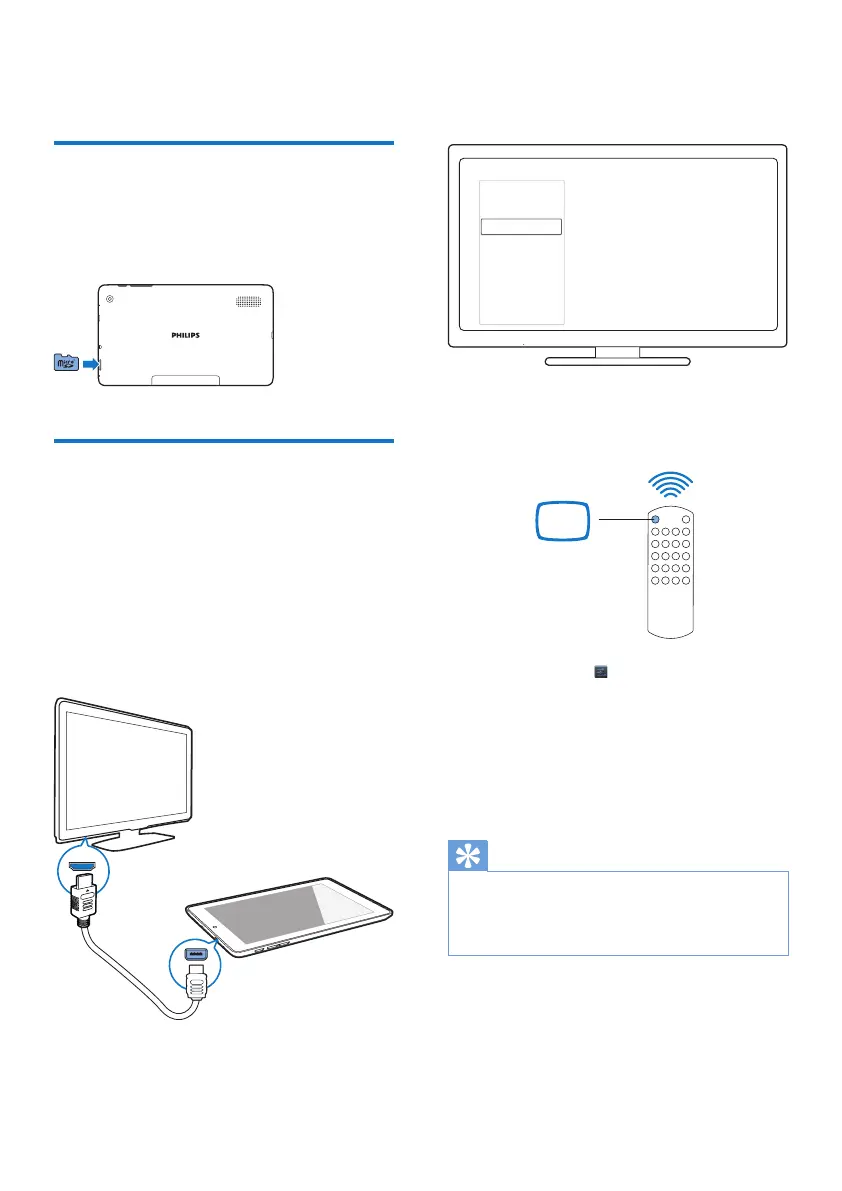
Use a Micro SD card
Insert a Micro SD card (up to 32 GB) into
PI3910. You can expand the memory size of
PI3910.
Connect to an HDTV
Connect PI3910 to a high-denition TV
(HDTV). You can watch on the HDTV the
photos and videos that play on PI3910.
1 On PI3910,
Connect an HDMI cable (sold separately)
to:
the Micro HDMI socket on PI3910, and
the HDMI input socket on the TV.
2 On the TV, switch to the input source of
PI3910:
HDMI IN
• On the remote control of your TV, use
the source button to select the input
connector that connects to PI3910.
3 On PI3910, tap Settings > HDMI.
Select the output resolution that your TV
supports.
• On PI3910, when the Micro HDMI
connector is in use, press the Power/
lock button to return to the previous
screen.
Tip
• As a compact audio/video interface, HDMI transmits
uncompressed digital data. With the HDMI connection,
high-denition video/audio contents can present
optimum video and audio quality on an HDTV.
SOURCE
TV
AV
HDMI 1
HDMI 2
HDMI 3
Side HDMI
Side AV



 To Next Page