EasyManua.ls Logo

Philips RC369 - Audio Adjustment; Setting the Clock

Philips RC369
23 pages
Print Icon
To Next Page IconTo Next Page
To Previous Page IconTo Previous Page
Loading...
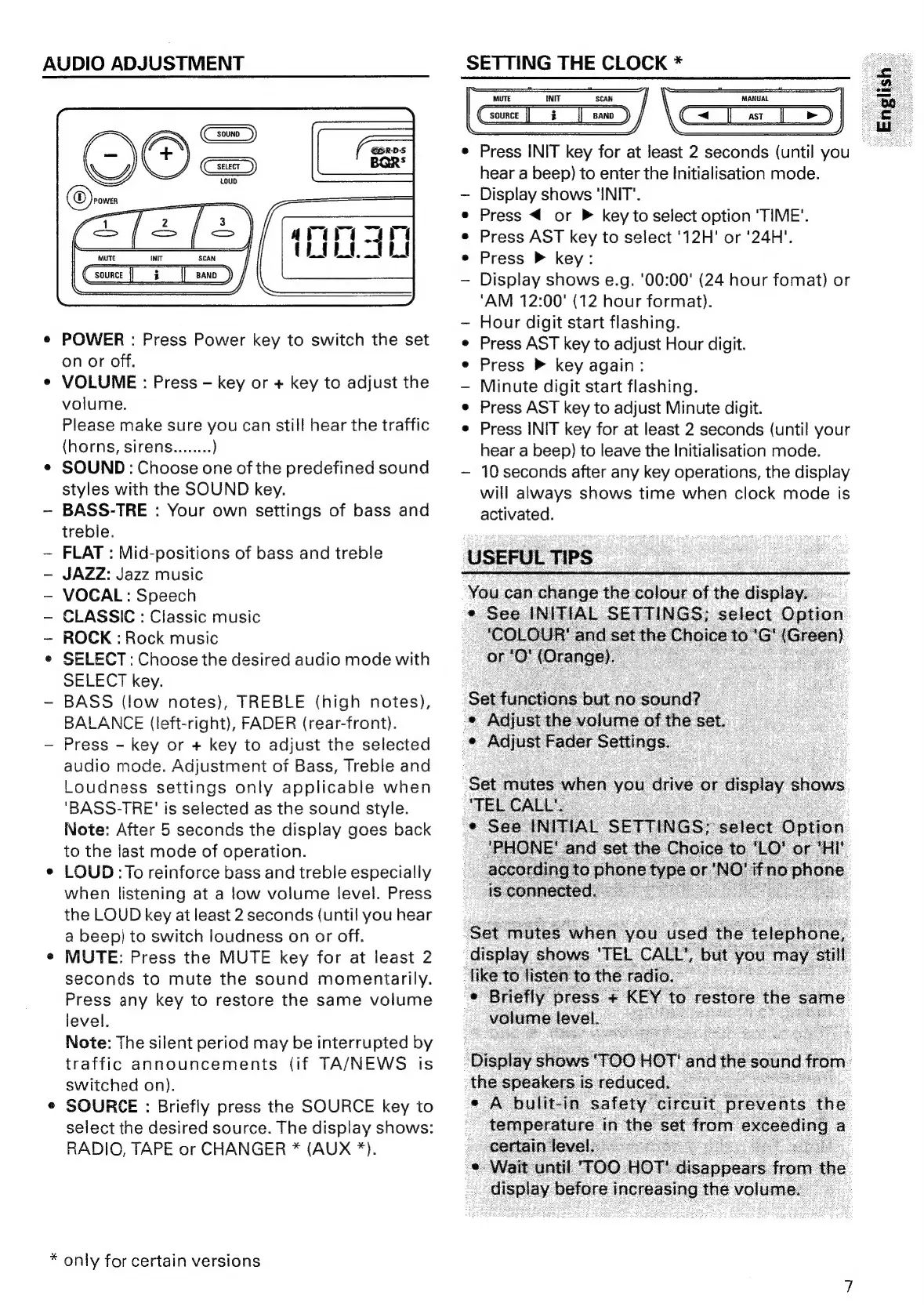
AUDIO
ADJUSTMENT
Csounce
]]
i]
sano
_)
e
POWER
:
Press
Power
key
to
switch
the
set
on
or
off.
¢
VOLUME
:
Press
—-
key
or
+
key
to
adjust
the
volume.
Please
make
sure
you
can
still
hear
the
traffic
(horns,
sirens........
)
e
SOUND:
Choose
one
of
the
predefined
sound
styles
with
the
SOUND
key.
~
BASS-TRE
:
Your
own
settings
of
bass
and
treble.
~
FLAT
:
Mid-positions
of
bass
and
treble
JAZZ:
Jazz
music
~
VOCAL:
Speech
CLASSIC
:
Classic
music
~
ROCK
:
Rock
music
®
SELECT:
Choose
the
desired
audio
mode
with
SELECT
key.
-
BASS
(low
notes),
TREBLE
(high
notes),
BALANCE
(left-right),
FADER
(rear-front).
-
Press
-
key
or
+
key
to
adjust
the
selected
audio
mode.
Adjustment
of
Bass,
Treble
and
Loudness
settings
only
applicable
when
‘BASS-TRE'
is
selected
as
the
sound
style.
Note:
After
5
seconds
the
display
goes
back
to
the
last
mode
of
operation.
¢
LOUD
:To
reinforce
bass
and
treble
especially
when
listening
at
a
low
volume
level.
Press
the
LOUD
key
at
least
2
seconds
(until
you
hear
a
beep)
to
switch
loudness
on
or
off.
e
MUTE:
Press
the
MUTE
key
for
at
least
2
seconds
to
mute
the
sound
momentarily.
Press
any
key
to
restore
the
same
volume
ievel.
Note:
The
silent
period
may
be
interrupted
by
traffic
announcements
(if
TA/NEWS
is
switched
on).
¢
SOURCE
:
Briefly
press
the
SOURCE
key
to
select
the
desired
source.
The
display
shows:
RADIO,
TAPE
or
CHANGER
*
(AUX
*).
*
only
for
certain
versions
SETTINGTHECLOCK*
USEFUL
TIPS
|
Gari
/
SCAN
|
sano
_)
(ees)
(=p)
GI=Ts)
Press
INIT
key
for
at
least
2
seconds
(until
you
hear
a
beep)
to
enter
the
Initialisation
mode.
Display
shows
'INIT".
Press
or
P
key
to
select
option
‘TIME’.
Press
AST
key
to
select
'12H'
or
'24H’.
Press
P
key:
Display
shows
e.g.
'00:00'
(24
hour
fomat)
or
‘AM
12:00'
(12
hour
format).
Hour
digit
start
flashing.
Press
AST
key
to
adjust
Hour
digit.
Press
®
key
again:
Minute
digit
start
flashing.
Press
AST
key
to
adjust
Minute
digit.
Press
INIT
key
for
at
least
2
seconds
(until
your
hear
a
beep)
to
leave
the
Initialisation
mode.
10
seconds
after
any
key
operations,
the
display
will
always
shows
time
when
clock
mode
is
activated.
You
can
Pherae
the
colour
ioe
the
displa
»
ses
INITIAL
SETTING
35
ay
before
ee
the
volume.

Related product manuals