EasyManua.ls Logo

Philips RC369 - Radio Data System (Rds) * on Fm

Philips RC369
23 pages
Print Icon
To Next Page IconTo Next Page
To Previous Page IconTo Previous Page
Loading...
RADIO
DATA
SYSTEM
(RDS)
*
ON
FM
Many
FM
stations
broadcast
RDS
information.
This
car
radio
uses
the
RDS
information
to
offer
you
many
advantages,
including
:
DISPLAY
OF
STATION-NAME
The
set
displays
the
name
of
the
station
instead
of
its
frequency.
AUTOMATIC
RETUNING
The
set
continuously
check
a
list
of
Alternative
Frequencies
(AF)
for
the
tuned
radio
station
and
automatically
selects
the
best
frequency.
DISPLAY
OF
PROGRAMME
TYPE
(PTY)
If
an
RDS
station
is
stored
on
a
preset,
you
can
check
the
type
of
programme
being
transmitted.
¢
Briefly
press
the
relevant
Preset
key
to
see
the
programme
type
(if
transmitted).
INFORMATION
FROM
RELATED
RADIO
STATIONS
Enhanced
Other
Networks
(EON)
is
an
RDS
service
where
the
broadcaster
links
some
stations
together.
If
you
are
tuned
to
a
station
where
is
linked
to
others
by
EON,
the
set
is
capable
of
receiving
Traffic
Announcements
(and/or
News
bulletins)
from
both
the
tuned
station
and
related
stations.
ALARM
MESSAGES
(PTY
Alarm)
This
set
automatically
receives
emergency
messages
made
by
the
broadcaster.
During
the
messages
the
display
shows
‘ALARM'
and
the
station-name
alternately.
TRAFFIC
ANNOUNCEMENTS
You
can
switch
on
the
TA
mode
to
give
priority
to
Traffic
Announcements
(even
if
you
play
a
cassette/CD*
or
mute
the
set).
¢
You
will
hear
the
Traffic
Announcements
when
broadcast,
if
you
switch
on
the
TA
mode.
e
If
the
tuned
station
does
not
enable
the
reception
of
Traffic
Announcements,
the
display
shows
‘NO
TA’.
The
_
radio
automatically
searches
an
appropriate
station.
*
only
for
certain
versions
NEWS
BULLETINS
You
can
switch
on
the
NEWS
mode
to
give
priority
to
News
bulletins
(even
if
you
play
a
cassette/CD*
or
mute
the
set).
NEWS
is
not
yet
implemented
in
all
countries.
Note
:
News
bulletins
may
be
interrupted
by
Traffic
Announcements
(if
the
TA
mode
is
switched
on)
Activate
the
desired
TA
or
NEWS
mode
e
Select
a
FM
band
with
BAND
key.
e
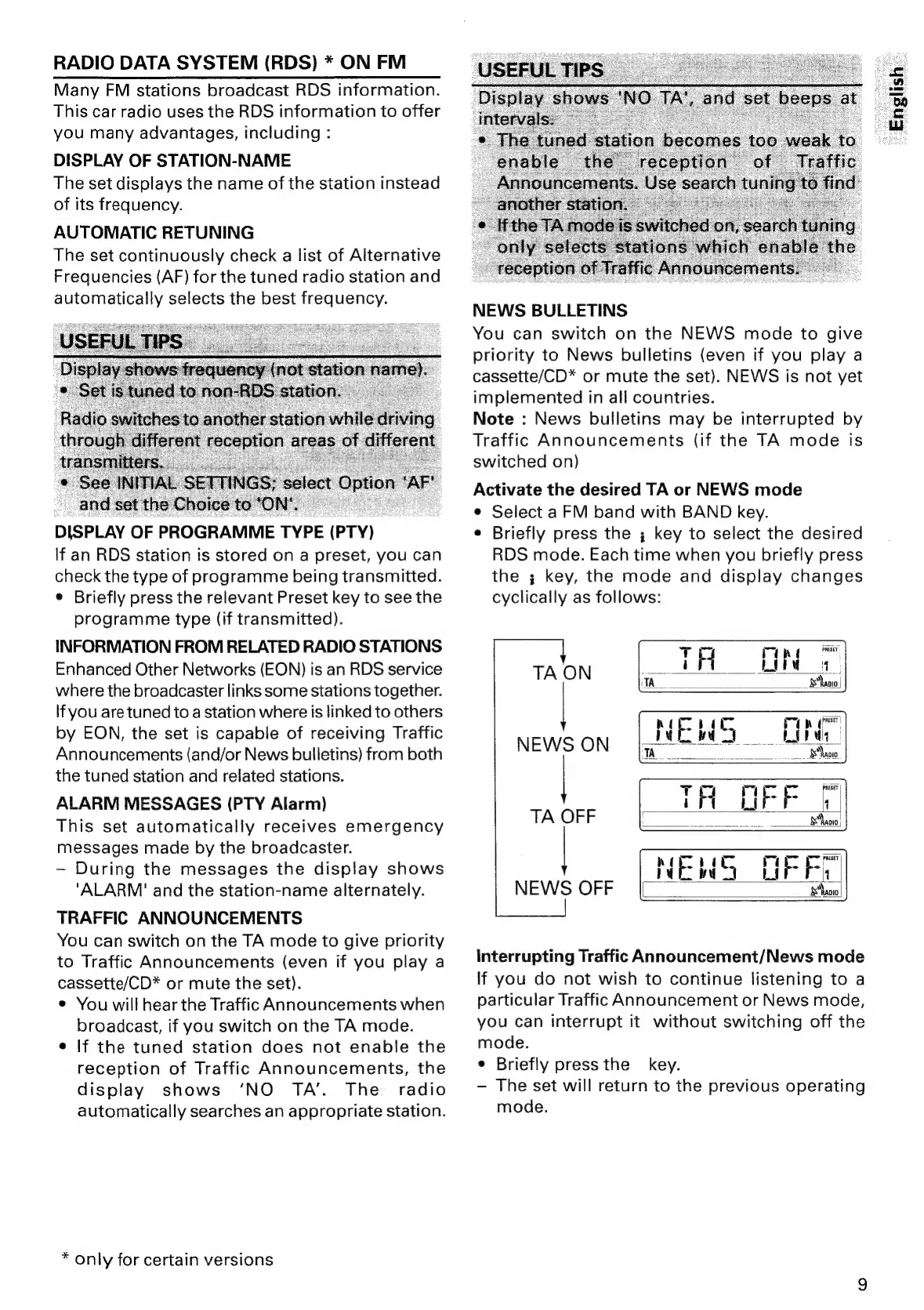
Briefly
press
the
;
key
to
select
the
desired
RDS
mode.
Each
time
when
you
briefly
press
the
;
key,
the
mode
and
display
changes
cyclically
as
follows:
Interrupting
Traffic
Announcement/News
mode
If
you
do
not
wish
to
continue
listening
to
a
particular
Traffic
Announcement
or
News
mode,
you
can
interrupt
it
without
switching
off
the
mode.
e
Briefly
press
the
key.
-
The
set
will
return
to
the
previous
operating
mode.
English

Related product manuals