EasyManua.ls Logo

Philips RC369 - Cassette Player; Stopping Playback; Maintenance

Philips RC369
23 pages
Print Icon
To Next Page IconTo Next Page
To Previous Page IconTo Previous Page
Loading...
CASSETTE
PLAYER
[
7
|
:
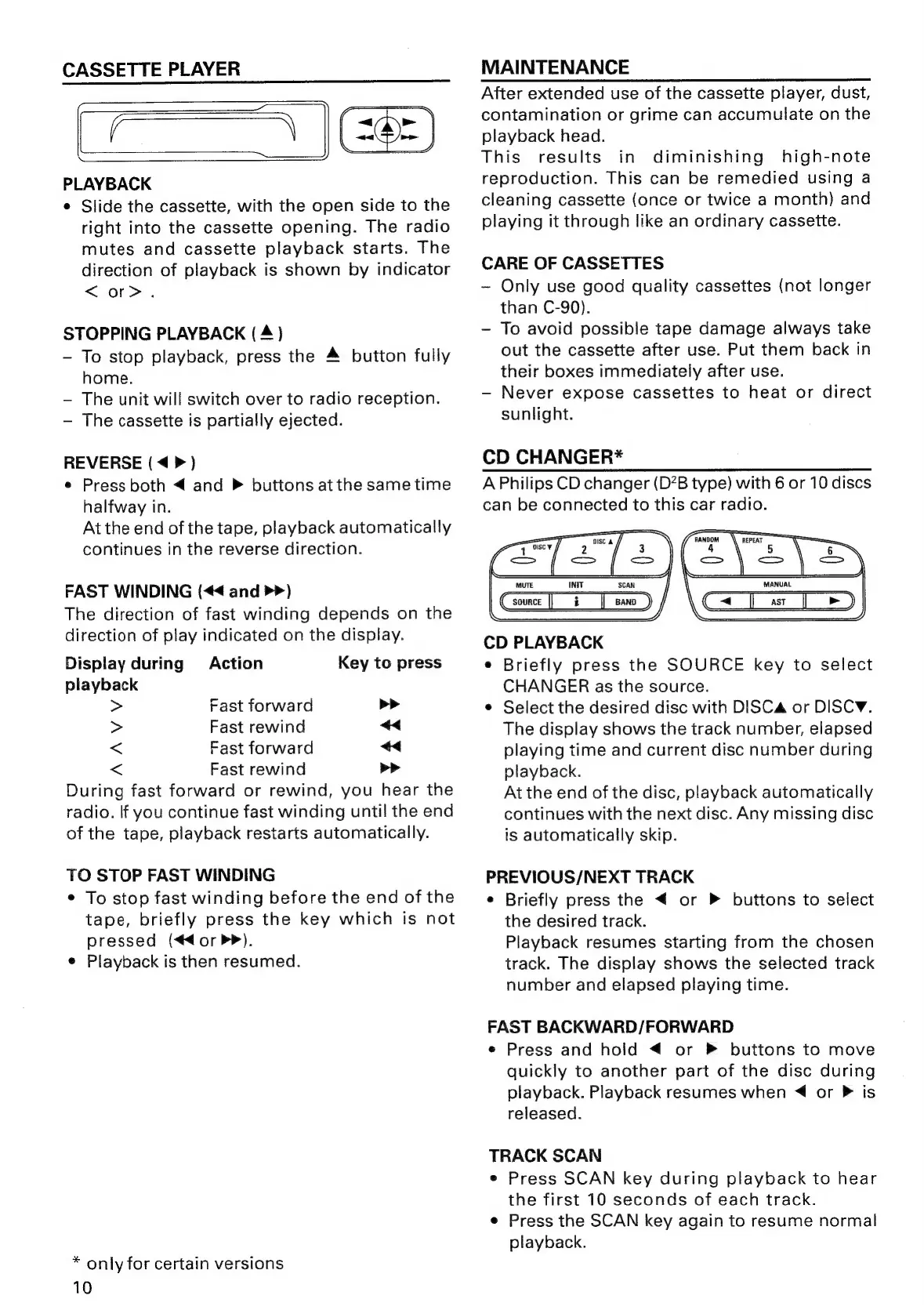
PLAYBACK
e
Slide
the
cassette,
with
the
open
side
to
the
right
into
the
cassette
opening.
The
radio
mutes
and
cassette
playback
starts.
The
direction
of
playback
is
shown
by
indicator
<or>.
STOPPING
PLAYBACK
(4)
-~
To
stop
playback,
press
the
4
button
fully
home.
The
unit
will
switch
over
to
radio
reception.
The
cassette
is
partially
ejected.
REVERSE
(<4
>)
e
Press
both
<
and
buttons
atthe
same
time
halfway
in.
At
the
end
of
the
tape,
playback
automatically
continues
in
the
reverse
direction.
FAST
WINDING
(<<
and
>>)
The
direction
of
fast
winding
depends
on
the
direction
of
play
indicated
on
the
display.
Display
during
Action
Key
to
press
playback
>
Fast
forward
>>
>
Fast
rewind
<
<
Fast
forward
<<
<
Fast
rewind
bP
During
fast
forward
or
rewind,
you
hear
the
radio.
lf
you
continue
fast
winding
until
the
end
of
the
tape,
playback
restarts
automatically.
TO
STOP
FAST
WINDING
¢
To
stop
fast
winding
before
the
end
of
the
tape,
briefly
press
the
key
which
is
not
pressed
(<€<4orP>).
e
Playback
is
then
resumed.
*
only
for
certain
versions
10
MAINTENANCE
After
extended
use
of
the
cassette
player,
dust,
contamination
or
grime
can
accumulate
on
the
playback
head.
This
results
in
diminishing
high-note
reproduction.
This
can
be
remedied
using
a
cleaning
cassette
(once
or
twice
a
month)
and
playing
it
through
like
an
ordinary
cassette.
CARE
OF
CASSETTES
~
Only
use
good
quality
cassettes
(not
longer
than
C-90).
-
To
avoid
possible
tape
damage
always
take
out
the
cassette
after
use.
Put
them
back
in
their
boxes
immediately
after
use.
Never
expose
cassettes
to
heat
or
direct
sunlight.
CD
CHANGER*
A
Philips
CD
changer
(D?B
type)
with
6
or
10
discs
can
be
connected
to
this
car
radio.
EES
7
;
>
=—
Nace
a
MANUAL
i
eee
co
Gsounce
|
i__|_sano_)
C=
jas
J)
CD
PLAYBACK
e
Briefly
press
the
SOURCE
key
to
select
CHANGER
as
the
source.
¢
Select
the
desired
disc
with
DISC
or
DISCY.
The
display
shows
the
track
number,
elapsed
playing
time
and
current
disc
number
during
playback.
At
the
end
of
the
disc,
playback
automatically
continues
with
the
next
disc.
Any
missing
disc
is
automatically
skip.
PREVIOUS/NEXT
TRACK
e
Briefly
press
the
<
or
P
buttons
to
select
the
desired
track.
Playback
resumes
starting
from
the
chosen
track.
The
display
shows
the
selected
track
number
and
elapsed
playing
time.
FAST
BACKWARD/FORWARD
e
Press
and
hold
<
or
»
buttons
to
move
quickly
to
another
part
of
the
disc
during
playback.
Playback
resumes
when
4
or
P
is
released.
TRACK
SCAN
e
Press
SCAN
key
during
playback
to
hear
the
first
10
seconds
of
each
track.
e
Press
the
SCAN
key
again
to
resume
normal
playback.

Related product manuals