EasyManua.ls Logo

Philips RC759 RDS - Page 22

Philips RC759 RDS
26 pages
Print Icon
To Next Page IconTo Next Page
To Previous Page IconTo Previous Page
Loading...
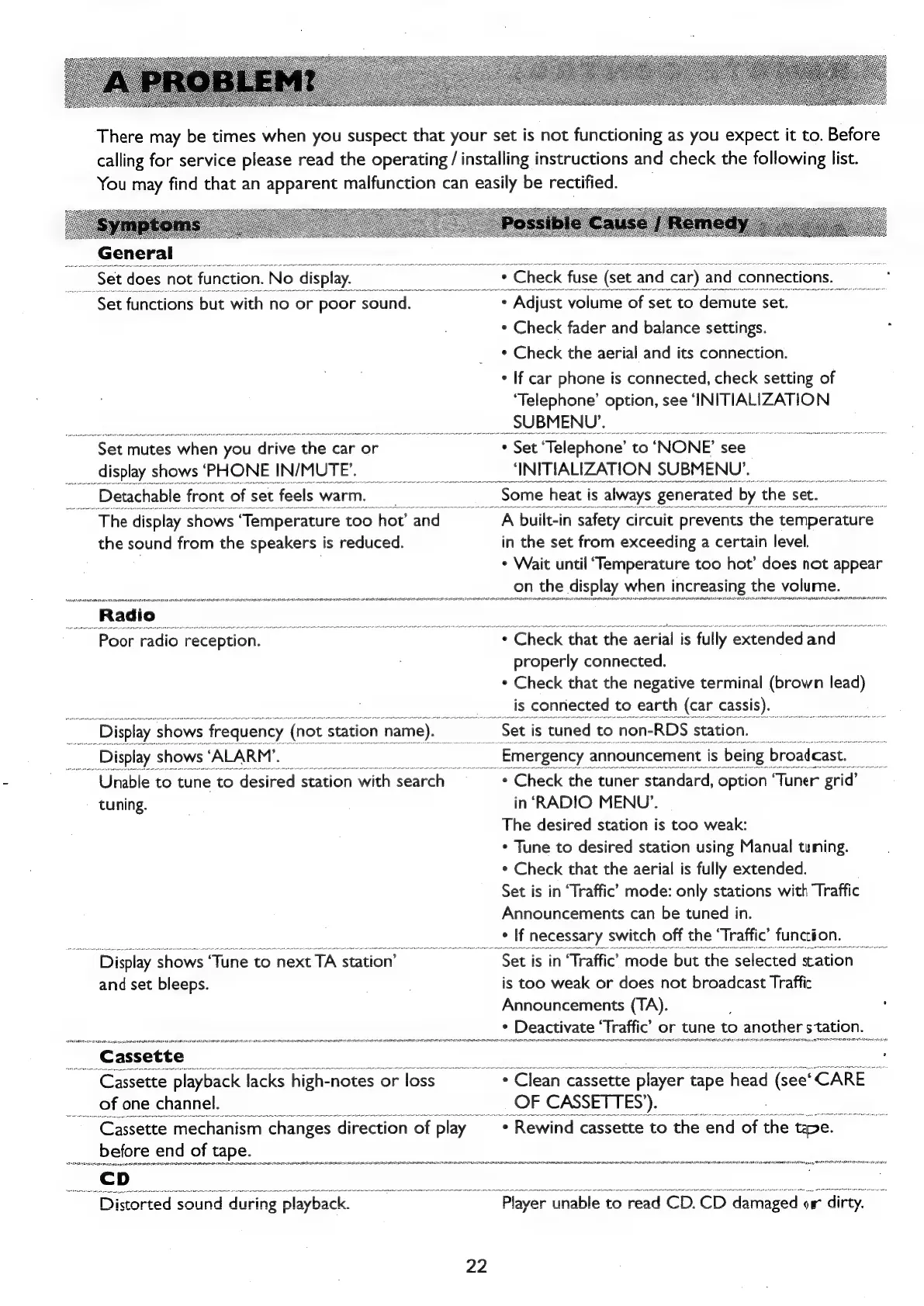
There
may
be
times
when
you
suspect
that
your
set
is
not
functioning
as
you
expect
it
to.
Before
calling
for
service
please
read
the
operating
/
installing
instructions
and
check
the
following
list.
You
may
find
that
an
apparent
malfunction
can
easily
be
rectified.
Se
t
does
*
Check
fuse
(set
and
car)
and
connections.
~
Set
functions
but
with
no
or
poor
sound.
°
+
Adjust
volume
of
set
to
demute
set.
*
Check
fader
and
balance
settings.
:
*
Check
the
aerial
and
its
connection.
+
If
car
phone
is
connected,
check
setting
of
‘Telephone’
option,
see
‘INITIALIZATION
se
Ne
AP
Ne
NNER
EN
NEC
NN
ENN
OCEAN
NOLEN
CNEL
thc
et
eNom
anANreNmcahe
ni
aceeete
_SU
BM
ENU’.
ove
anes
isis
sei
uate
rt
Set
mutes
when
you
drive
the
car
or
*
Set
‘Telephone’
to
‘NONE’
see
_
display
shows
‘PHONE
IN/MUTE’.
-
‘INITIALIZATION
SUBMENU’.
Detachable
front
of
set
feels
warm.
:
Some
h
heat
is
always
generated
by,
the.
set.
~
The
display
shows
‘Temperature
too
hot’
and
A
built-in
safety
circuit
prevents
the
temperature
|
the
sound
from
the
speakers
is
reduced.
in
the
set
from
exceeding
a
certain
level.
.
¢
Wait
until
‘Temperature
too
hot’
does
not
appear
i
on
the
display
when
increasing
the
volume.
“Radio_
Soha
cea
pane
ni
ac
eta
ni
a
Ri
a
a
i
i
rematch
at
eth
NANG
tA
GAN
kN
tana
ste
~
Poor
radio
reception.
*
Check
that
the
aerial
is
fully
extended
and
properly
connected.
*
Check
that
the
negative
terminal
(brown
lead)
is
connected
to
earth
(car
cassis).
_
Display
shows
frequency
(not
station
name).
Set
is
tuned
to
non-
-RDS
station.
_
Display
shows
‘ALARM’.
oo
_
Emergency
announcement
is
being
broadcast.
iat
Unable
to
tune
to
desired
station
with
search
*
Check
the
tuner
standard,
option
Tuner
grid’
tuning.
in
‘RADIO
MENU’.
The
desired
station
is
too
weak:
*
Tune
to
desired
station
using
Manual
tuning.
*
Check
that
the
aerial
is
fully
extended.
Set
is
in
‘Traffic’
mode:
only
stations
with
Traffic
Announcements
can
be
tuned
in.
*
If
necessary
switch
off
the
‘Traffic’
funcion.
Display
shows
“Tune
to
next
TA
station’
Set
is
in
‘Traffic’
mode
but
the
selected
station
|
and
set
bleeps.
is
too
weak
or
does
not
broadcast
Traffic
Announcements
(TA).
;
:
*
Deactivate
‘Traffic’
or
tune
to
another
station
_
Cassette
a
;
,
~
Cassette
playback
Jacks
‘high-
notes
or
loss
*
Clean
cassette
>
player
tape
head
(see’
‘CARE
_
of
one
channel.
OF
CASSETTES’).
~
Cassette
mechanism
changes
‘direction
of
play
*
Rewind
cassette
to
the
end
of
the
te.
_before
end
of
tape.
se
eat
es
i
Ac
NAM
NA
REA
ASAE
istorted
sound
during
playback.
_
Player
unable
to
read
CD.
CD
damaged
ow
dirty.
22

Related product manuals