Service Modes, Error Codes, and Fault Finding
EN 26 SDI PDP5.
5.2 Fault Finding
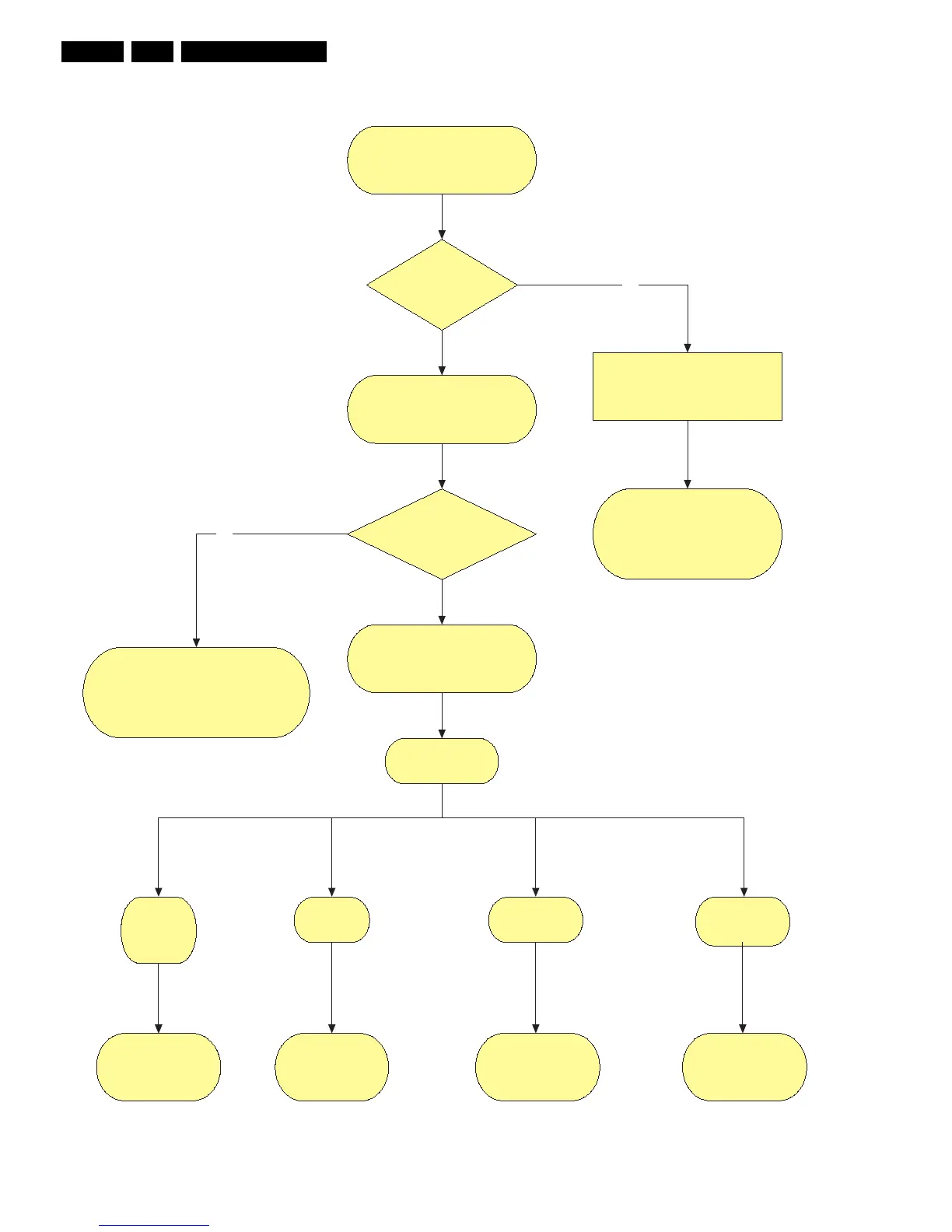
Figure 5-4 Which repair scenario?
Chassis ?
FM242
Repair Scenario
42” SD v2
Repair Scenario
42”/50” SD/HD v3
First check complete TV set.
Fault Symptom?
Check if LVDS from SCAVIO
or SSB board is OK.
Use LVDS Tool when possible.
Output of SSB / SCAVIO
is OK?
SDI repair Scenario.
Fault finding: Display fault.
Repair Philips application.
See chassis related Service Manuals
No
Power Supply
is working ?
Go to “Power Supply Check”
& repair scenario
with Philips application
or PDP as stand alone check.
No
FTP1.1
F21RE
FM24_AB
LC4.7
FTP2..2
LC4.7
Repair Scenario
42”/50” SD/HD v4
Repair Scenario
37” SD v4
Power supply is not working.
No voltage output.
F_14991_036.eps
111005
FTP2..4
LC4.9
BP2.x











 To Next Page