Service Modes, Error Codes, and Fault Finding
EN 28 SDI PDP5.
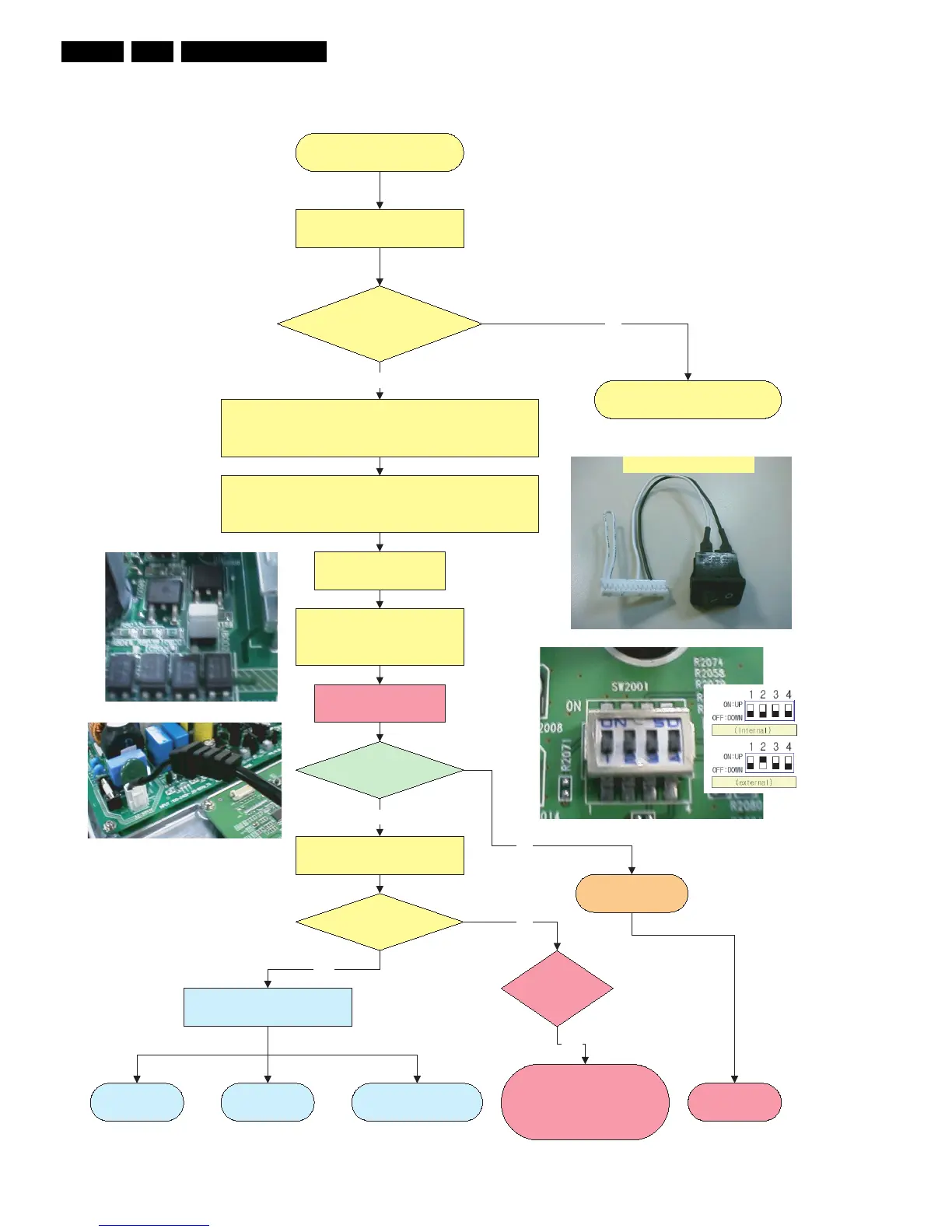
Figure 5-6 Repair scenario v2 stand alone panels
Repair 42 SD v2
as stand alone
PDP identification =
S42SD-YD06
Check PDP Type number
For FM242 disconnect and remove SCAVIO Board.
For FTP1.1 disconnect and remove SSB and Audio Board.
Connect Jig connector to CN8002 (13 pins).
Short circuit between pin 1 & 2 = On/Off switch (vacation switch).
Switch between pin 8 & 11 standby line switch.
Y
No
Go to v3 or v4 repair scenario.
Short the Jumper J8002.
Set the DIP switch 2 “on”.
.the Logic main board to “off”.
Plug in the Power cord.
Switch Jig connector switch “on”.
Green Stby LED
8003 is “on” ?
Green LEDs 8001
& 8002 are “on”?
Ye s
Standby Supply
is defective.
Replace Power
supply board.
No
Go to fault finding part:
Ye s
Go to “Power Supply Check”
repair procedure for v2 versions.
Switch “on” via Jig connector
switch.
Protection
LED8004 is “on”?
Ye s
No
No Display Abnormal Display
Some horizontal or
Vertical Lines don´t exist
3122 785 90760











 To Next Page