Service Modes, Error Codes, and Fault Finding
EN 30 SDI PDP5.
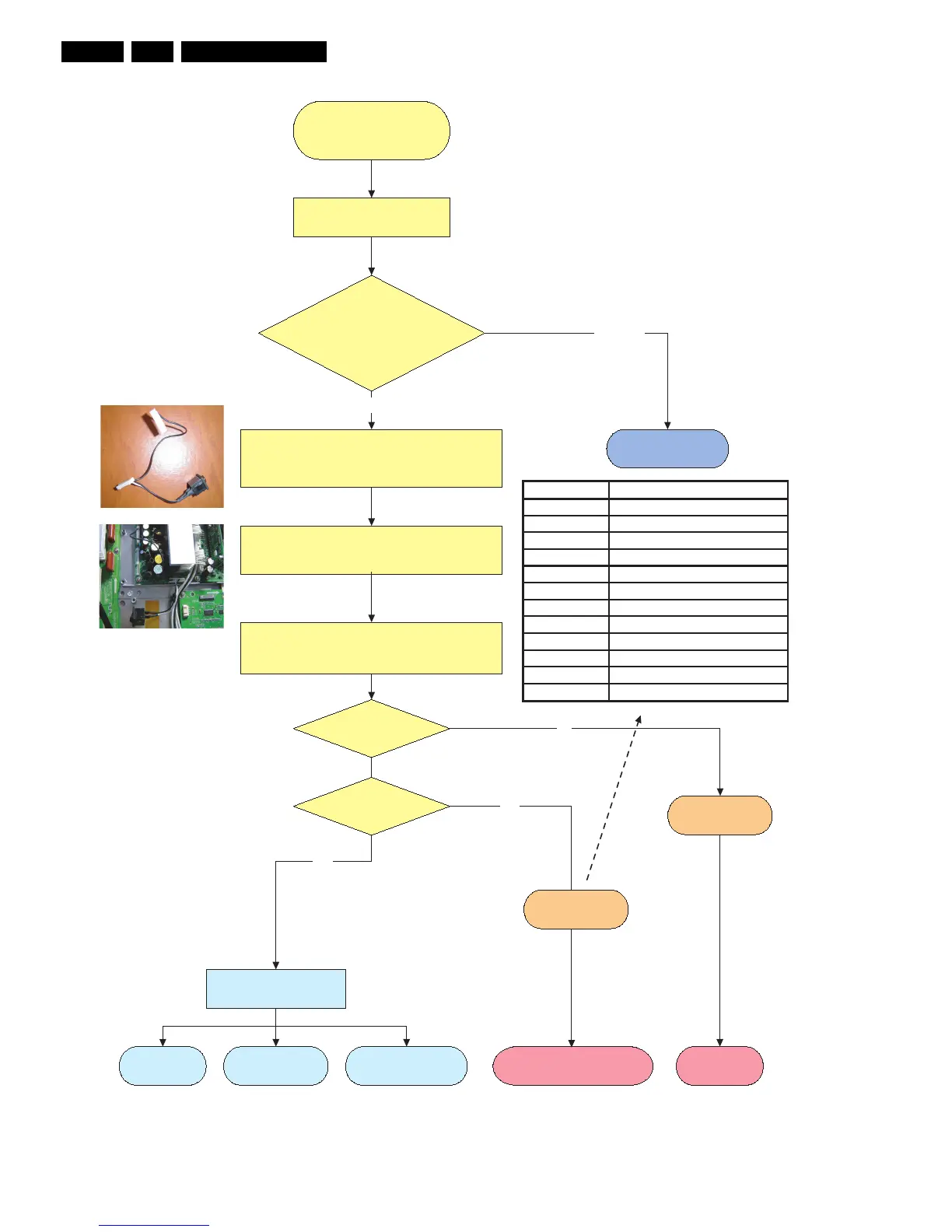
Figure 5-8 Repair scenario 37” SD v4 stand alone panels
Repair 37" SD v4
Check PDP type number:
PDP identification =
S37SD-YD02?
Disconnect and remove SSB (and other Philips applications).
Remove plastic frame to have acces to all boards
- Insert jumper CN2008 on Logic Brd for full white picture.
This is the ONLY jumper that must be placed!
2. Insert jumper at CN8012 for stand alone application
- Connect Jig connector/switch to Sub PSU pos. 9004/9005
- Connect Mains to PSU board (CN8001 on PSU, use
mains filter).
Green LEDs
(jumper setting ok?)are “on” ?
LD8001, LD8003
Go to other repair scenario
Other PDP
type
Power Supply
is defective.
Replace Power
Supply board.
No
go to fault finding part:
PSU okay. If display problems,
Go to “Power Supply Check”
repair procedure for v4 versions.
Ye s
No
Ye s
No Display Abnormal Display
Some horizontal or
Vertical Lines don´t exist
F_14991_037.eps
111005
as stand alone.
Determine defective
part via error table.
Protection
LED BLD8001 is
blinking?
LED signature Detected error condition
1 time V_A OVP, UVP
2 times V_G OVP, UVP
3 times D5VL OVP, UVP
4 times D3V3 OVP, UVP
5 times V_S OVP, UVP
6 times V_SET OVP, UVP
7 times V_SCAN OVP, UVP
8 times VE OVP, UVP
9 times Over-temperature (> 105 oC)
10 times DC_PROT
11 times ALT_SIG
12 times TIME_OVER
3122 785 90770
CN
9004
CN9005
Switch
Sub
PSU
- Switch PDP “on’ with switch.











 To Next Page