EN
10
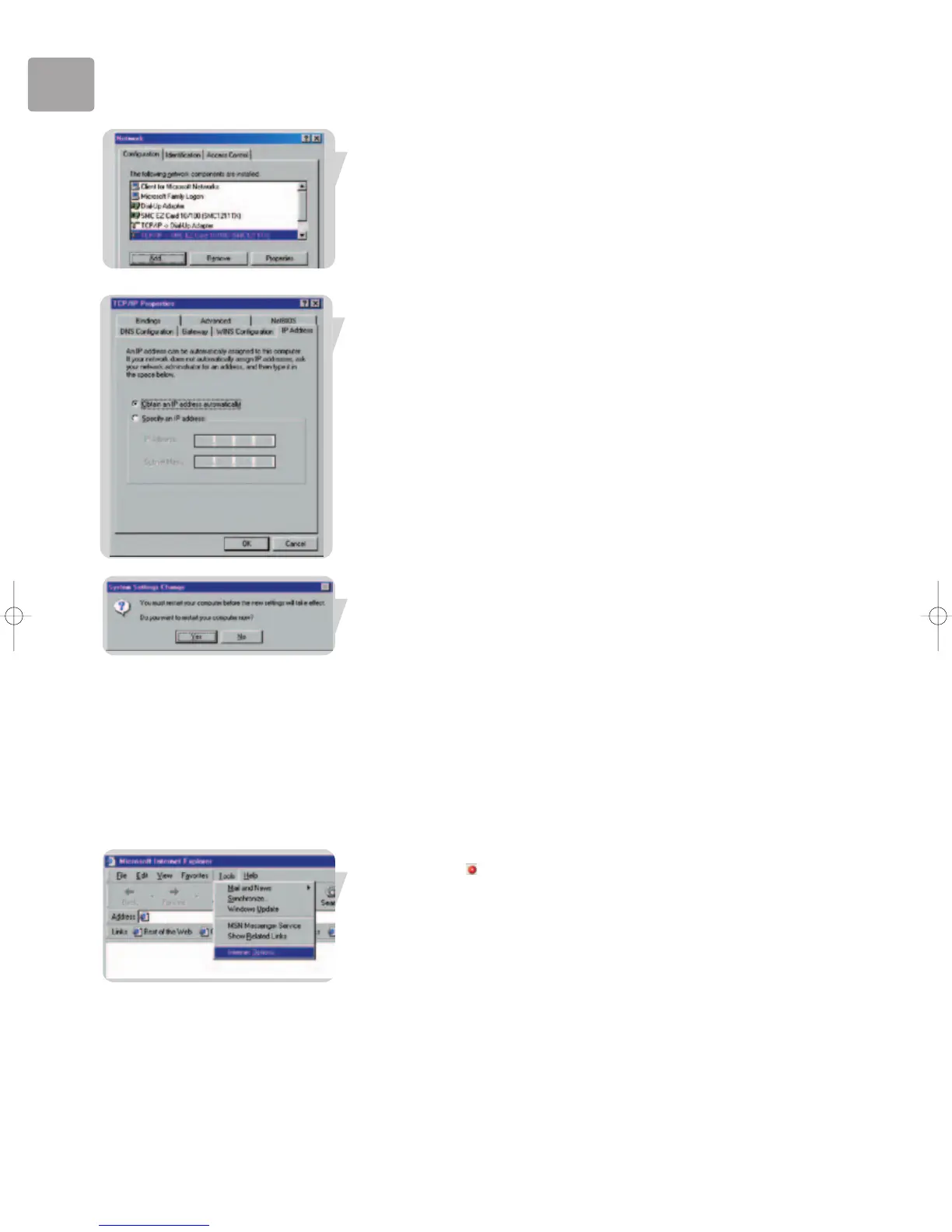
3 In the Network window, under the Configuration tab, double-click the TCP/IP
item listed for your network card.
4 In the TCP/IP window, select the IP Address tab. If ‘Obtain an IP address
automatically’ is already selected, your computer is already configured for DHCP.
If not, select this option.
5 Windows may need your Windows 98/Me CD to copy some files.
After it finishes copying, it will prompt you to restart your system.
Click Yes and your computer will restart.
TCP/IP Configuration Setting
Primary DNS Server ____.____.____.____
Secondary DNS Server ____.____.____.____
Default Gateway ____.____.____.____
Host Name ____.____.____.____
Disable HTTP Proxy
You need to verify that the ‘HTTP Proxy’ feature of your web browser is disabled.
This is so that your browser can view the ADSL Wireless Base Station's HTML
configuration pages. The following steps are for Internet Explorer.
Internet Explorer
1 Open Internet Explorer.
2 Click the Stop button, then click Tools/Internet Options.


 To Next Page