EasyManua.ls Logo

Philips SNA6500 - Network Identification and Sharing; Computer and Workgroup Identification; File and Printer Sharing Configuration

Philips SNA6500
47 pages
Print Icon
To Next Page IconTo Next Page
To Previous Page IconTo Previous Page
Loading...
EN
36
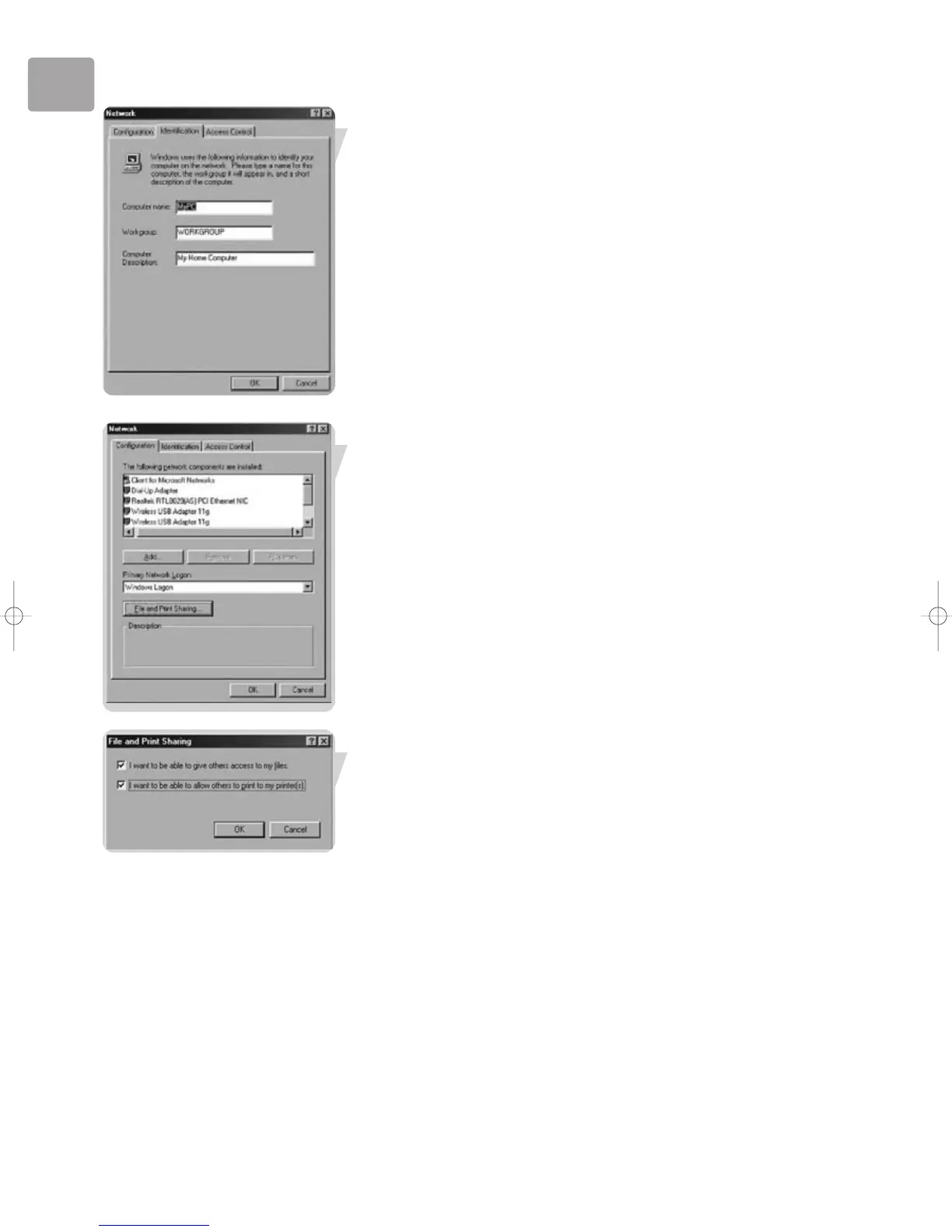
1. Enter a name that is different for each computer.
2. Enter the same workgroup name for all computers in the network.
3. Enter a description that helps you recognize the computer.
4. Click on the ‘Configuration’ tab to continue.
Click the ‘Sharing files and printers’ button.
Select the access options you want, and click ‘OK’ to continue.

SNA6500_Eng_Rob.qxd 17-03-2005 10:02 Pagina 36

Other manuals for Philips SNA6500

Related product manuals