ENGLISH 21
1
4
7
8
5
6
3
9
2
15
12
14
11
10
16
13
Chapter 8 - Remote control
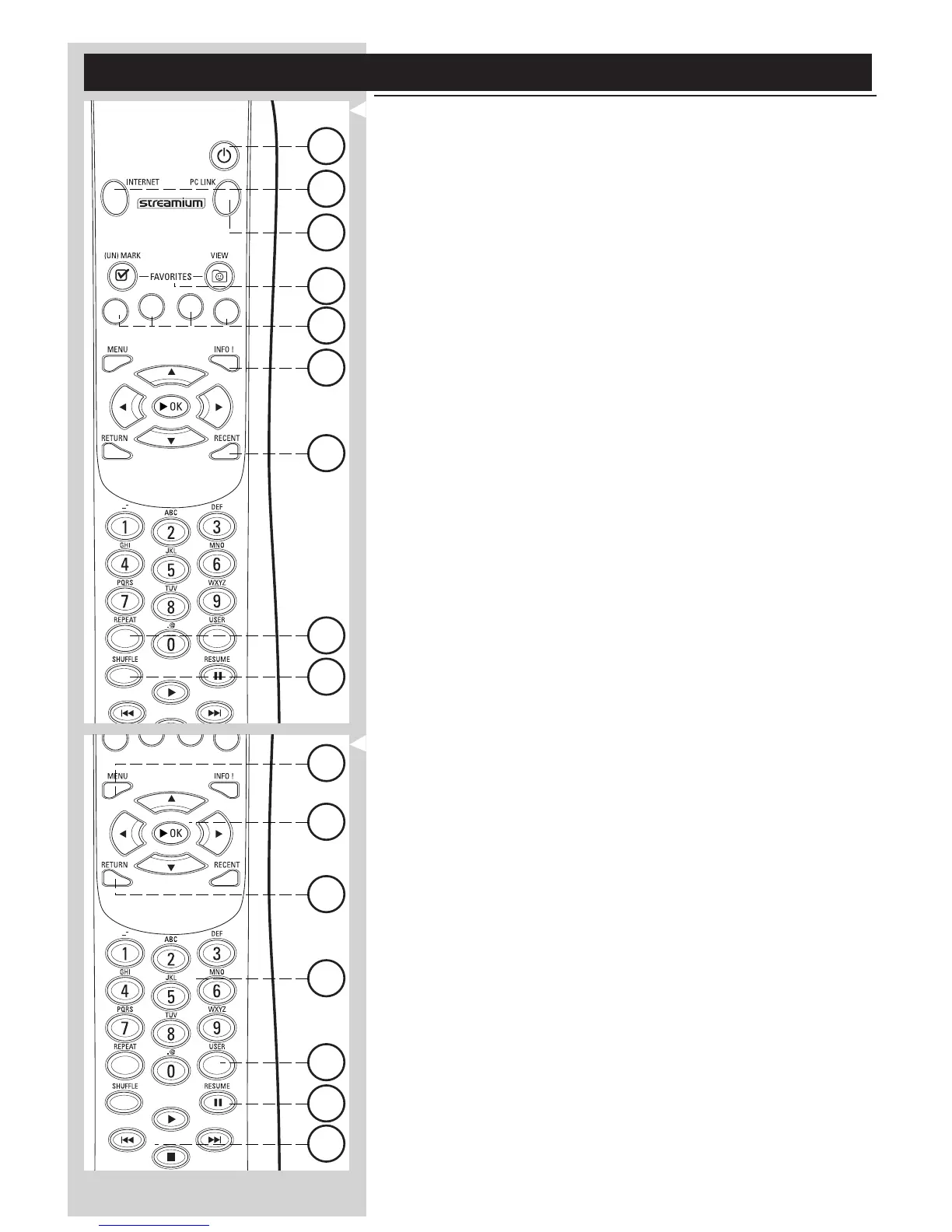
8.1 Remote control buttons
1 Power/standby button
Switches SL50i off (to standby).
– Switch on the SL50i with the INTERNET or PC LINK source button
2 INTERNET source button
Selects the Internet as your source of music content.
– Requires a broadband Internet access of at least 128 kbps, higher recommended
3 FAVORITES
Buttons for (un)marking and viewing your favourites.
4 RECENT (Internet only)
Overview of recently played content.
5 INFO! (some Internet services only)
Request information on content.
6 PC LINK source button
Selects PC Link as your source of music content.
7 REPEAT (PC Link only)
Selects the repeat mode.
8 SHUFFLE (PC Link only)
Selects the shuffle mode.
9 Coloured buttons
Offer direct access to favourites of:
– Playlist (red);
– Genre (green);
– Artist (yellow);
– Album (blue).
10 MENU
Accesses the SL50i System menu.
11 RETURN
For switching from Play view to Navigation view and vice versa.
12 Number/Text buttons
For inputting numbers and SMS-style TEXT.
13 Playback control buttons: Play/Pause, Previous/Next and Stop
Playback control functions for music content.
14 Menu navigation buttons: up/down/left/right/OK
Used for navigating through menus and for making choices.
15 USER
Selects one of the available users.
16 RESUME
For resuming paused playback.



 To Next Page