Function I Command
Description
Default See
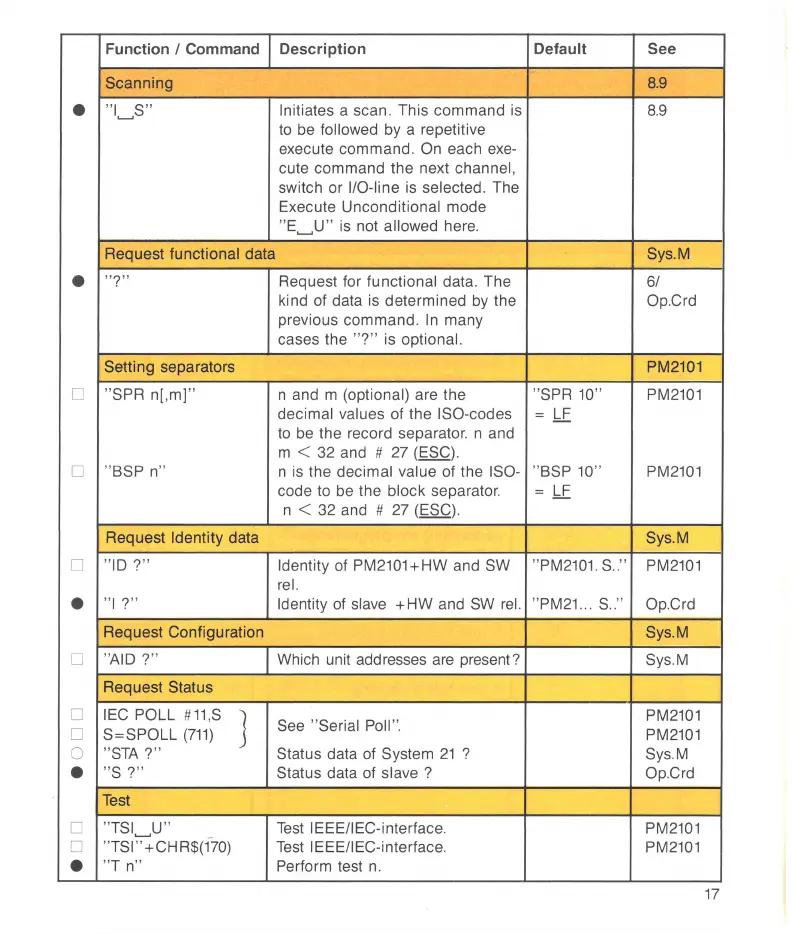
Scanning
8.9
•
"
I~S
"
Initiates a scan. This command is
8.9
to
be
followed by a repetitive
execute command.
On
each
exe-
cute command the next channel,
switch or
I/O-line is selected. The
Execute
Unconditional mode
"
E~U
"
is not allowed here.
Request f
un
ctional data Sys.M
•
"?"
Request for functional data. The 61
kind of data is determined
by
the Op.Crd
previous command.
In
many
cases the
"?
" is optiona
l.
Setting separators
PM2101
D
"SPA
n[,m]"
n and m (optional) are the "SPR
10
"
PM2101
decimal values of the !SO-codes
=
LF
to
be the record separator. n and
m
< 32 and #
27
(ESC).
D
" BSP n"
n is the decimal value of the
ISO
- "BSP
10
"
PM2101
code
to
be
the block separator.
=
LF
n <
32
and #
27
(ESC).
Request Identity data
Sys.M
D
"
ID
?"
Identity of PM2101+HW and
SW
"
PM2101
. S
..
"
PM2101
rei.
•
"
I?
"
Identity
of
slave
+HW
and
SW
rei.
"
PM21
... S .. "
Op.Crd
Request Configuration
Sys.M
D
"AID
?"
Which unit addresses
are
present?
Sys.M
Request Status
D
IEC
POLL #
11
,S
]
See "Serial Poll ".
PM2101
D
S=SPOLL
(711)
PM2101
0
"
STA
?"
Status
data of System
21
?
Sys.M
•
"S ?"
Status
data of slave ? Op.Crd
Test
D
"
TSI~U
"
Test
IEEE/IEC-interface.
PM2101
D
"
TSI
" +CHR$(1-
70)
Test
IEEE/IEC-interface.
PM2101
•
"T n"
Perform test
n.
17



 To Next Page