D
0
•
DATA-
AND STATUS-REQUEST COMMANDS WITH RESPONSES
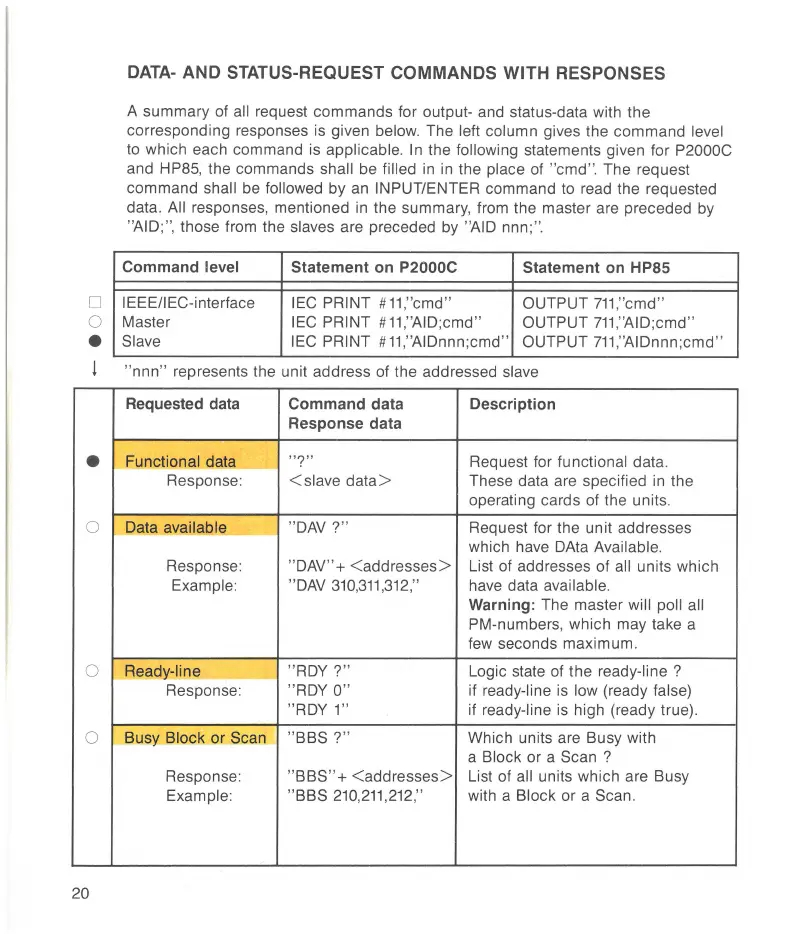
A summary of all request commands for output- and status-data with the
corresponding responses is given
below. The left column gives the command level
to
which each command is applicable.
In
the followi
ng
statements given
fo
r P2000C
and HP85, the commands shall be filled
in in
the place of "cmd". The request
command
shall
be
followed by
an
INPUT/ENTER command
to
read the requested
data.
All responses, mentioned
in
the summary, from the master are preceded by
"AID;", those from the slaves are preceded by "AID nnn; ".
Command level
Statement on P2000C
Statement on HP85
IEEEIIEC-interface
IEC
PRINT #
11
,''
cmd"
OUTPUT
711
,''
cmd"
Master
IEC
PRINT #
11
,''
AID;cmd "
OUTPUT
711
,''
AID;cmd"
Slave
IEC PRINT
#
11
,''AIDnnn ;cmd" OUTPUT
711
,''
A1Dnnn
;cmd"
I "nnn" represents the unit address of the addressed slave
Requested data Command data Description
Response data
•
Functional data
" ?"
Request for functional data.
Response:
< slave data> These data are specified
in
the
operating cards of the units.
0 Data available
"
DAV
?"
Request for the unit addresses
which have DAta
Available.
Response: "
DAV
" + < addresses> List of addresses of all units which
Example: "DAV
310
,
311
,
312
,''
have data available.
Warning: The master will poll all
PM-numbers,
which may take a
few seconds maximum.
0
Ready-line
" ROY?"
Logic state of the ready-line ?
Response:
"
ROY
0"
if ready-line is low (ready false)
"ROY 1"
if ready-line is high (ready true).
0
Busy Block or Scan
"BBS ?"
Which units are Busy with
a
Block or a Scan ?
Response:
"BBS" + < addresses>
List of
all units which are Busy
Example:
"BBS
210
,
211
,
212
,'' with a Block or a Scan.
20



 To Next Page