3 Get started
Caution
Use the controls only as stated in this user manual.
Always follow the instructions in this chapter in sequence.
If you contact Philips, you will be asked for the model and serial number of your player. The model
number and serial number are on the bottom of your player. Write the numbers here:
Model No. __________________________
Serial No. ___________________________
Charge the battery
Risk of product damage! Ensure that the power supply voltage corresponds to the voltage printed on the bottom of the
player.
Use only the supplied AC adaptor to charge the battery.
1
Slide the OFF ON switch to OFF position.
2
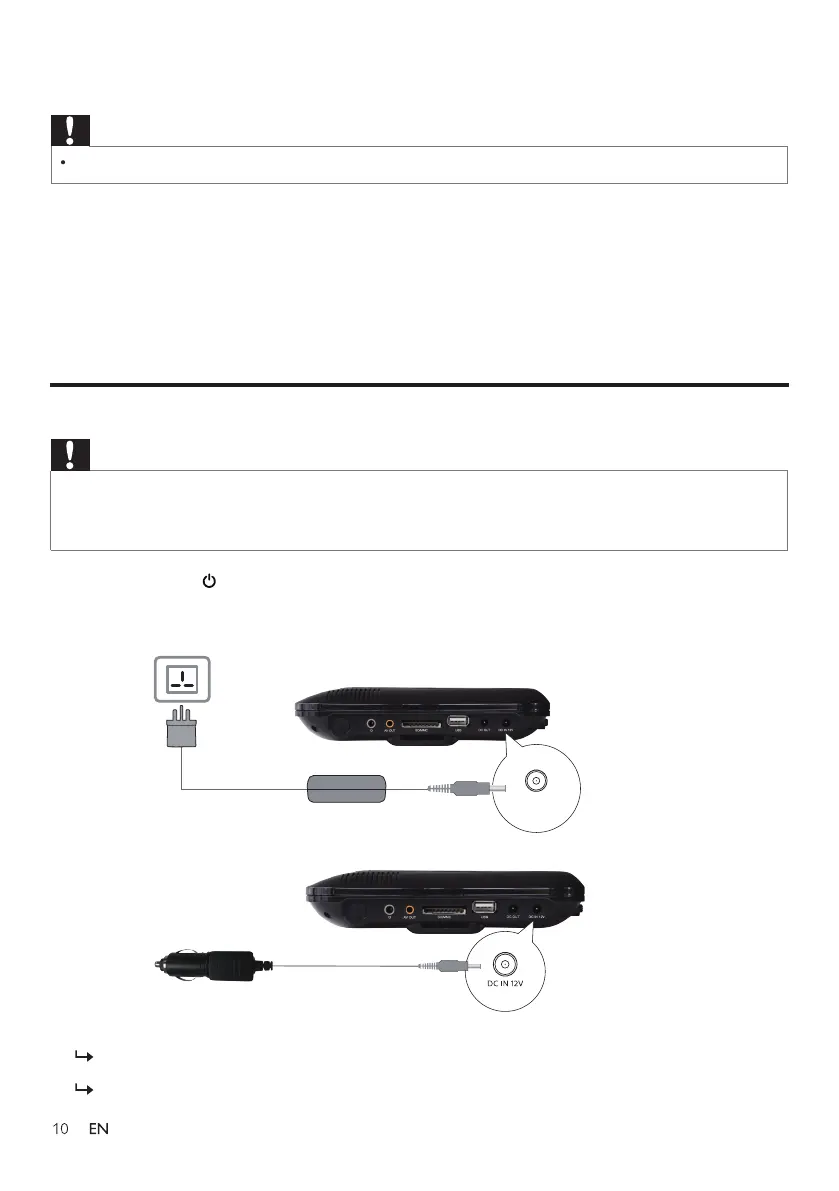
Connect the supplied AC adaptor to the player and to the AC outlet or connect to a car charger
to charge battery.
The charge indicator lights up and turns red. It takes about 3.5 hours to fully charge the battery.
When the battery is fully charged, the charge indicator turns yellow.
Caution
DC IN 12V



 To Next Page