9.OFF ON : Turn on/off the main unit.
10. : Headphone jack.
11.AV OUT : Connect the AV IN jack of monitor to supply AV signal to monitor.
12.SD/MMC : SD/MMC slot.
13.USB : USB port.
14.DC OUT: Connect the DC IN jack of monitor to supply power to monitor.
15.DC IN : Power supply socket.
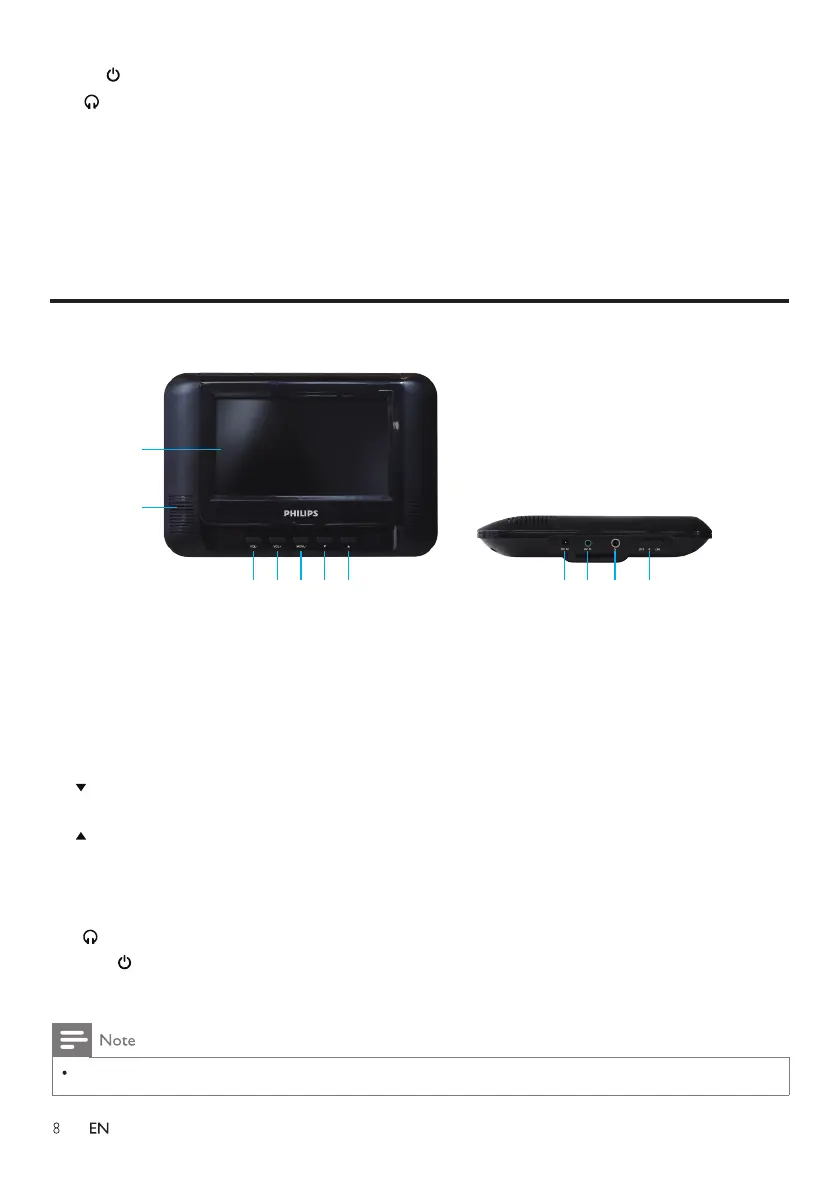
1.LED Display
2.Speakers
3.VOL- : Press to reduce the volume.
4.VOL+ : Press to increase the volume.
5.MENU : Short press MENU on the monitor to enter into the monitor setting; long press to
turn off the monitor.
6. : In normal condition, press to turn off the sound, press again to turn on.
In menu setting mode, press to scroll down.
7. : In normal condition, press to turn off the display information (The sound is still playing).
In menu setting mode, press to scroll up.
8.DC IN : Connect the DC OUT jack of the main unit to get power.
9.AV IN : Connect the AV OUT jack of the main unit to get signal.
10. : Headphone jack.
11.OFF ON : Turn on/off the monitor.
Overview of the monitor
1
2
3 4 5 6 7
8 9 10 11
The remote control operation does not support the monitor.



 To Next Page