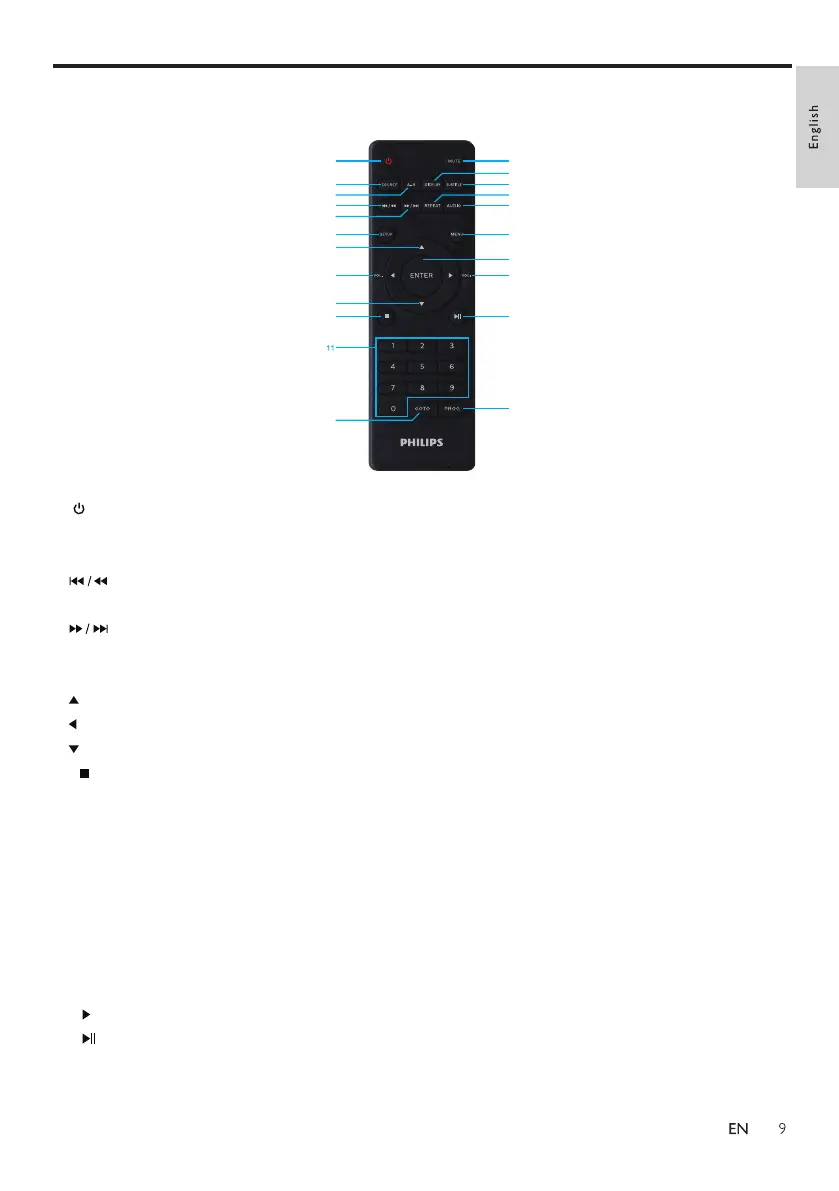
Overview of the remote control
1
2
3
4
6
5
7
8
9
10
12
13
15
17
14
16
18
20
22
19
21
1.
2.SOURCE
3.A-B
4.
5.
7.
8.
9.
10.
20.
6.SETUP
11.0-9
12.GOTO
13.MUTE
14.DISPLAY
15.SUBTITLE
16.REPEAT
17.AUDIO
18.MENU
19.ENTER
22.PROG
21.
Press to turn on the player, or switch the player to standby.
Switch between DVD/USB/SD card/AV IN mode.
Mark the section for repeat play.
Short press to skip to the previous title, chapter, or track; long press for fast
rewind play.
Short press to skip to the next title, chapter, or track; long press for fast forward
play.
Enter or exit the system setup menu.
Scroll up.
Short press to scroll left; long press to reduce volume.
Scroll down.
Stop play.
Number keys.
Skip to a title, a chapter or a track.
Press once to turn off the sound; press again to turn on the sound.
Display screen information.
Select a subtitle language.
Repeat a title, chapter, track or the whole disc.
Adjust the audio output fomat.
Return to the main memu of the disc.
Confirm an entry or selection.
If a disc contains 2 or more tracks, chapter or titles, set up the playing to your
preferred programming. Press this button to enter the programming menu.
Short press to scroll right; long press to increase volume.
Start, pause or resume play.



 To Next Page