3
EN
2
Your clock radio
Congratulations on your purchase, and
support that Philips offers, register your product
at www.philips.com/support.
Introduction
With this clock radio, you can
• listen to both FM and Digital Audio
Broadcasting (DAB+) radio;
• set two alarms to ring at different times.
What's in the box
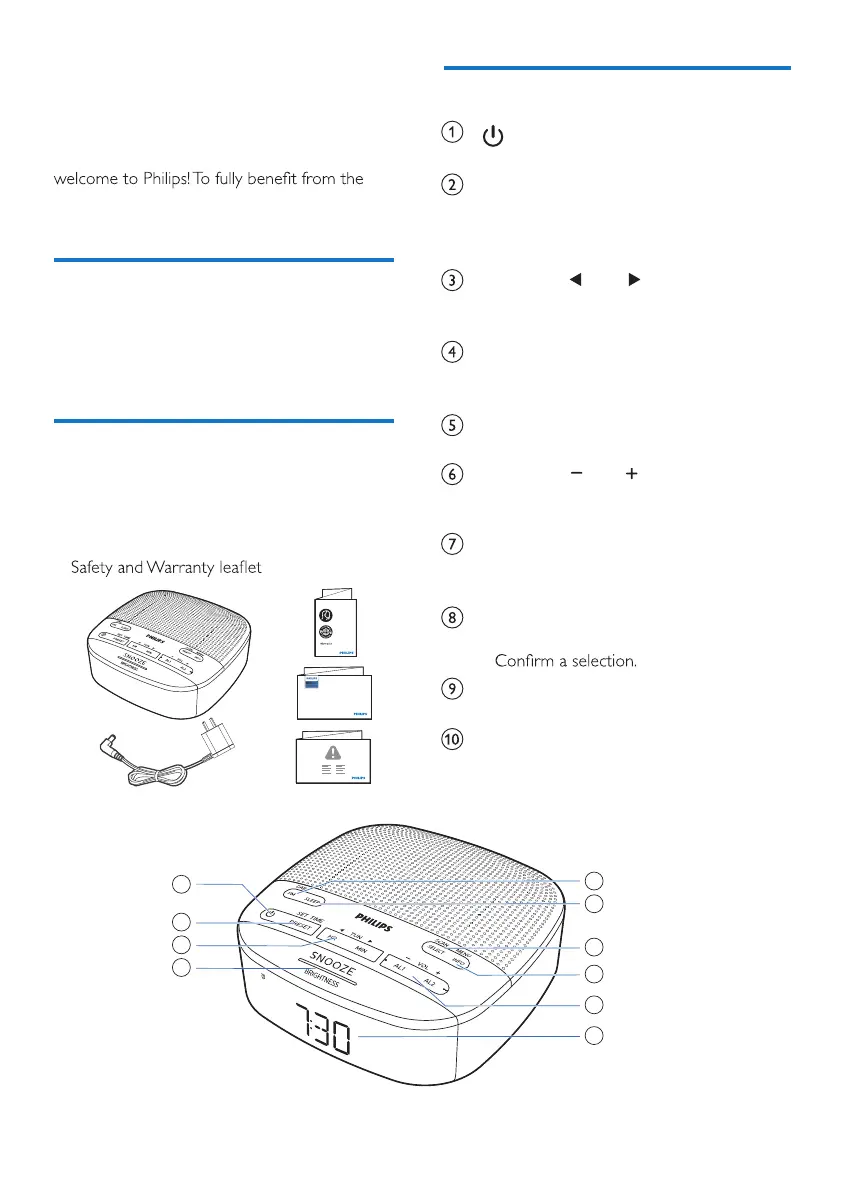
Check and identify the contents of your package:
• Main unit
• AC power adaptor
• Quick start guide
•
Quick start guide
TAPR802
Overview of the clock radio
• Turn on or switch to standby.
PRESET / SET TIME
• Store radio stations in memory.
• Select a preset FM station or DAB station.
• Set time.
HR / MIN /
TUN
• Tune to radio stations.
• Set hour and minute.
SNOOZE / BRIGHTNESS
• Snooze alarm.
• Adjust display brightness.
Display panel
• Display current status.
AL1 / AL2 /
VOL
• Set alarm.
• Adjust volume.
MENU / INFO
• Enter the DAB+ menu.
• Display DAB/RDS station information.
SCAN / SELECT
• Scan/store radio stations automatcially.
•
SLEEP
• Set the sleep timer.
FM / DAB
• Select FM or DAB+ mode.



 To Next Page