3 - 1
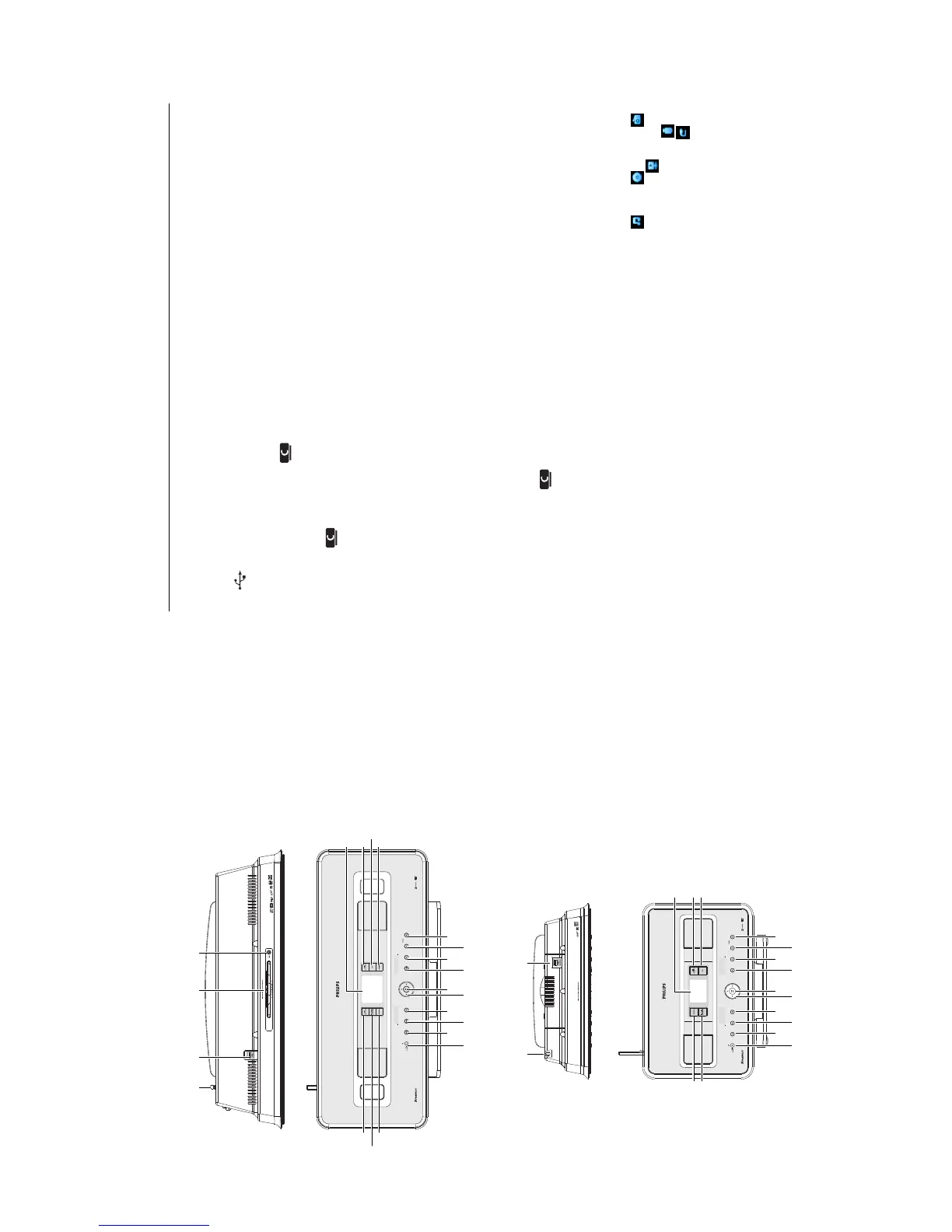
CONNECTION AND CONTROLS
Controls
2143
6
5
7
8
21
20
19
9
10
11
12
13
14
15
16
17
18
21
6
5
7
21
20
9
10
11
12
13
14
15
16
17
18
2.2.1 Controls on Center and Station
1 Antenna
2
USB jack
3 Disc slot
(loader) (only )
Insert discs with graphics facing you
4
/
(only )
Ejects a disk from the CD slot
5 LCD
Display shows the status of the set
6 MUSIC FOLLOWS ME
HD: moves music playback between Center
and Station
7 DBB (Dynamic B
ass
B
oost)
Toggles the bass enhancement between on
(DBB1, DBB2, DBB3) and off
8 SMART EQ (only )
HD:
selects the sound settings for the
current music type (genre)
9 VOLUME +
Adjusts the volume level up
10 VOLUME -
Adjusts the volume level down
11 9
Stops playback or recording
12 )K
Pr
ess to skip to next track / press & hold
to fast forward
13 OK
/
2;
Starts or pauses playback
14 1 / 2 / 3 / 4
Navigation controls (left, right up, down)
allow you to scroll through the option lists
1
HD / CD / USB / UPnP: returns to previous
option lists
3
/
4
HD / CD / USB / UPnP skips/searches
tracks/passage back/forward (in playback
screen)
Fast scroll through options/alphanumeric
lists
Radio: tunes to stations
2
Confirms selection
Radio: enters the list of present stations
15 J(
Pr
ess to skip to previous track / press &
hold to rewind
16 MENU
Enters or exits setup menu
17 HOME
Selects HD Music , CD , Radio ,
UPnP
(Universal Plug & Play) ,
Portable
(USB Universal Serial Bus) , or
AUX
(separately connected device)
18 y ON / STANDBY / ECO STANDBY
Pr
ess briefl
y to toggle betw
een modes
Standby and ON.
Pr
ess & hold to toggle power modes
between ON and Eco Standby (power-
sa
ving mode).
Green indicator light = the set is
switched ON.
Red indicator light
= the set is switched
to Standb
y or Eco Standb
y
.















 To Next Page