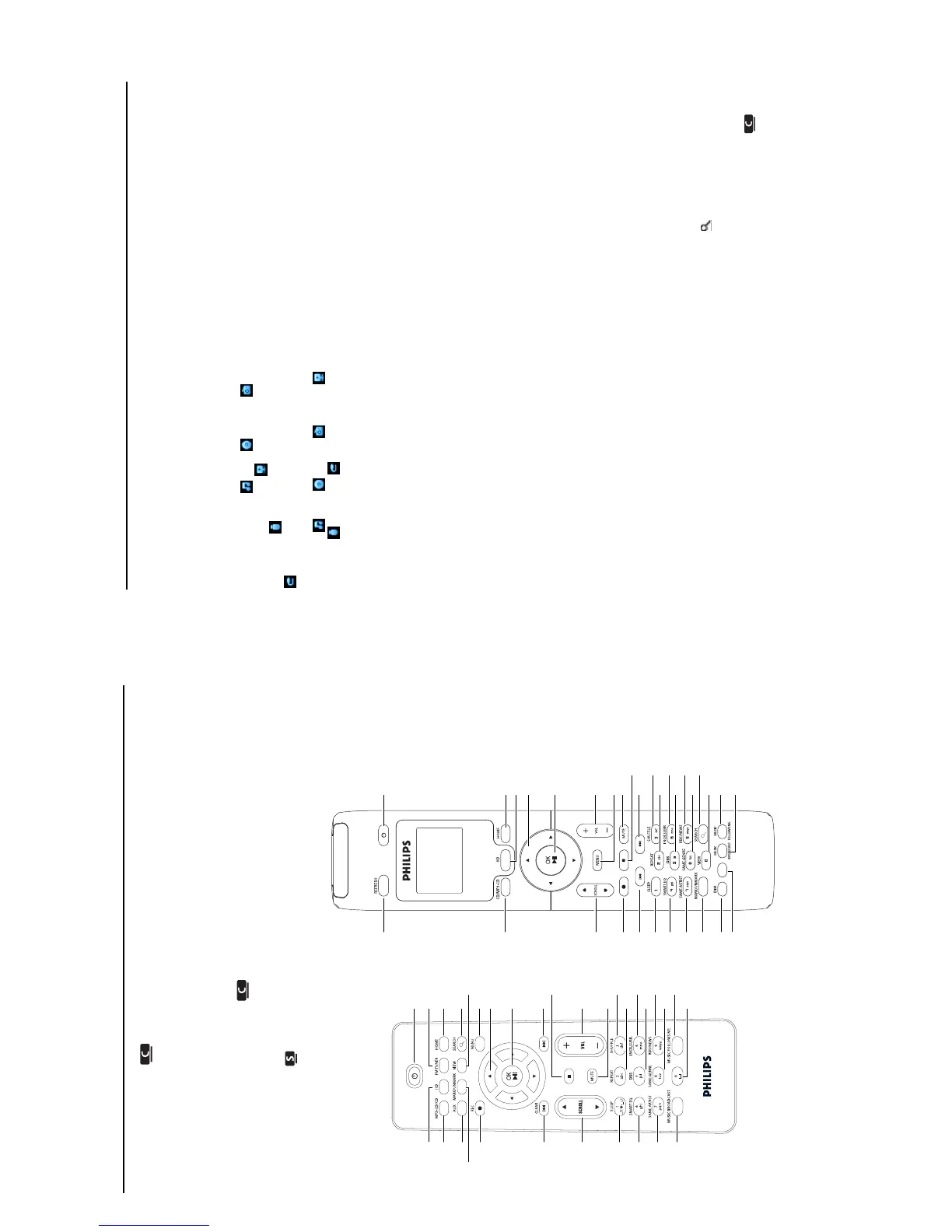
Controls
3 - 2
19 0 RECORD (only )
CD/Radio/AUX: starts to record to the HARDDISK (HD)
20 INCR.SURR.
Selects Incredible Surround sound effect
21 MUSIC BROADCAST (only )
HD: broadcasts music from the Center to the Station
SMAR
T EQ
(onl
y )
HD: selects the sound settings for the current Genre
1
2
3
4
6
7
8
9
10
12
14
16
18
11
15
17
33
30
29
27
26
25
24
23
21
28
19
20
5
13
1-WAY REMOTE CONTROL
1
2
3
4
5
6
7
8
9
11
13
15
17
10
14
16
31
30
29
28
27
26
25
24
23
22
21
18
19
20
12
2-WAY REMOTE CONTROL
32
1 y
Press briefly to switch the set to ON or Standby
Press & hold to switch the set to Eco Standby (power-
saving mode)
2 HOME
Selects HD Music
,
CD
,
Radio
,
UPnP
(Universal Plug & Play) ,
Portable
(USB Universal
Serial Bus) , or
AUX
(separately connected device)
In Standby mode: switches the set ON
and selects
HD Music
, CD , Radio
,
UPnP
,
Portable , or AUX
3 HD
Selects HD (Harddisk) source
In Standb
y mode
:
s
witches the set ON and selects
HD (Harddisk) source
4
1 /
2 /
3
/ 4
Navigation controls (left, right, up, down) allow you to
scroll through the option lists
1
HD/CD/USB/UPnP
:
returns to previous option lists
T
ext input:
moves the cursor backwards
3
/
4
HD/CD/USB/UPnP: skips/sear
ches tracks/passage
back/forward (in playback screen)
Scrolls fast thr
ough options list
Radio: tunes to stations
2
Confirms selection
Radio:
enters the list of pr
eset stations
Text entry: confirms input and moves the cursor
forward
5OK
, 2
/
;
Confirms selection
star
ts pla
ying
6
VOL +
, -
Adjusts the volume level up or down
7 MENU
Enters or exits the setup menu
8 MUTE
Deactivates the sound temporarily
9
9
Stops playback or recording
10
)K
Press to skip to previous track / press &
hold to fast forward
11 SHUFFLE (3 def)
Selects random playback
12 REPEAT (2 abc
)
Selects continuous playback
13 INCR.SURR. (
6 mno
)
Selects Incredible Surround sound effect
14 DBB
(
D
ynamic
B
ass
B
oost) (
5 jkl
)
Toggles the bass enhancement between on
(DBB1, DBB2, DBB3) and off
15 RDS/NEWS (9 wxyz)
Radio: selects RDS information
HD/CD/UPnP/AUX/USB: toggles
between NEWS function on or off
16 SAME GENRE (8 tuv)
HD: plays all the tracks of the current
Genre
17 SEARCH ()
Searches by leading keywords
18 MARK/UNMARK
(0
V
) (only )
Selects or deselects tracks you want to
record (press & hold to select/deselect ALL
tracks)
19 MUSIC FOLLOWS ME
HD
:
mo
ves music playback between Center
and Station















 To Next Page