The actual life of lter cartridge should depend on the local tap water quality and daily
usage (the recommended daily consumption is about 10L).
The recommended replacement period is an average based on dierent local tap
water quality. If the local water quality is below the average indicator, the actual life
of the cartridge will dier from the recommended life. If the lter cartridge is blocked
and fails, please consider to replace the lter cartridge.
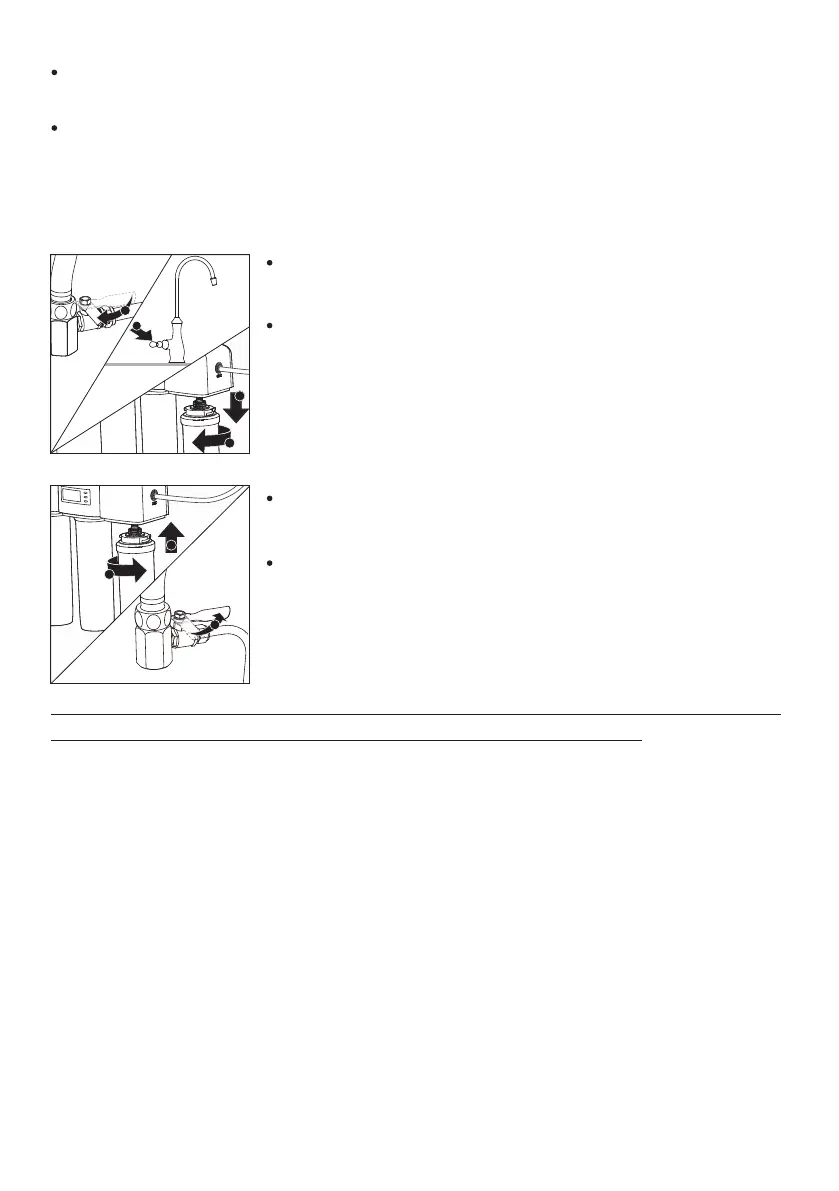
Turn o the switch for the three-way connector and turn on
the lever of the faucet;
Unscrew the cartridge to be replaced in the direction as
shown in the gure;
Steps for lter cartridge replacement:
Screw the replacing cartridge into the lter cover in the
direction as shown in the gure;
Turn on the switch of three-way connector; run the water for
5 minutes before use.
Note: The life of replaced lter cartridge for WP4161/01 and WP4161/91 should be reset
(see the chapter "Filter Element Life Reset" for the operation).
* Battery replacement
When the water ltration system is intermittently blaring, please check the display
screen. If the battery level icon is ashing, please replace the battery (please purchase
the battery to be replaced). This water purier needs to be equipped with three AAA
alkaline dry batteries. For battery replacement method, see the Section: “Installation
Steps” - Part: “Installation of Batteries”.
26
* For WP4161/01 and WP4161/91 only










 To Next Page