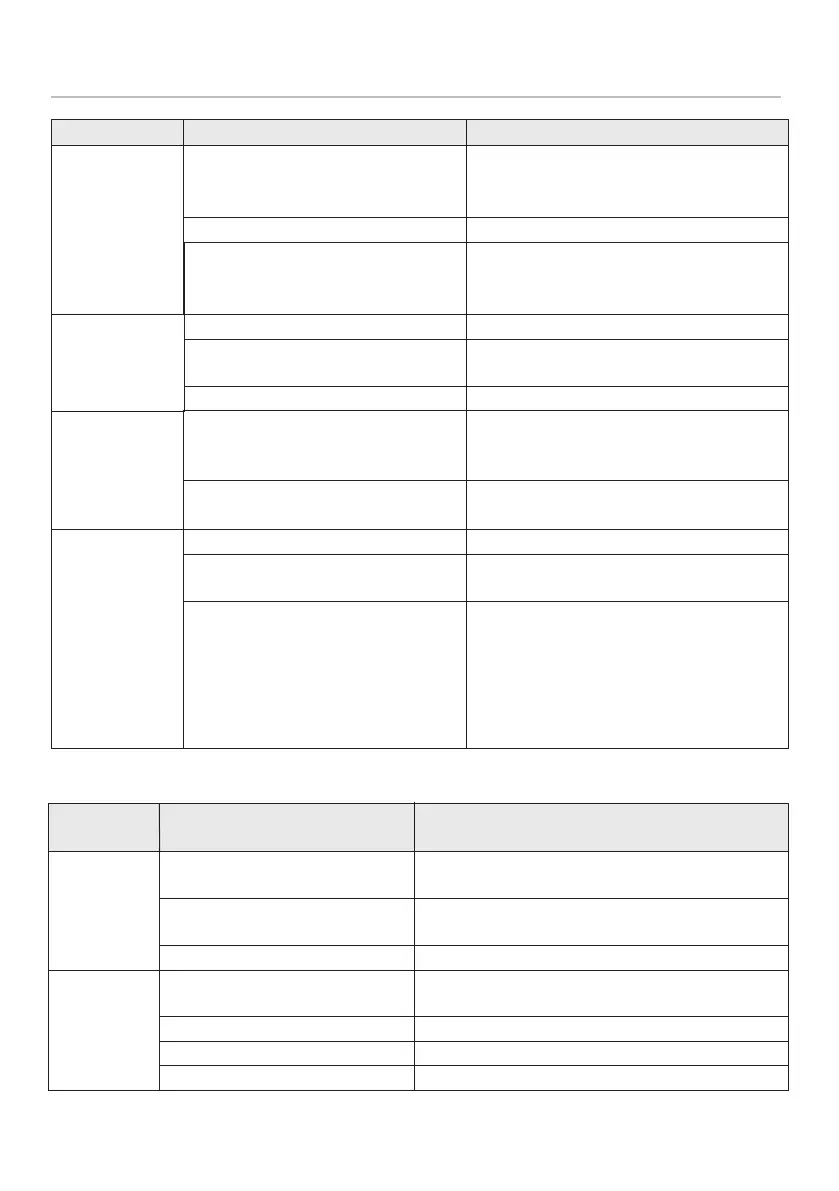
Fault
phenomenon
The screen
does not light
up after
installing the
battery.
The "Filter
Element Life"
icon has not
been
lowered.
Fault
The outlet
water ow
rate of the
water
purier has
obviously
decreased.
Poor quality of
outlet water
Water
leakage
The life of the
lter element
as displayed
on the screen
has not expired,
while the actual
life of the lter
element has
expired.
Possible cause
The cold water valve, the
three-way connector or the
faucet is not fully opened.
The lter cartridge is plugged.
The water pressure is too low.
The lter cartridge fails.
Stop using for a long time
(more than 3 days).
The quality of tap water is poor.
The pipeline or lter cartridge
is not installed properly.
The parts and components
are damaged.
The quality of tap water is poor.
There is any failure of
owmeter or timer.
Did not replaced cartridge, but
reset cartridge’s life.
Solution
Fully turn on the switches.
Replace the lter cartridge.
Take the pressurization measures or
wait for the water pressure to return
to normal before use.
Replace the lter cartridge.
Rinse it for 2~4 minutes.
Check the water quality of tap water.
Re-install the pipeline or lter
cartridge according to the installation
instruction.
Please contact consumer care
services.
Replace the lter element.
Please contact the after-sales
service personnel.
Replace the lter cartridge and reset
the corresponding life in time. Reset
the corresponding life of lter
cartridge only after replacing the
lter element.
13. Trouble Shooting
* Display screen
Possible cause of fault
The battery is not installed
correctly.
There is no sucient battery
voltage.
Other abnormalities
The owmeter line is not
correctly plugged.
The owmeter is damaged.
The timing module is damaged.
Other abnormalities
Troubleshooting
Remove and re-install the battery.
Replace the battery.
Please contact the after-sales service personnel.
Re-plug the owmeter line.
Please contact the after-sales service personnel.
Please contact the after-sales service personnel.
Please contact the after-sales service personnel.
27
* For WP4161/01 and WP4161/91 only










 To Next Page