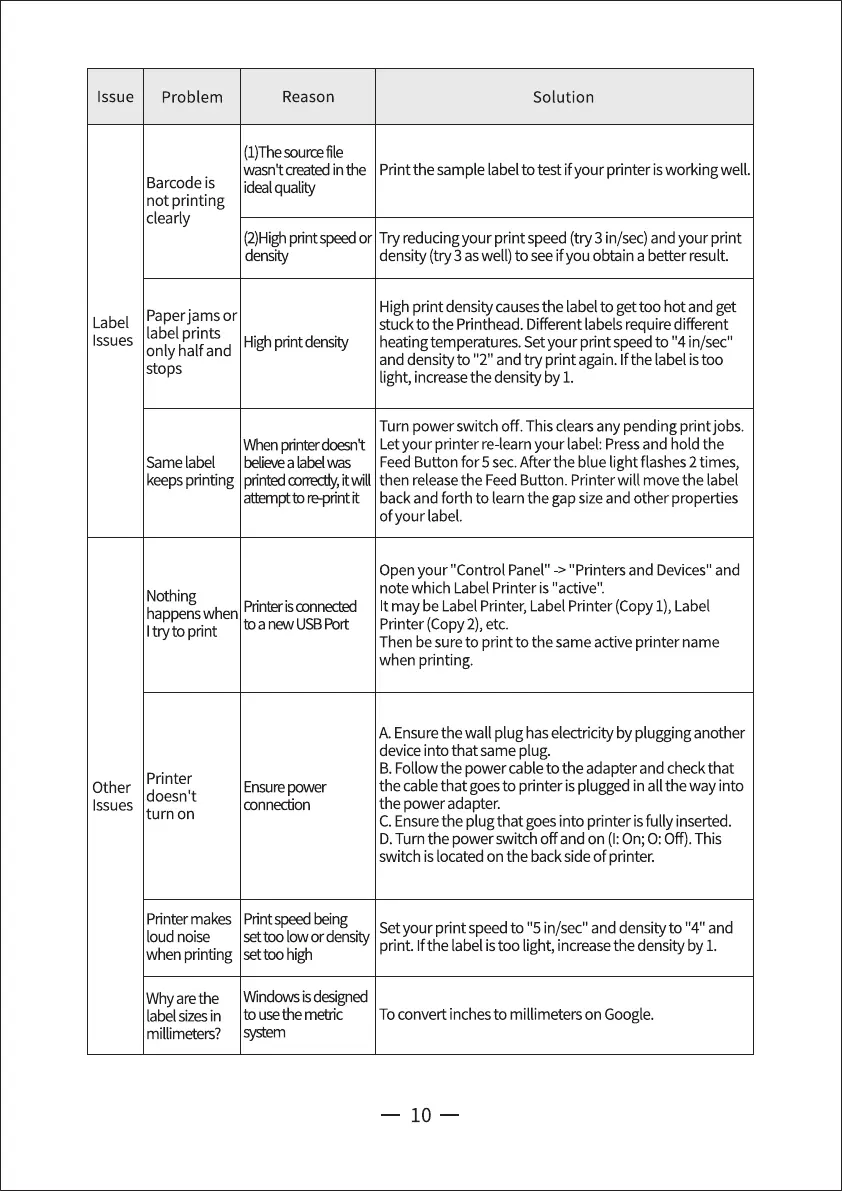
Issue
Problem
Barcode is
not printing
clearly
Reason
(1)Thesourcefile
Solution
wasntcreatedinthe Print the sample labelto testifyour printer isworkingwell.
idealqualiW
(2)Highprintspeedor Try reducingyour print speed (try 3 in/sec)and your print
density
Paperjams or
Label
label prints
Issues
Highprintdensity
only half and
stops
Whenprinterdoesnt
Same label believe a label was
keepsprinting printedcorrectly,itwill
attemptto reprint it
Nothing
Printer is conneded
happenswhen
I try to print
Printer
Other
doesn't
Issues
turn on
Printer makes
loud noise
when pnnting
Whyarethe
label sizes in
millimeters?
to a new USB Port
Ensurepower
connection
Printspeedbeing
settoo low ordensity
settoo high
Windowsisdesigned
to use the metric
system
density (try 3 aswell) to seeifyou obtain a better result.
High print density causesthe labelto get too hot and get
stuck to the Printhead. Different labels require different
heatingtemperatures. Setyour print speed to "4 in/sec"
and densityto "2" and try print again. Ifthe label istoo
light, increasethe density by 1.
Turn power switch off. Thisclearsany pending printjobs.
Letyour printer re-learnyour label: Pressand hold the
FeedButton for 5 sec.Afterthe blue light flashes2 times,
then release the Feed Button. Printer will move the label
backand forth to learnthe gap sizeand other properties
of your label.
Openyour "Control Panel" ->"Printers and Devices"and
note which Label Printer is "active".
It may be Label Printer, Label Printer (Copy1), Label
Printer (Copy2),etc.
Then besure to print to the same active printer name
when printing.
A. Ensurethe wall plug haselectricity by plugging another
device into that same plug.
B.Follow the power cableto the adapter and check that
the cable that goesto printer is plugged in all the way into
the power adapter.
C.Ensurethe plug that goesinto printer isfully inserted.
D.Turn the power switch off and on (I:On;O:Off). This
switch is located on the backsideof printer.
Setyour print speed to "5 in/sec" and densityto "4" and
print. Ifthe labelistoo light, increasethe density by 1.
To convert inchesto millimeters on Google.
10


 To Next Page
 Loading...