Wireless setup for landline telephones
Establishing a wireless connection between the HearIt All
charger and receiver
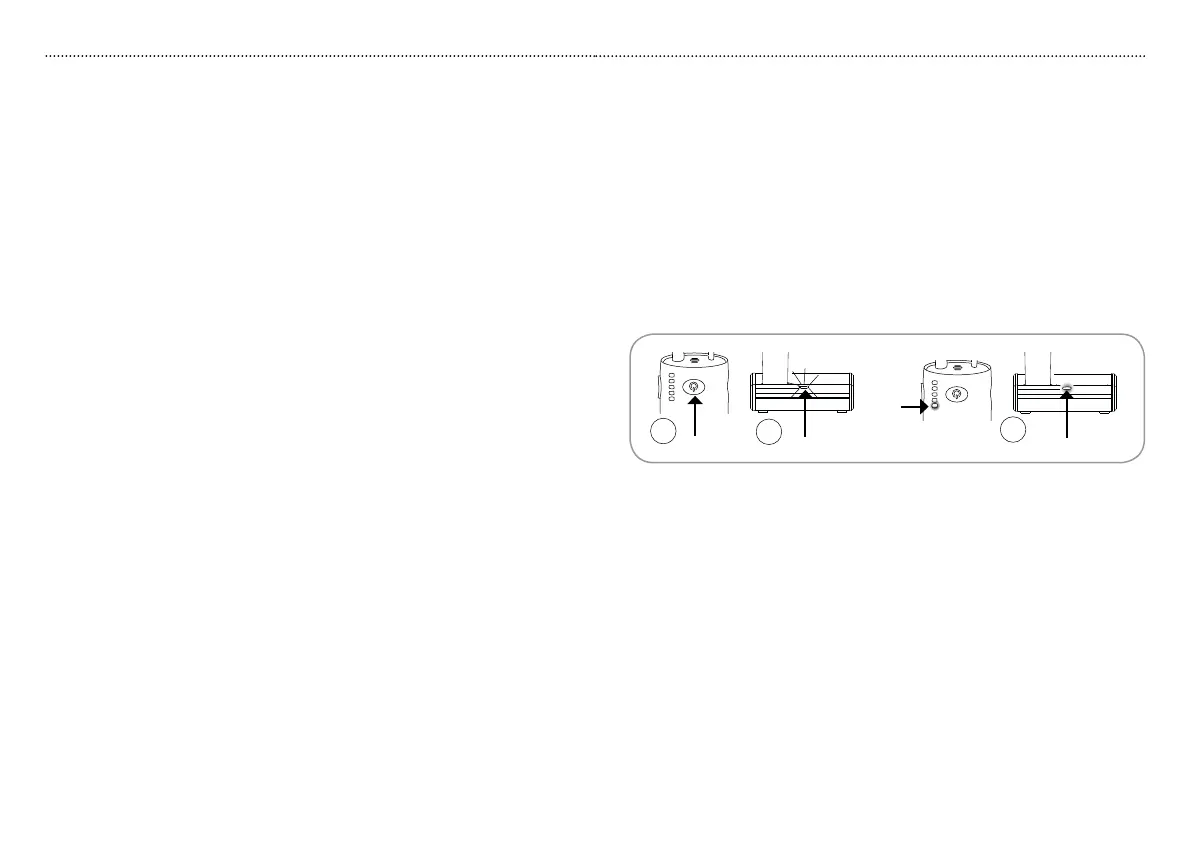
1. Turn on the receiver by pressing receiver button R1 for up to five seconds.
2. Turn on the main power for the charger.
3. The charger indicator C3 begins blinking rapidly while connection is in
progress.
4. Once a connection has been established, the charger indicators C3 and
R3 stop blinking blue.
SetupSetup
11
R3
R1
C3
C3
3
1
4
10
Wireless setup
Wireless connections must be established before main power is turned on.
HearIt All combines two wireless radio systems: Bluetooth and WDA.
Bluetooth: Is a way of connecting and exchanging information between
between Bluetooth enabled devices such as mobile telephones, laptops, PC’s,
printers, headsets etc.
WDA (Wireless Digital Audio): Is a way of connecting and exchanging
information between WDA enabled devices such as the HearIt All charger and
receiver.
Please note:
Once the wireless connection between HearIt All and a Bluetooth unit •
has been established, the units will automatically connect when they are
within range of each other.
If the connection is lost or power to the charging stand was turned on •
before wireless setup was made, connection can be established by a
single push to charger button C5 at any time. Always turn on the receiver
before attempting to connect charger and receiver.
If the connection is lost because of low or no range or no receiver power, •
the connection will automatically be re-established once a suitable range
has been reached or the receiver has been charged. If connection is
lost because there is no power to the charger, follow steps 1 to 4 to re-
establish the connection.



 To Next Page