Receiver Setup
Neck loop and T/MT function on HA
In order to use HearIt All with hearing aids in T-position (telecoil), the hearing
aid must be equipped with a telecoil fitted by the hearing care professionel.
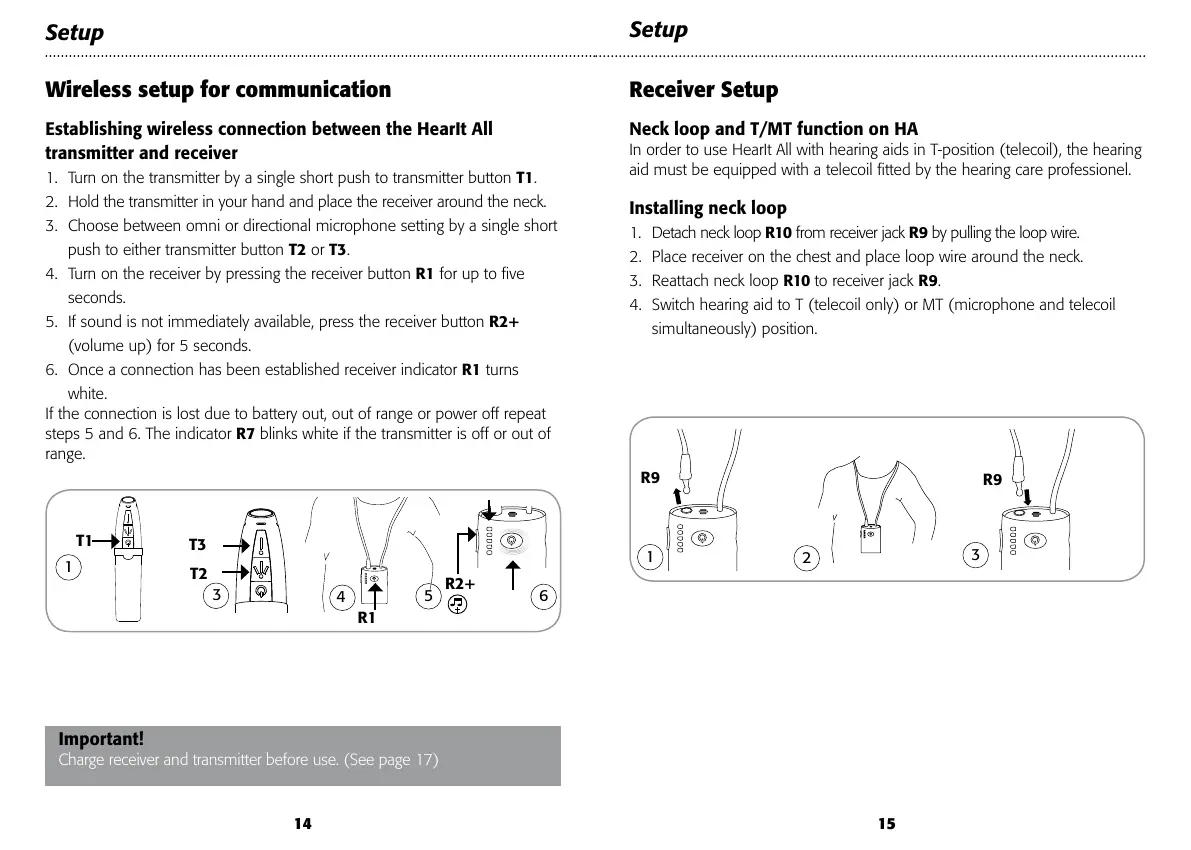
Installing neck loop
1. Detach neck loop R10 from receiver jack R9 by pulling the loop wire.
2. Place receiver on the chest and place loop wire around the neck.
3. Reattach neck loop R10 to receiver jack R9.
4. Switch hearing aid to T (telecoil only) or MT (microphone and telecoil
simultaneously) position.
Wireless setup for communication
Establishing wireless connection between the HearIt All
transmitter and receiver
1. Turn on the transmitter by a single short push to transmitter button T1.
2. Hold the transmitter in your hand and place the receiver around the neck.
3. Choose between omni or directional microphone setting by a single short
push to either transmitter button T2 or T3.
4. Turn on the receiver by pressing the receiver button R1 for up to five
seconds.
5. If sound is not immediately available, press the receiver button R2+
(volume up) for 5 seconds.
6. Once a connection has been established receiver indicator R1 turns
white.
If the connection is lost due to battery out, out of range or power off repeat
steps 5 and 6. The indicator R7 blinks white if the transmitter is off or out of
range.
Setup
Setup
R9
R9
2
3
1
1514
Important!
Charge receiver and transmitter before use. (See page 17)
T3
T2
T1
R1
1
4
3
6
5
R2+
R1
R7
During TV listening and communication the receiver indicator R1 will
illuminate white to show that the wireless connection is active.
Please note:
Connecting headphones to the headphones jack • R8 disconnects the
signal to the neck loop.



 To Next Page