5
AM442D USB / AM642D USB
English Deutsch Español Français Português
日本語
简体中文
Digital Effect Engine
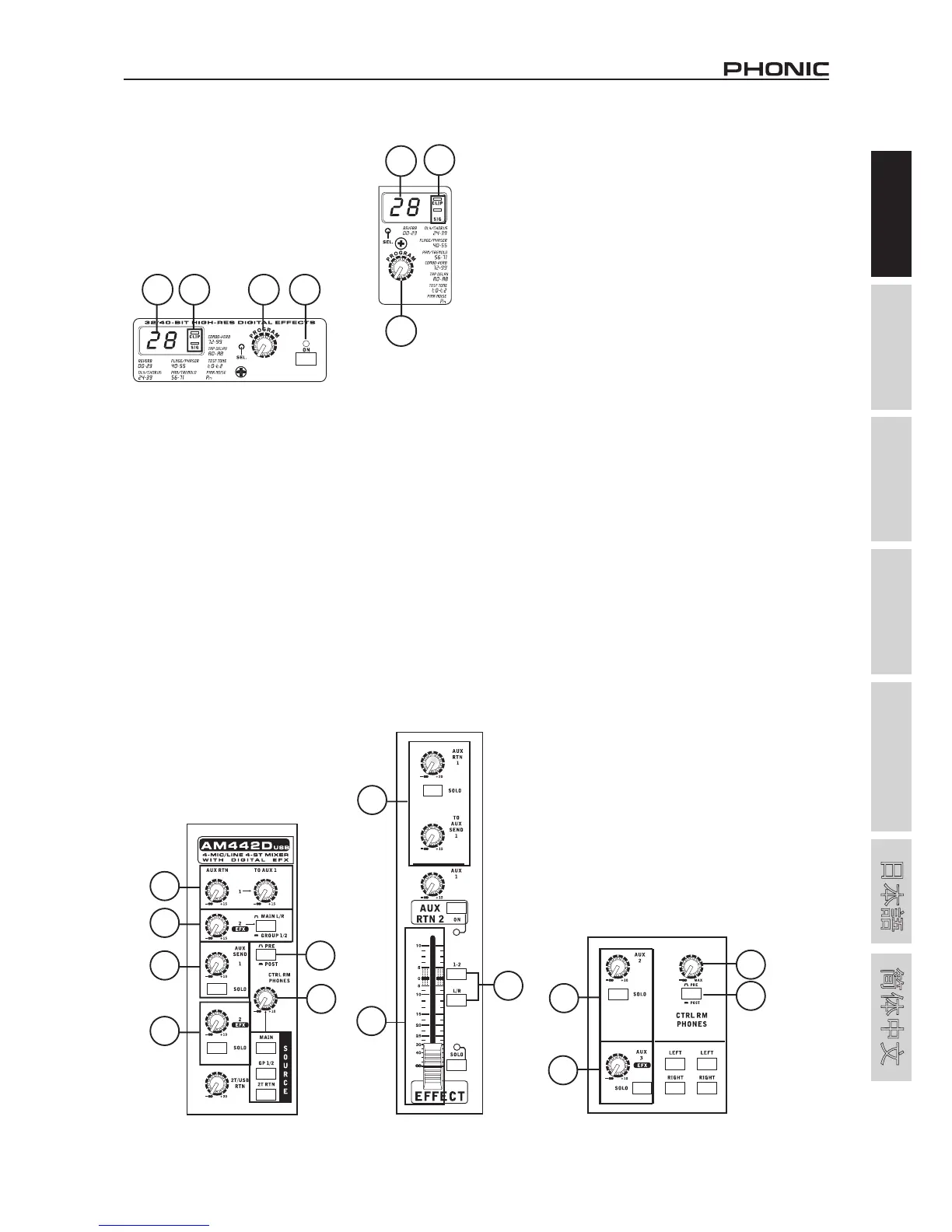
34. Digital Effect Display
This 2-digital numeric display shows the
program number that is currently applied
to your EFX audio signal. When you rotate
the Program control, you can scroll through
different program numbers; however the
display will revert back to the original program
if a new program is not selected within a
few seconds. For a list of available effects,
please observe the Digital Effect Table.
35. Sig and Clip Indicators
Located within the Digital Effect Display are Clip and Sig LEDs.
The Sig LED will light up when any signal is received by the effect
processor, and the Clip LED will light up shortly before excessive
signals are dynamically clipped. If the Clip LED lights up too often,
it may be advisable to turn down the AUX 3/EFX control on one or
all input channels to ensure the signal level is not excessive.
36. Program Control
This control is used to scroll through the various effects. Turning
the control clockwise will allow users to ascend into higher
program numbers, and turning it counter-clockwise will allow
users to descend into lower program numbers. Pushing this
control will apply the new effect. When a tap-delay effect is
selected, pressing this control will allow users to select the tap-
delay time.
By pushing the button several times, the effect processor
interprets the time between last two pushes and remembers this
as the delay time – until the button is pushed again. This is kept
even after the power is turned off. When the tap delay effect is
selected, a small LED will flash within the digital effect display
window at the selected intervals.
37. Effect On Button (AM642D USB)
This button is pushed to turn the corresponding effect panel on
or off. When effects are bypassed, there will be 2 flashing LEDs
in the effect display. This button is not featured on the AM442D
USB. Users must use a footswitch to activate and deactivate
effects on this model.
Master Section
38. AUX Return Controls
These controls adjust the signal level of audio fed through to the
stereo AUX Return inputs, which will be added to the main mix.
The two “To AUX” controls adjust the post-fader level of the signal
from the AUX Return control to the AUX 1 mix.
On the AM642D USB, the AUX return control also features
a SOLO button, which sends the signal to the Control Room /
Phones mixing bus, most commonly for monitoring.
39. EFX Return Control
This control adjusts the signal level of audio fed through to stereo
AUX Return 2 inputs. If no device is plugged into the AUX Return
2 inputs, this control then acts as the final level control of the
built-in Digital Effect Engine. The signal of this control is sent to
the appropriate mixing bus, as selected by the Main L-R / Group
1-2 button.
On the AM642D USB, the EFX return control is a little different,
as it is, in fact, a 6 mm fader, and takes its feed from AUX Return
2. Along with what was already stated above, the AM642D USB’s
also features a SOLO button (with indicator), which sends the
signal to the Control Room / Phones mixing bus; an L-R button,
which allows you to send the EFX Return post-fader signal to the
Main Left and Right mixing bus; and a 1-2 button, allowing you
to send the EFX Return post-fader signal to the Group 1 and 2
mix.
40. Main L/R - Group 1/2 Button
This button changes the destination of the signal sent from the
AUX Return 1 through to AUX Return 3 mixing buses between
the Main L/R and Group 1/2 mixing buses.
41. AUX Send Master Controls
These controls adjust the final level of the AUX mixes (as
taken from the AUX level controls on each channel strip), the
audio of which is sent to corresponding AUX send outputs. The
corresponding SOLO button allows you to send the AUX Send
signal to the Control Room / Phones mixing bus. The AM442D
USB offers one AUX send, while the AM642D USB offers two
(excluding the EFX sends, of course). The AM642D USB’s AUX 1
send is a 60 mm fader and also features an on/off button.
42. EFX Send Master Control
This control adjusts the final level of the EFX mixing bus (as taken
from the EFX level controls on each channel strip), the audio of
which is sent to the AUX Send 2 (on the AM442D USB) and the
AUX Send 3 (on the AM642D USB) outputs, as well as the built-in
digital effect processor. The corresponding SOLO button allows
you to send the signal to the Control Room / Phones mixing bus.
AM642D USB
34 35
36 37
AM442D USB
34
35
36
AM442D USB
38
44
43
39
41
42
39
38
40
AM642D USB
43
44
41
42
AM642D USB


 To Next Page
 Loading...