17
FIREFLY 808
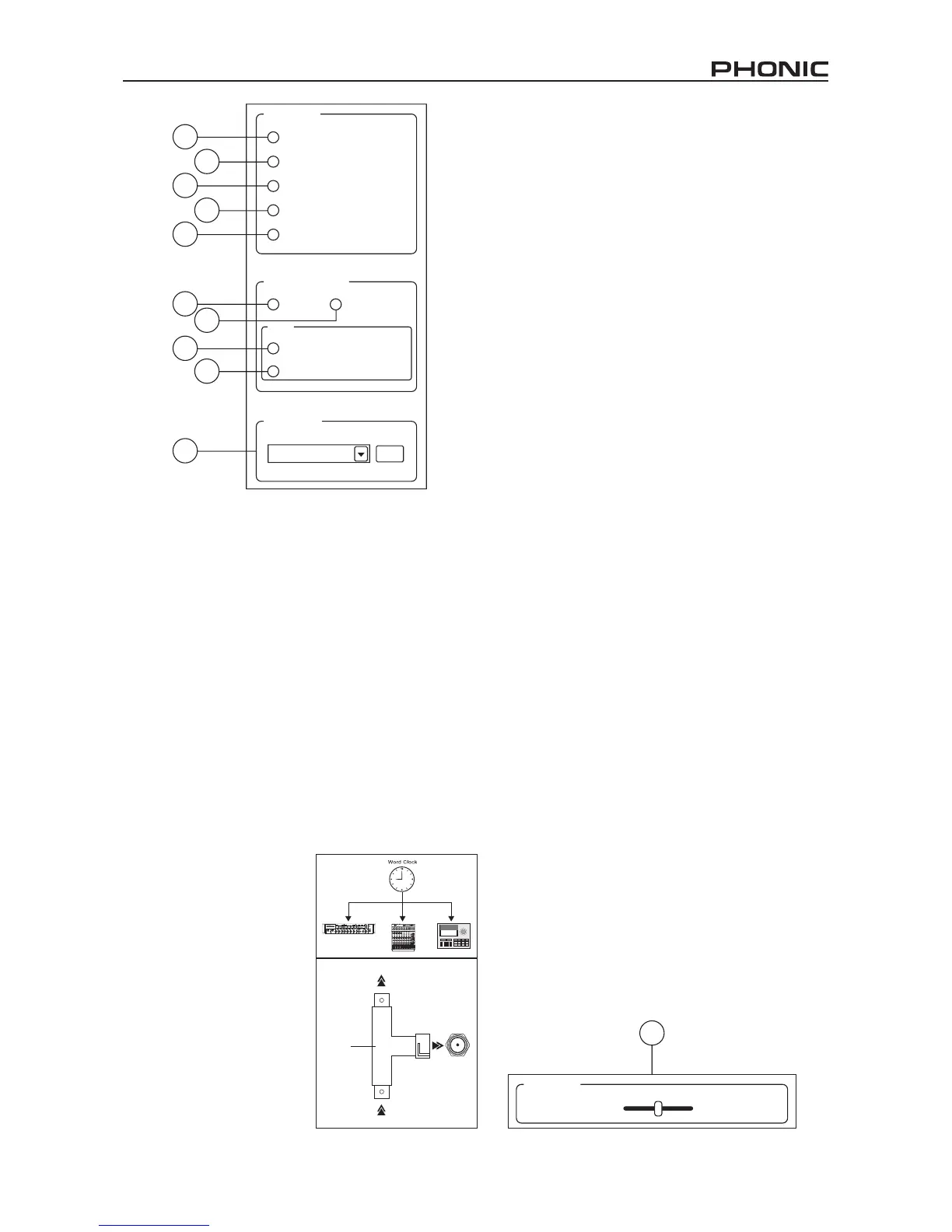
Sync Source
Digital I/O Selection
Sample Rate
44.1 kHz set
ADAT
ADAT ( 44.1 / 48 kHz)
SMUX ( 88.2 / 96 kHz)
SPDIF HS-SPDIF
Device
Coax S/PDIF
ADAT
Word Clock
PC
11
12
14
17
19
13
15
16
18
20
21
Input Monitor Mixer Main 1/2 - from PC
Cross Fader
Sync Source
11. Device
Pushing this will allow you to use the Firey 808 as the
sync source for all your digital gear.
12. Coaxial S/PDIF
Selecting this option will activate any coaxial S/PDIF
device as the sync source for your digital gear. If no
device is connected to the S/PDIF input on the Firey
808, the corresponding sync source LED on the face
of the device will ash briey then return back to the
previously selected sync source.
13. Optical S/PDIF
Selecting this option will activate any optical S/PDIF
device as the sync source for your digital gear. If no
optical S/PDIF device is connected to the TOSlink
ADAT input on the rear of the Firey 808, the corre-
sponding sync source LED on the face of the device
will ash briey then return back to the previously se-
lected sync source.
14. Word Clock
This option will allow you to
use a word clock as your sync
source. If no word clock de-
vice is connected to the BNC
word clock input on the rear
of the Firey, then the cor-
responding sync source LED
on the face of the mixer will
ash briey and then return
back to the previously select-
ed sync source. Please see
the diagram below for infor-
mation on hooking up a world
clock as your sync source.
15. PC
This is the default option, and allows you to use the
PC as the sync source. When set to PC, the corre-
sponding sync source LED on the front of the Firey
808 will light up.
Note: If ADAT and S/PDIF devices are not set to the same sync
source, the user will be prompted to correct the problem.
Digital I/O Select
16. S/PDIF
Selecting this option will allow you to use a S/PDIF or
AES enabled digital device with the Firey 808.
17. High Speed S/PDIF
If you connect a high speed S/PDIF product to the
S/PDIF connector on the rear of the Firey 808, click-
ing this option will allow you to use the output signal
from this device.
18. ADAT
Select this option to use the TOSlink ADAT inputs on
the rear of the Firey 808.
19. SMUX
By selecting SMUX as your digital input/output device,
you are able to connect a SMUX enabled product to
the ADAT TOSlink inputs of the Firey. The SMUX
output signal is typically 8 channel, however if you set
the sampling rate to 96 kHz, this is reduced to 4 channels.
Other Features
20. Sampling Rate Selection
Here you can select the sampling rate of the signal
sent to the computer. For most applications, you will
be able to select between 44.1, 48, 88.2 and 96 kHz.
If you choose ADAT as your digital input selection,
then you are able to select 44.1 kHz or 48 kHz. When
using high speed S/PDIF devices, you are able to se-
lect between 176.4 and 192 kHz sampling rates. If the
192 kHz sampling rate is set, the Firey’s level meter
will be disabled.
21. Crossfader
The mixing software’s crossfader allows users to ad-
just the signal returned to the computer’s analog 1
and 2 outputs. When centered, the signal will be a 50-
50 mix of the pure signal received by the Firey 808
and the signal returned to the 808 from the computer.
When pulled to the left, the monitor signal from the
808 gradually becomes more dominant; when pulled
all the way to the left, this signal is the only signal
audible. If this control is pulled to the right, however,
the stereo signal from the mixing panel software will
become more dominant.
Wor d Cl oc k to O th er Slave s
BNC T-Adapter
Wor ld C lo ck f ro m Maste r
Wor ld C lo c k
IN


 To Next Page
 Loading...