7
FIREFLY 808
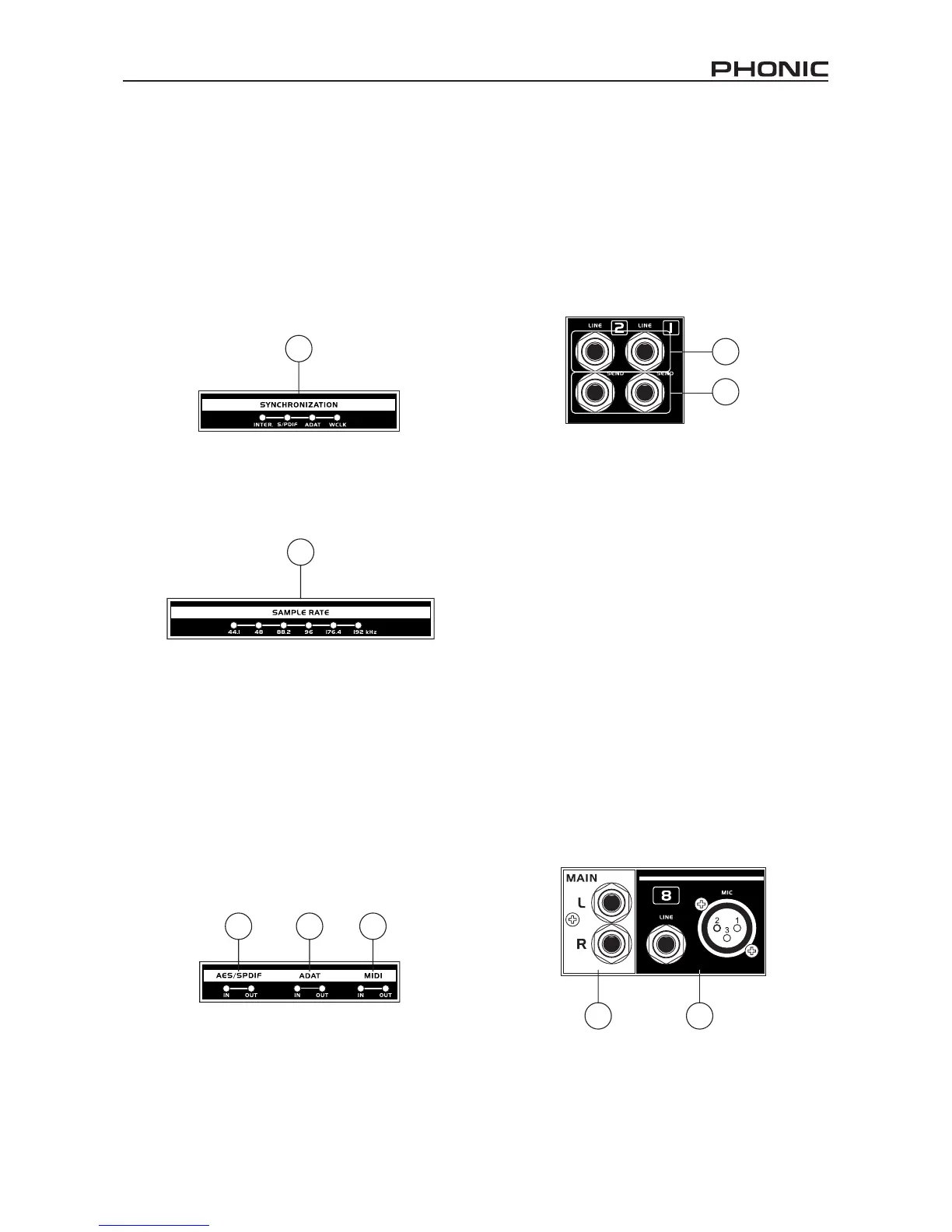
12. Synchronization Indicators
Firey 808 can be synchronized with any WCLK
sync device, enabling you to use it for your audio/
video recording studios as well as cinema and video
production that requires high resolution audio.
When the Firey 808 is synchronized one of these
LEDs will light up to indicate which kind of sync the
Firey 808 is currently using. If you use the control
software to adjust to a device not connected to the
Firey, the corresponding light will ash briey and
return back to the previous setting.
13. Sampling Rate Indicator
When Firey 808 gets synchronized, one of these
LEDs will light up to show the sampling rate of the
device the Firey is synchronized with, and the
Firey will automatically be set to that rate.
14. AES/SPDIF LED Indicator
These input and output LEDs will light up when the
AES/EBU or S/PDIF interface is in use.
15. ADAT LED Indicator
You can use your optical devices in conjunction with
the Firey 808. When the ADAT optical connection
is in use, the input and output LEDs will activate to
let you know the connection is successful.
16. MIDI Indicator
When using the MIDI interface, these input and
output LEDs will light up.
Rear Panel Description
17. Line Input Channel 1 and 2
These input jacks allow users to connect line-level
devices, the signal of which is fed through the
FireWire interface, and sent directly out the channel
1 and 2 sends.
18. Channel 1 and 2 Sends
These outputs act as direct sends of the channel 1
and 2 inputs, allowing the signal to be used in other
devices.
19. Input Channels 3 to 8
Each of these channels features a balanced 1/4”
TRS Line Inputs and can be used to connect any
line level device like CD players, DAT recorders.
You can even connect an analog mixer that does
not have FireWire interface to allow you to send
that signal to the computer. Also present are 3-pin
XLR mic input connectors for use with condenser
or dynamic microphones.
20. Main Outputs
These 1/4” TRS outputs will allow users to send
the main stereo mix of the Firey 808’s return
signal to external devices. The signals from
analog channels 1, 3, 5 and 7 are sent to the left
output, where the 2, 4, 6 and 8 signals are sent
to the right output. When the FireWire interface
is in use, users are able to use the Firey Mixer
software's crossfader to select the degree of the
FireWire return signal and the analog input signal
that is sent to these outputs. The main outputs can
be connected to active speakers, monitors, or other
mixers, depending on your needs.
13
14 15 16
17
18
20
19
12


 To Next Page