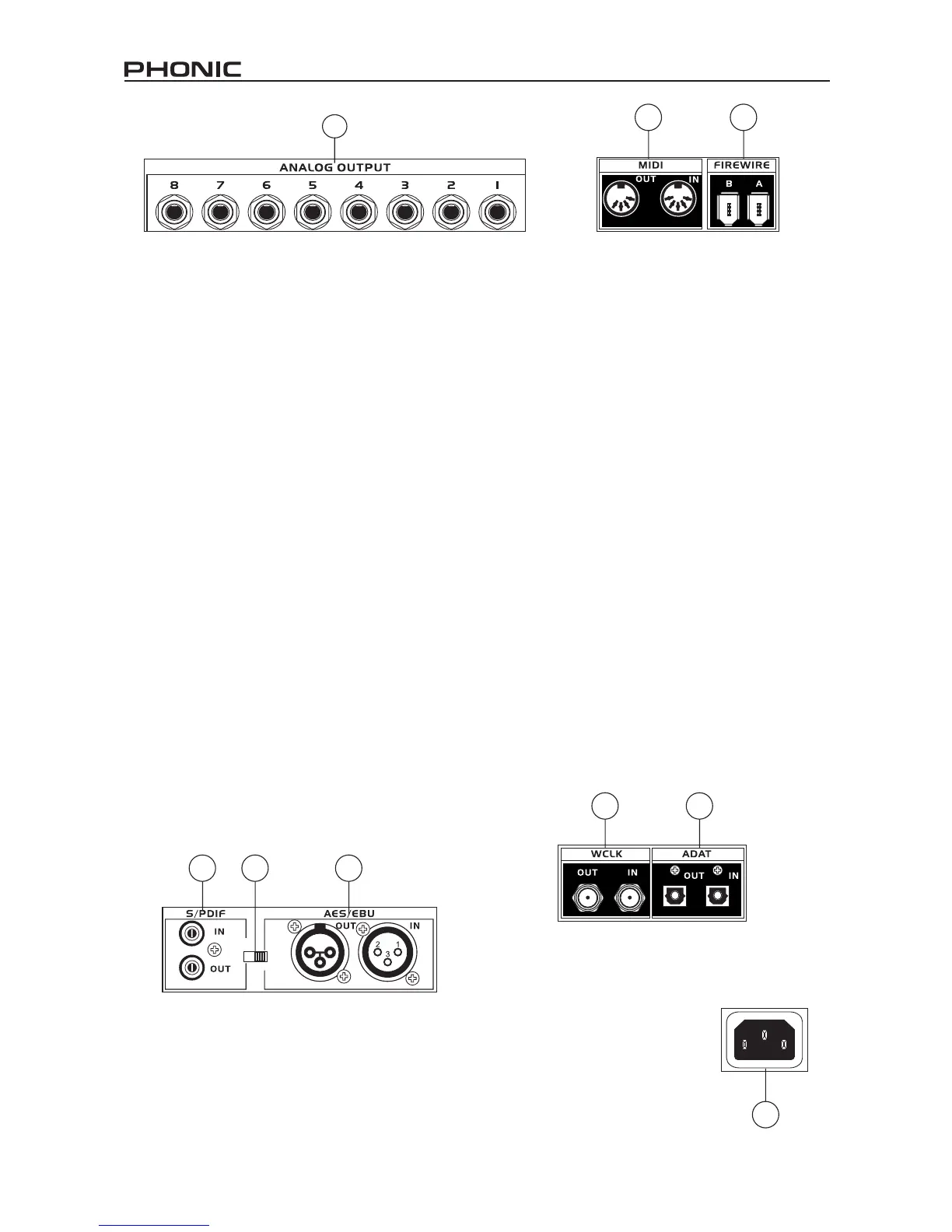
21. Analog Outputs
This are balanced 1/4” TRS line outputs with line
level signal (+4dBu). Users are able to use these
outputs to get a stereo output channel from each
pair of odd and even numbered outputs, or even
a surround mix (5.2 or 6.2). Analog outputs 1 and
2 can be used to send a stereo mix of your analog
inputs or return signal, which is ideal for use with
subwoofers (if making a 5.2 or 6.2 system) or just
for monitoring the signal.
22. AES/EBU In/Out
This is a standard XLR AES/EBU digital interface
that lets you connect your digital AES-enabled
devices to your Firey. The IN or OUT LED on the
front of the Firey will light up when the inputs and
outputs are in use.
23. S/PDIF / AES IN Switch
This switch determines which of these digital inputs
will be used.
24. S/PDIF In/Out
This is a standard RCA S/PDIF Digital Audio
Input/Output that can be used with digital mixers,
DAT recorders, or any external device that uses
the RCA Digital interface format. Please use a
75 ohms coaxial cable with RCA plug when using
S/PDIF. The most common problems or glitches
incorporated with S/PDIF transfer are due to use of
improper analog cables. Users may also use these
inputs for high-speed S/PDIF devices when that
option is selected in the computer's Firey mixer
software.
25. FireWire Ports
This is a digital FireWire (or PC IEEE 1394) interface
that you can use to connect to your computer; use
it to send the audio your Firey receives to your
computer, for recording, editing, mixing, and so
forth, in your favorite Digital Audio Workstation
Software.
You have two FireWire ports at your disposal;
however you need only connect one to your
computer. The second port will allow you to connect
a second Firey 808, allowing twice the number of
inputs!
26. MIDI In/Out
These inputs will allow you to send 16 MIDI channels
through the FireWire interface to your computer,
as well as receive 16 back. These channels will
be present within the Firey Control Software, and
available for use in most MIDI-enabled programs.
27. ADAT In/Out
This is a standard TOSlink ADAT optical interface
that you can use in the same way as you would use
your typical ADAT devices. This input can also be
used for SMUX inputs when this option is selected
in the computer's Firey mixer software.
28. WCLK IN/OUT
These are BNC input/output connectors for
standard Word Clock Syncs, as are used in DVTRs
and other digital devices.
29. AC Power Input and Fuse Holder
Connect the supplied AC power cord to this
connector. The other end should be connected to
a suitable power supply. The power supply’s fuse
is located just below this connector.
If your fuse blows, remove the
fuse holder’s cover and replace
the fuse with another suitable fuse
(as indicated on the fuse-holder’s
cover).
AES IN
S/PDIF
IN
24 2223
26 25
28 27
29
21


 To Next Page