Front Panel Description
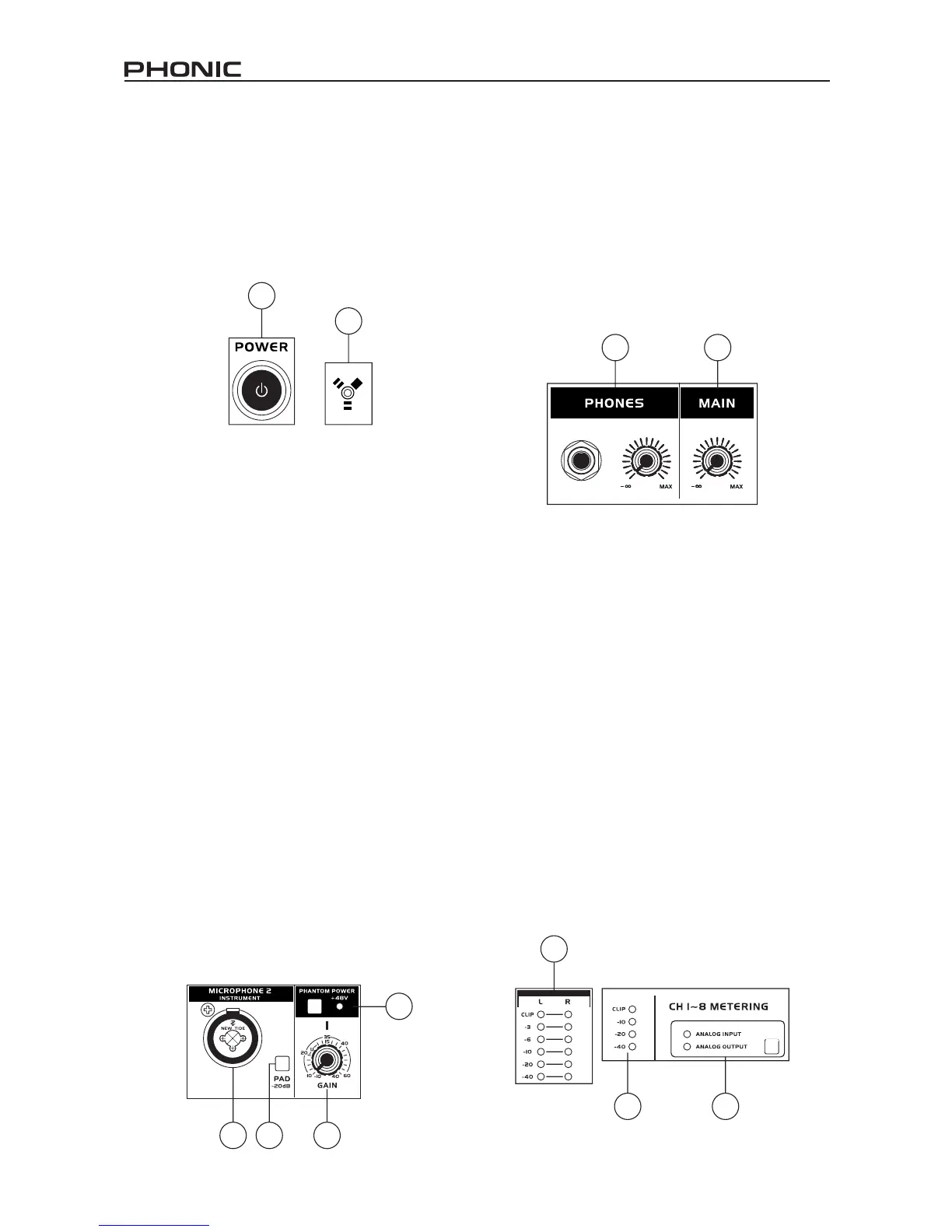
1. Power Button
Push this button in to turn the Firey 808 on. When
the unit is on, the power button will light up.
2. FireWire LED
This LED will light up when a connection to the
computer is established through the FireWire
interface.
3. Channel 1 and 2 Inputs
These two combo jacks allow users to connect
either balanced XLR 3-pin connectors, for dynamic
or condenser microphones, or ¼” TRS phone jacks
for instruments such as electric or bass guitars.
NOTE: When plugging line-level signals into the
combo jacks, disengage the PAD button to lower
the signal level somewhat.
4. Input Gain Controls 1 - 8
Turn these knobs clockwise to increase the
microphone/line input gain for the corresponding
channels. You have 50dB of gain to work with, but
be sure not to adjust it to a level that will make the
input meter hit the “clip” point. A good region to be
in is about -6dB – this will give you a greater signal
level with enough headroom to avoid clipping.
5. PAD selector
This button controls the input sensitivity for channels
1 and 2. Pushing this button in will attenuate the
input signal by 20dB, allowing you to connect a
microphone or instrument to the combo input jack.
6. +48V Phantom Power
Pushing one of these buttons will activate the
+48V phantom power for the corresponding
channel, allowing you to use condenser or ribbon
microphones (or other devices that require +48V)
to work properly. Activation of phantom power will
be accompanied by an illuminated LED. If you are
not sure if your mic uses phantom power, please
refer to the microphone user’s manual.
7. Headphone Output Jack and Gain Control
All the audio signals that are mixed inside the Firey
808 can be monitored with headphones through this
jack. You can also use the corresponding control to
adjust the signal level.
8. Main Level Control
This control adjusts the nal level of the audio sent
through the main left and right outputs, the signal
of which is taken either from the FireWire return
signal or the various analog and digital inputs.
9. LED Level Meter
This stereo 6-segment LED meter displays the
signal level of sum of all 8 analog input channels.
User’s are advised to keep this meter sitting around
the -6dB mark to make the best use of audio possible
without causing any unnecessary clipping.
10. Channel LED Level Meters
The input/output signal levels from analog inputs/
outputs 1 to 8 are shown in these 4-segment LED
meters. Whether these meters display the input or
output level is dependant on the input/output select
button. Users are advised to try and keep their
signal level around the -20, -10 marks, as to avoid
distortion and clipping.
11. Input/Output Select Switch and Indicator
This button determines whether the LED level meter
will display the input or output signal of the Firey
808’s input/output channels. This button is an easy
way to compare input/output levels. Depending
which setting is currently active, an LED will light
up next to the corresponding setting (“analog input”
or “analog output”).
1
2
3
4
6
5
7
8
9
11
10


 To Next Page