POWERPOD408 USER’S MANUAL
GETTING STARTED
1. Before turning on the power, set the Master out put
control to the off position.
2. Always turn the power off before connecting or
disconnecting cables.
3. Cleck the AC Voltage before connecting the AC
plug.
4. Do not obstruct the back panel at all for proper
ventilation.
PHONIC CORPORATIONPage 4
INTRODUCTION / FEATURES / GETTING STARTED
INTRODUCTION
Congratulations on your purchase of the Phon ic
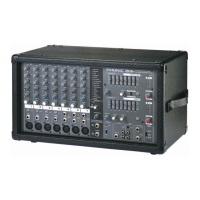
Powerpod408 Powered Mixer. The Powerpod408
is built into a rugged wooden cab i net for heavy-
duty use. In or der to get the best per for mance
from your Powerpod408, please read all of this
safe ty and op er a tion manual be fore op er at ing
the mixers and keep the manual for future refer-
ence.
FEATURES
4 mono input channels for a wide range of Mi-
cro phone and Line level signals from sep a rate
input sockets
Built-in 80 watt power amplifi er (max. output)
Built-in Digital Delay
Super musical 2-band EQ at mono chan-
nels
Record out
Tape in



 To Next Page