LUCAS
TM
2 Chest Compression System –
Instructions for Use
100901-00 Rev A, Valid from CO J2716 © 2014 Jolife AB
15
5 Use LUCAS™
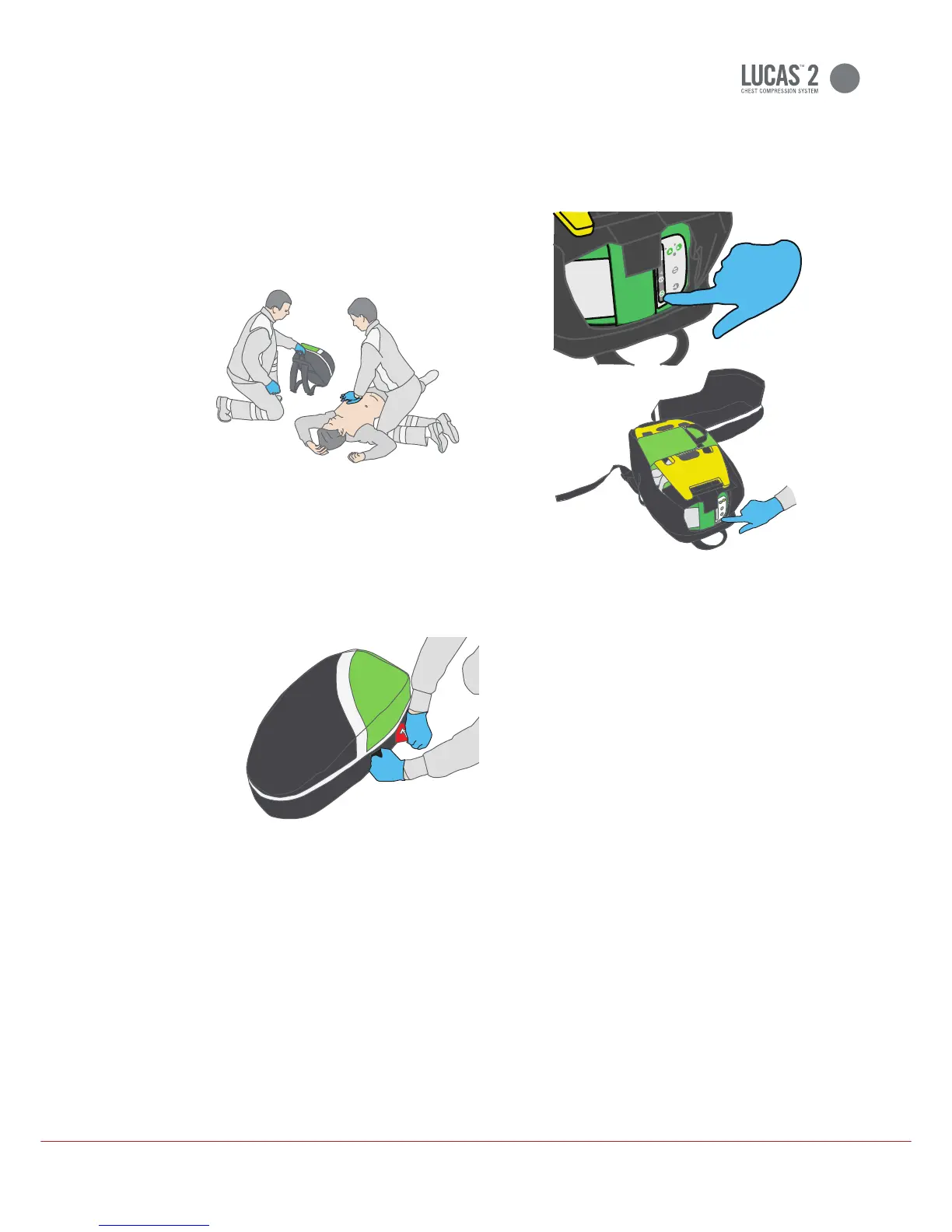
5.1 Arrival at the patient
When you have confirmed a cardiac arrest,
immediately start manual cardiopulmonary
resuscitation (CPR). Continue with a
minimum of interruptions.
1. Position the bag with its top nearest to
you.
2. Put your left hand on the black strap on
the left side and pull the red handle so
that the bag unfolds.
3. Push
on the User Control Panel
for 1 second to power up LUCAS in the
bag and start the self test. The green
LED adjacent to the
key illumi-
nates when LUCAS is ready for use.
: LUCAS powers down automatically
after 5 minutes if you let it stay in the
If there is any malfunction during operation
the red Alarm LED will illuminate and a
high priority alarm will be heard.
For troubleshooting, refer to section 8.3.
Caution - keep Battery installed
The Battery must always be installed for
LUCAS to be able to operate, also when
powered by the external Power Supply.
100901-00 Rev B, Valid from CO J3166 © 2017 Jolife AB












 To Next Page