Page 14
Process Calibrator
mA ∙ V ∙ TC ∙ Ω ∙ RTD ∙ Hz
SOURCE
HI
SET
LO
OFF
MAX
READ
MIN
READ
OVERLOAD
Hz SYNC
Double Click
Menu
Push & Turn
for
Fast Dialing
Push & Hold
to
Store/Step
V
10.00
HI
Voltage Receiver Input
Controller
Transmitter
Computer
Logger
DCS
2
+
-
1
T/C
All mA∙ Read V
-
23
RTD
Ω
RTD
Ω
65
4
+
Source & Read Hz∙ mV
Source V∙ pH
-
+
1
-
V & mV Source
SOURCE mV / V
Choose this function to provide an output from 0.00 to 80.00 mV
or from 0.00 to 10.25 V. The source current is a nominal 24 mA
to provide the driving power to your voltage receivers.
Move the power switch
w to SOURCE then Double Click the
EZ-DIAL knob to get into the Double Click Menu. Turn the knob
to scroll through the settings and press the knob to make your
selection. Select V for the FUNCTION and 10V or 80 mV for the
RANGE.
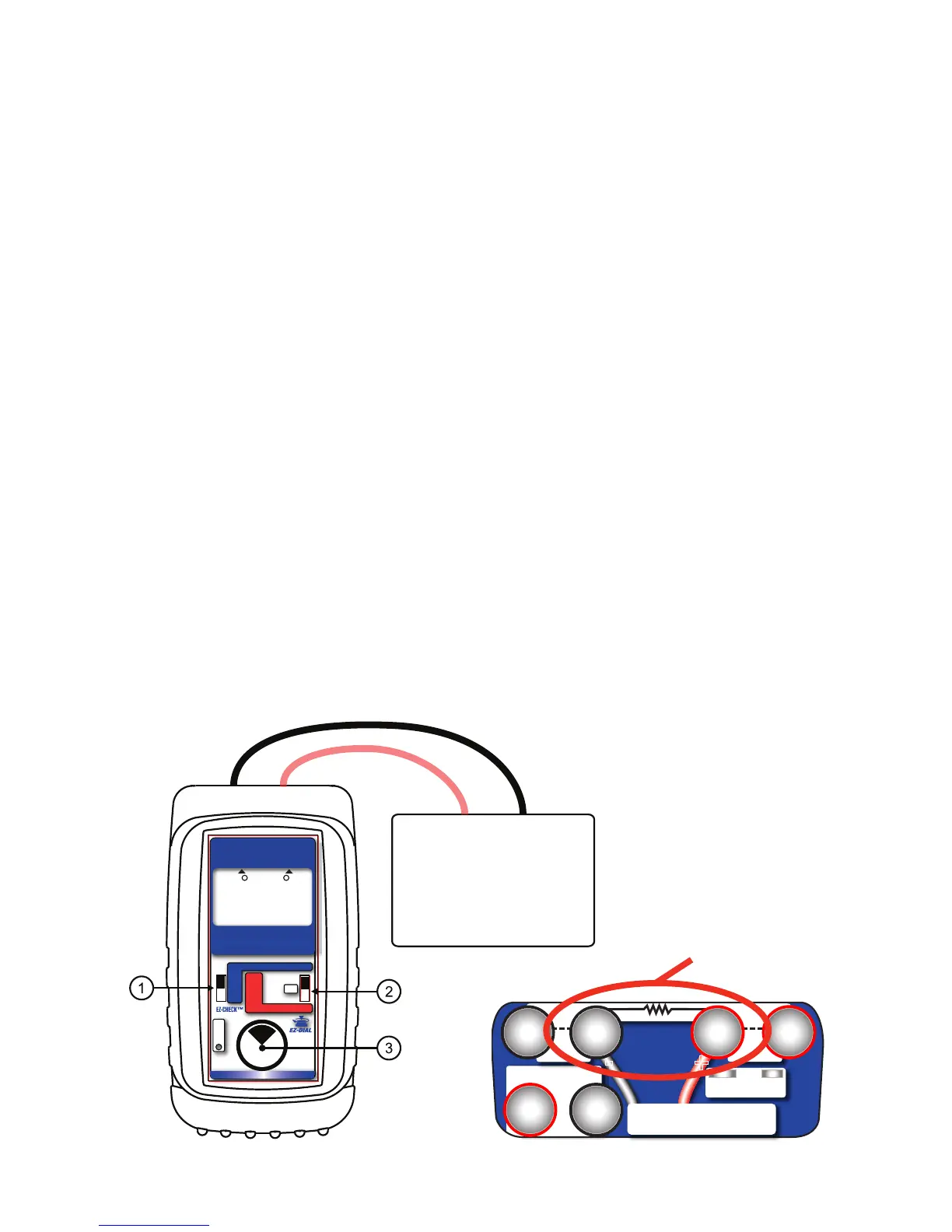
Connect the output leads of the PIECAL 820 to the inputs of the
device being calibrated, making sure to check polarity. Red lead
to the plus (+) input and black lead to the minus (-) input.
Instantly output your SPAN and ZERO output settings by moving
the EZ-CHECK switch between HI and LO. You may also select
any third output setting (such as mid-range) using the SET
position on the EZ-CHECK switch. The output is adjusted in 0.01
mV or V increments by turning the knob
e. Press and turn the
knob for faster dialing with 1.00 mV or V increments.


 To Next Page