EasyManua.ls Logo

Pioneer A-509R - Service Manual

Pioneer A-509R
30 pages
Print Icon
To Next Page IconTo Next Page
Loading...
ORDER NO.
PIONEER CORPORATION 4-1, Meguro 1-chome, Meguro-ku, Tokyo 153-8654, Japan
PIONEER ELECTRONICS SERVICE, INC. P.O. Box 1760, Long Beach, CA 90801-1760, U.S.A.
PIONEER EUROPE N.V. Haven 1087, Keetberglaan 1, 9120 Melsele, Belgium
PIONEER ELECTRONICS ASIACENTRE PTE. LTD. 253 Alexandra Road, #04-01, Singapore 159936
PIONEER CORPORATION 2000
c
RRV2285
1. SAFETY INFORMATION
......................................
2
2. EXPLODED VIEWS AND PARTS LIST
...............
3
3. BLOCK DIAGRAM AND SCHEMATIC DIAGRAM
.....
6
4. PCB CONNECTION DIAGRAM
.........................
16
5. PCB PARTS LIST
...............................................
21
6. ADJUSTMENT
....................................................
24
CONTENTS
7. GENERAL INFORMATION
................................
25
7.1 IC
..................................................................
25
8. PANEL FACILITIES AND SPECIFICATIONS
.......
26
T – ZZK APR. 2000 Printed in Japan
THIS MANUAL IS APPLICABLE TO THE FOLLOWING MODEL(S) AND TYPE(S).
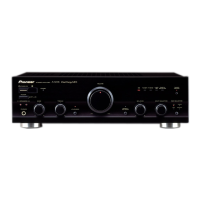
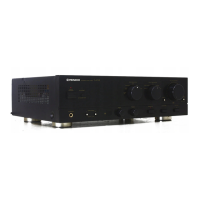
STEREO AMPLIFIER
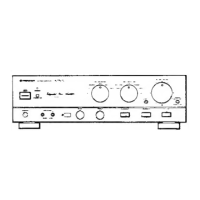
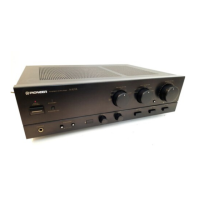
A-509R Direct Energy MOS
STANDBY/ON
STANDBY
OFF ON
POWER
A SPEAKERS B BASS TREBLE
PHONES
LOUDNESS
MIN MAX
VOLUME
DIRECT/
SB MODE
BALANCE INPUT SELECTOR REC SELECTOR
CD TUNER PHONO
TAPE 1/
CD-R/MD
LINE/
SB
TAPE 2
MONITOR
CD TUNER
OFF SOURCE
L R
STEREO AMPLIFIER
A-509R
Type
Model
Power Requirement Remarks
A-509R
MY AC220-230V

Other manuals for Pioneer A-509R

Questions and Answers

  • L
    Lauren GarzaJul 29, 2025
    What to do if my Pioneer A-509R has no sound?
    • R
      Raymond KimJul 29, 2025
      If your Pioneer Amplifier has no sound, check the following: Ensure connecting cords are securely connected to the terminals. Clean any dirty terminals or pin plugs on the connecting cords. Make sure the indicator light is on for your desired input source by turning the INPUT SELECTOR knob. Verify the operation of any other connected components. Finally, ensure that at least one of the SPEAKERS selector buttons is set to ON.
  • S
    Sherri WhitakerAug 2, 2025
    Why is my Pioneer Amplifier remote control not working?
    • G
      Grace SanchezAug 2, 2025
      If the remote control unit for your Pioneer Amplifier isn't working, try these steps: Replace the batteries with new ones. Ensure you are operating the remote within a 7-meter range and at an angle of 30 degrees. Check that the remote control cord is correctly connected. Make sure no fluorescent light is shining directly on the amplifier's front panel remote sensor window. If SB MODE is on, switch it OFF.
  • C
    Crystal WhiteAug 7, 2025
    How to troubleshoot no power on my Pioneer A-509R Amplifier?
    • W
      whitney92Aug 7, 2025
      If your Pioneer Amplifier has no power, ensure the power plug is securely inserted into the inlet and outlet. Check if the amplifier is plugged into another component's power outlet (like a timer) and that the other component is powered on. Also, verify that the STANDBY/ON switch is set to ON (the STANDBY indicator should be off) and that the POWER switch is set to ON.
  • C
    Christina JacksonAug 11, 2025
    How to fix no sound from one speaker on Pioneer A-509R?
    • S
      steven66Aug 11, 2025
      If you're not getting sound from one speaker on your Pioneer Amplifier, first, make sure the connecting cords or speaker cords are securely connected on that side. Next, check the BALANCE control and adjust it to the center position.
  • R
    Robert ArellanoAug 15, 2025
    Why doesn't the volume indicator light up on my Pioneer A-509R Amplifier?
    • B
      bryan54Aug 15, 2025
      If the volume indicator on your Pioneer Amplifier is not lighting up, it might be because SB MODE is set to ON. Try switching it OFF.
  • M
    Mario FullerAug 20, 2025
    What to do if I cannot record tapes with my Pioneer Amplifier?
    • R
      Raymond WadeAug 20, 2025
      If you cannot record tapes with your Pioneer Amplifier, ensure the REC SELECTOR switch is set correctly. Also, check that all connections are properly made. Finally, consult the operating instructions for your cassette deck to ensure it is operating correctly.
  • B
    brittanyclarkAug 23, 2025
    How to troubleshoot tape copying issues on my Pioneer Amplifier?
    • B
      Brett RobersonAug 25, 2025
      If you cannot perform tape copying with your Pioneer Amplifier, ensure that the REC SELECTOR switch is set correctly. Also, consult the operating instructions for your cassette decks to ensure they are operating correctly.

Summary

Safety Information

Safety Precautions

Essential safety checks for technicians and customers.

Product Safety Notice

Identifies critical safety components and their importance.

Exploded Views and Parts List

Packing Details

Lists all components included in the product packaging.

Exterior View

Illustrates the external physical components and their arrangement.

Block Diagrams and Schematics

Block Diagram

Visual overview of the amplifier's functional blocks and signal flow.

Overall Connection Diagram

Shows how different internal assemblies connect to each other.

AF Assembly Schematic

Detailed schematic of the Audio Frequency amplifier section.

Front L and Volume Assembly Schematics

Schematics for front left and volume control circuits.

Front R, AC Primary, Headphone, and Power SW Schematics

Schematics for front right, power supply, and headphone modules.

PCB Connection Diagrams

AF Assembly PCB Layout

Physical layout and component placement for the AF amplifier board.

Front L and Volume Assembly PCB Layouts

PCB layout for front left and volume control assemblies.

Front R Assembly PCB Layout

PCB layout for the front right amplifier board.

AC Primary, Headphone, and Power SW PCB Layouts

PCB layouts for AC primary, headphone, and power switch modules.

PCB Parts List

Adjustments

Idle Current Adjustment

Procedure for setting the amplifier's idle current for optimal performance.

General Information

Integrated Circuit (IC) Details

Information on the functions and pin assignments of key ICs.

Panel Features and Specifications

Front Panel Controls and Indicators

Description of all controls, buttons, and indicators on the front panel.

Rear Panel Connections

Identification and explanation of all input/output terminals on the rear panel.

Remote Control Operation

Guide to operating the amplifier using the included remote control.

Technical Specifications

Detailed technical specifications including power, sensitivity, and frequency response.

Pioneer A-509R Specifications

Amplifier Section IconAmplifier Section
continuous power output (20 Hz to 20 kHz, 8 Ω)45 W + 45 W
continuous power output (20 Hz to 20 kHz, 4 Ω)65 W + 65 W
DIN continuous power output (1 kHz, 8 Ω)60 W + 60 W
DIN continuous power output (1 kHz, 4 Ω)90 W + 90 W
total harmonic distortion (20 Hz to 20 kHz, 20 W, 8 Ω)0.05 %
input sensitivity/impedance (PHONO MM)2.8 mV/50 kΩ
input sensitivity/impedance (CD, TUNER, LINE/SB, TAPE 1/CD-R/MD, TAPE 2 MONITOR)200 mV/50 kΩ
PHONO (MM) overload level (1 kHz, T.H.D. 0.1 %)150 mV
output level/impedance (TAPE 1/CD-R/MD, TAPE 2 MONITOR)200 mV/1 kΩ
frequency response (PHONO MM)20 Hz to 20 kHz ± 0.5 dB
frequency response (CD, TUNER, LINE/SB, TAPE 1/CD-R/MD, TAPE 2 MONITOR)5 Hz to 100 kHz +0-3 dB
tone control (BASS)± 8 dB (100 Hz)
tone control (TREBLE)± 8 dB (10 kHz)
loudness contour (volume control set at – 30 dB position)+ 5 dB (100 Hz)/ + 3 dB (10 kHz)
signal-to-noise ratio (PHONO MM, 5 mV input)86 dB
signal-to-noise ratio (CD, TUNER, LINE/SB, TAPE 1/CD-R/MD, TAPE 2 MONITOR)106 dB
signal-to-noise ratio (DIN, continuous power/ 50 mW, PHONO MM)71 dB/ 67 dB
signal-to-noise ratio (DIN, continuous power/ 50 mW, CD, TUNER, LINE/SB, TAPE 1/CD-R/MD, TAPE 2 MONITOR)95 dB/ 71 dB
Power Supply IconPower Supply
power requirementsAC 220 - 230 V, 50/60 Hz
power consumption160 W
power consumption in standby mode1 W
AC outlet switched100 W
Weight and Dimensions IconWeight and Dimensions
dimensions (including knobs and other protruding parts)420 (W) x 335 (D) x 128 (H) mm
weight (without package)6.9 kg

Related product manuals