Removing the built-in battery (XW-SMA3 only)
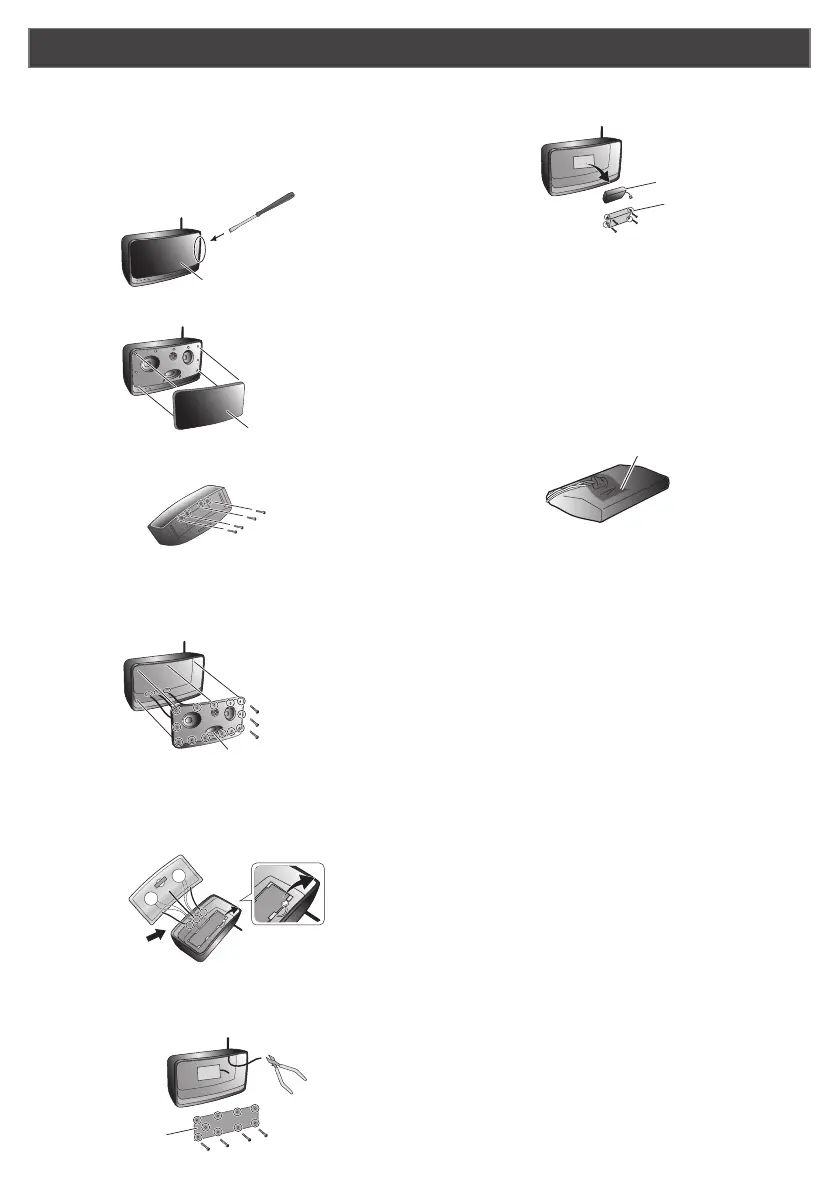
1 Insert the ordinary at-head (−) screwdriver into
the gap between the speaker grille and grille
frame, and press the grille outward to release it.
The speaker grille is press-tted into the grille frame.
Take care not to injure yourself with the tip of the
screwdriver.
on
input
network
input
volume
standby/on
Ordinary flat-head (–)
screwdriver
Speaker grill
2 Remove the speaker grill.
on
input
network
input
volume
standby/on
Speaker grill
3 Remove the 4 screws on the bottom of the unit.
Screws
4 Remove the grille frame.
The grille frame is xed rmly in position. Remove the
13 screws (a) holding the frame, then insert your nger
in the duct (b) and pull out rmly.
on
input
network
input
volume
standby/on
(a)
(b)
5 Remove the connectors.
First remove the 1 connector (a) on the upper inside
surface of the unit. Next, remove the 3 connectors (b)
on the unit’s lower inside surface.
(a)
(b)
6 Remove the MAIN ASSY.
Remove the 9 MAIN ASSY screws, then use the wire
cutters to cut the antenna wire.
Wire cutters
Screws
MAIN ASSY
7 Remove the 4 screws around the battery case
to remove the battery and battery case.
Battery
Battery case
TIPS
・
When removing the lithium-ion battery, do not pull on
the device’s connectors or wires.
・
Insert the tip of the ordinary at-head (−) screwdriver
between the battery and case, and pry out the battery.
Be careful not to scar the battery with the tip of the
screwdriver.
8 Use a piece of adhesive tape to tape the battery
connector to the side of the battery.
TIPS
・
To avoid short circuit accidents, cover the entire
connector with adhesive tape and fasten it to the
battery’s body.
CAUTION
・
Follow the precautions noted below when placing the
depleted lithium-ion battery into the recycling container
of a participating dealer.
- Do not remove any of the battery’s vinyl plastic
covering.
- Do not cut the battery’s wire or connector.
- Do not attempt to disassemble the battery.
- If the battery’s metallic terminal becomes exposed,
cover it entirely in electrical insulating tape.
・
When disposing of the other parts of the device, follow
all local community rules and ordinances regarding
disposal.
<
ARH7151-A
>


 To Previous Page