EasyManua.ls Logo

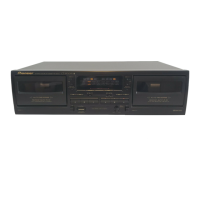
Pioneer CT-W203 - User Manual

Pioneer CT-W203
19 pages
Print Icon
To Next Page IconTo Next Page
Loading...
Operating
Instructions
STEREO
DOUBLE
CASSETTE
DECK
_
CT-W503R
CT-W403R
SPAaE
ae
CT-W203
~~,
aS
canis
ASTER
©
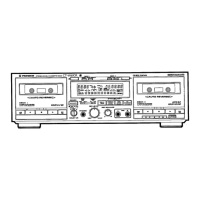
The
above
illustration
shows
CT-W503R.
@
For
the
demo
function,
refer
to
back
cover
of
these
operating
instructions.
Thank
you
for
buying
this
Pioneer
product.
Please
read
through
these
operating
instructions
so
you
will
know
how
to
operate
your
unit
properiy.
After
you
have
finished
reading
the
instructions,
keep
the
manual
in
a
safe
place
for
future
ref-
erence,
In
some
countries
or
regions,
the
shape
of
the
power
plug
and
power
outlet
may
sometimes
differ
from
that
shown
in
the
expla-
natory
drawings.
However,
the
method
of
connecting
and
opera-
ting
the
unit
is
the
same.
WARNING:
to
prevent
FIRE
OR
SHOCK
HAZARD,
DO
NOT
EXPOSE
THIS
APPLIANCE
TO
RAIN
OR
MOISTURE.
IMPORTANT
NOTICE
The
serial
number
for
this
equipment
is
located
on
the
rear
panel.
Please
write
this
serial
number
on
your
enclosed
war-
ranty
card
and
keep
it
in
a
secure
area.
This
is
for
your
security.
:
[For
Canadian
model]
CAUTION:10
prevent
eLectric
SHOCK
DO
NOT
USE
THIS
(POLARIZED)
PLUG
WITH
AN
EXTENSION
CORD,
RECEPTACLE
OR
OTHER
OUTLET
UNLESS
THE
BLADES
CAN
BE
FULLY
INSERTED
TO
PREVENT
‘BLADE
EXPOSURE.
ATTENTION:rour
preveniR
LES
cHocs
ELECTRIQUES
NE
PAS
UTILISER
CETTE FICHE
POLARISEE
AVEC
UN
PROLONGATEUR
UNE
PRISE
DE
COURANT
OU
UNE
AUTRE
SORTIE
DE
COURANT,
SAUF
Si
LES
LAMES
PEUVENT
ETRE
INSEREES
A
FOND
SANS
EN-LAISSER
AUCUNE
PARTIE
A
DECOUVERT.
f
“This
product
complies
with
the
Radio
Interference
require-
|
ments
of
the
EC
(European
Community}
Directive
87/308/EEC.”
The
fightaang
hash
with
arrowhead.
within
an
equilateral
thangie,
1s
intended
to alert
the
uses
tc
the
presence
of
uninsulates
“Gangerous
vottage”’
wnttin
the
product's
enciosure
that
may
De
of
sufficient
magneuge
to
Constitute
a
Sk
Of
Biectne
snotk
te
persons
|
IMPORTANT
1
RISK
OF
ELECTRIC
SHOCK
DD-NOT
OPEN
CAUTION:
TO
PREVENT
THE
RISK
OF
ELECTRIC
SHOCK,
DO
NOT
REMOVE
COVER
{OR
BACK).
NO
USER-
SERVICEABLE
PARTS
INSIDE.
REFER
SERVICING
TO.
QUALIFIED
SERVICE
PERSONNEL.
The
exclamation
point
within
an
equilateral
triangle
1s.
intendec
to
aiert
the
user
to
the
presence
of
mportant
operating
ano
mamtenance
(servicing!
instructions
in
the
literature
accompanying
the
appliance.
YQ
PIONEER’
The
Art
of
Entertainment

Other manuals for Pioneer CT-W203

Question and Answer IconNeed help?

Do you have a question about the Pioneer CT-W203 and is the answer not in the manual?

Summary

IMPORTANT 1: General Safety Precautions

SAFETY INSTRUCTIONS

IMPORTANT 2: Specific Safety Notes

Additional safety advice, including UK usage and general instructions.

OUTDOOR ANTENNA GROUNDING: Safety Measure

Instructions for properly grounding an outdoor antenna system for safety.

FCC COMPLIANCE AND USER INFORMATION

INSTALLATION AND MAINTENANCE

INSTALLATION GUIDELINES

Advice on proper placement, ventilation, and environmental considerations.

MAINTENANCE PROCEDURES

Instructions for cleaning heads, pinch rollers, capstans, and demagnetizing heads.

CASSETTE TAPE HANDLING AND TIPS

HANDLING CASSETTE TAPES

Guidance on checking tapes, using erasure prevention tabs, and tape types.

CASSETTE TAPE USAGE TIPS

Advice on tape selection, storage, and potential issues like jamming.

CONNECTIONS GUIDE

FRONT PANEL FACILITIES OVERVIEW

Power, Eject, and Headphone Jacks

Details power switch, eject buttons, and headphone jack functionality.

Tape Transport and Operation Buttons

Explains playback, stop, search, and mode selection buttons for tape decks.

Recording and Synchronization Functions

Covers recording, mute, CD sync, and synchro copy operations.

Indicators and Special Playback Systems

Describes displays, level meter, FLEX, AUTO-NR, and Dolby NR features.

ADVANCED FRONT PANEL FUNCTIONS

Reverse Mode and Autoplay Settings

Explains reverse mode switch and rewind autoplay functions.

Auto-NR and FLEX Playback Systems

Details automatic noise reduction and FLEX system for enhanced playback.

FUNCTION DISPLAY AND AUDIO PROCESSING

Function Display Indicators Explained

Clarifies the meaning of various front panel indicators and displays.

Dolby NR and HX PRO Features

Explains Dolby noise reduction and HX PRO headroom extension systems.

TAPE TRANSPORT INDICATORS AND COUNTERS

Tape Transport Mode Indicators

Illustrates tape transport modes like playback, rewind, and search.

Tape Counter and Time Counter Modes

Details the functions of tape and time counters, including reset.

PLAYBACK MODES

Single Playback Operation

Instructions for playing a tape on a single deck.

Relay Playback and Blank Skip

How to play tapes across decks and skip unrecorded portions.

PLAYBACK SEQUENCES AND MUSIC SEARCH

Playback Sequence with Reverse Mode

Explains how tape playback order changes with reverse mode settings.

Music Search Functionality

Guide to skipping tracks by detecting blank sections.

RECORDING OPERATIONS

Recording Process and Level Adjustment

Steps for recording audio and setting optimal recording levels.

Recording Mute and Erasure Functions

How to create blanks and erase tapes, including tab checks.

CD DECK SYNCHRO RECORDING

TAPE COPYING

Tape Copying Procedure

Instructions for copying tapes from Deck I to Deck II at normal or high speed.

Copying Notes and Precautions

Important considerations for tape copying, including speed and quality.

TROUBLESHOOTING GUIDE

Power and Cassette Door Issues

Solutions for problems with power, door opening, and closing.

Playback and Recording Problems

Addresses common playback issues and recording failures.

TROUBLESHOOTING: SOUND AND OTHER ISSUES

Poor Sound Quality Solutions

Fixes for unstable sound, no high frequencies, distortion, and noise.

Other System Malfunctions

Troubleshooting for music search, remote control, and CD sync errors.

SPECIFICATIONS

System and Electrical Specifications

Technical details on system type, heads, power, dimensions, and weight.

Subfunctions and Accessories List

Lists available subfunctions and included accessories.

Summary

IMPORTANT 1: General Safety Precautions

SAFETY INSTRUCTIONS

IMPORTANT 2: Specific Safety Notes

Additional safety advice, including UK usage and general instructions.

OUTDOOR ANTENNA GROUNDING: Safety Measure

Instructions for properly grounding an outdoor antenna system for safety.

FCC COMPLIANCE AND USER INFORMATION

INSTALLATION AND MAINTENANCE

INSTALLATION GUIDELINES

Advice on proper placement, ventilation, and environmental considerations.

MAINTENANCE PROCEDURES

Instructions for cleaning heads, pinch rollers, capstans, and demagnetizing heads.

CASSETTE TAPE HANDLING AND TIPS

HANDLING CASSETTE TAPES

Guidance on checking tapes, using erasure prevention tabs, and tape types.

CASSETTE TAPE USAGE TIPS

Advice on tape selection, storage, and potential issues like jamming.

CONNECTIONS GUIDE

FRONT PANEL FACILITIES OVERVIEW

Power, Eject, and Headphone Jacks

Details power switch, eject buttons, and headphone jack functionality.

Tape Transport and Operation Buttons

Explains playback, stop, search, and mode selection buttons for tape decks.

Recording and Synchronization Functions

Covers recording, mute, CD sync, and synchro copy operations.

Indicators and Special Playback Systems

Describes displays, level meter, FLEX, AUTO-NR, and Dolby NR features.

ADVANCED FRONT PANEL FUNCTIONS

Reverse Mode and Autoplay Settings

Explains reverse mode switch and rewind autoplay functions.

Auto-NR and FLEX Playback Systems

Details automatic noise reduction and FLEX system for enhanced playback.

FUNCTION DISPLAY AND AUDIO PROCESSING

Function Display Indicators Explained

Clarifies the meaning of various front panel indicators and displays.

Dolby NR and HX PRO Features

Explains Dolby noise reduction and HX PRO headroom extension systems.

TAPE TRANSPORT INDICATORS AND COUNTERS

Tape Transport Mode Indicators

Illustrates tape transport modes like playback, rewind, and search.

Tape Counter and Time Counter Modes

Details the functions of tape and time counters, including reset.

PLAYBACK MODES

Single Playback Operation

Instructions for playing a tape on a single deck.

Relay Playback and Blank Skip

How to play tapes across decks and skip unrecorded portions.

PLAYBACK SEQUENCES AND MUSIC SEARCH

Playback Sequence with Reverse Mode

Explains how tape playback order changes with reverse mode settings.

Music Search Functionality

Guide to skipping tracks by detecting blank sections.

RECORDING OPERATIONS

Recording Process and Level Adjustment

Steps for recording audio and setting optimal recording levels.

Recording Mute and Erasure Functions

How to create blanks and erase tapes, including tab checks.

CD DECK SYNCHRO RECORDING

TAPE COPYING

Tape Copying Procedure

Instructions for copying tapes from Deck I to Deck II at normal or high speed.

Copying Notes and Precautions

Important considerations for tape copying, including speed and quality.

TROUBLESHOOTING GUIDE

Power and Cassette Door Issues

Solutions for problems with power, door opening, and closing.

Playback and Recording Problems

Addresses common playback issues and recording failures.

TROUBLESHOOTING: SOUND AND OTHER ISSUES

Poor Sound Quality Solutions

Fixes for unstable sound, no high frequencies, distortion, and noise.

Other System Malfunctions

Troubleshooting for music search, remote control, and CD sync errors.

SPECIFICATIONS

System and Electrical Specifications

Technical details on system type, heads, power, dimensions, and weight.

Subfunctions and Accessories List

Lists available subfunctions and included accessories.

Pioneer CT-W203 Specifications

General IconGeneral
Track System4-track, 2-channel stereo
Total Harmonic Distortion0.8%
InputsLine In
TypeDouble Cassette Deck
Heads2 x erase
MotorDC Servo Motor
OutputsLine Out

Related product manuals