
 Need help?
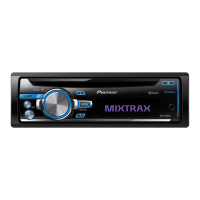
Do you have a question about the Pioneer DEH-X9600BHS and is the answer not in the manual?
Provides crucial pre-operation guidance, including safety and product information.
Highlights essential safety precautions for unit operation, installation, and potential hazards.
Covers fundamental operations like powering on/off, adjusting volume, and selecting audio sources.
Guides users on setting up and playing music wirelessly from a Bluetooth audio device.
Covers initial connection, basic call handling, and hands-free phoning setup.
Explains requirements, limitations, and procedure for using Pandora streaming.
Guides smartphone users on connecting and controlling Pandora playback.
Outlines steps for connecting iPhones and smartphones to use integrated applications.
Covers system-wide settings including language, calendar, clock, and brightness.
Provides detailed instructions and critical safety warnings for connecting the unit's wiring.
Illustrates specific connections for the power cord, speakers, and subwoofer.
Explains procedures for front-mount and rear-mount DIN installation, including securing the unit.
Details attaching the front panel and installing the microphone on the sun visor or steering column.
Lists common symptoms, causes, and actions for unit malfunctions and display issues.
Details common unit errors and specific codes for CD playback issues.
Covers error codes and issues related to USB devices and iPods, including compatibility.
Addresses errors for Bluetooth connection and Pandora service availability.
Provides solutions for SiriusXM antenna, tuner, and signal reception issues.
Lists general specs like power source, dimensions, and audio output power.
Provides technical specs for tuners, USB interface, and Bluetooth module.
Outlines the limited warranty terms, coverage, and exclusions for Pioneer products.
 General
| DIN Size | Single DIN |
|---|---|
| CEA-2006 Compliant | Yes |
| Preamp Outputs | 3 pairs (front, rear, subwoofer) |
| Subwoofer Preamp Output | Yes |
| Preamp Voltage | 4 volts |
| Subwoofer Output | Yes |
| Display Type | LCD |
| Display Colors | 210, 000 colors |
| Wireless Remote | Yes |
| Remote Control | Yes |
| MP3 Playback | Yes |
| WMA Playback | Yes |
| AAC Playback | Yes |
| Tuner | AM/FM |
| AM/FM Tuner | Yes |
| Bluetooth | Yes |
| Built-in Bluetooth | Yes |
| USB Input | Yes |
| AUX Input | Yes |
| Memory Card Slot | No |
| Android Compatibility | Yes |
| Android Control | Yes |
| Apple Compatibility | Yes |
| iPod/iPhone Control | Yes |
| High-Pass Filter | Yes |
| Low-Pass Filter | Yes |
| CD Player | Yes |
| Peak Output | 50 watts |
| Power Output | 50 watts x 4 |
| EQ Bands | 13-band |
| Playback | CD, USB, Bluetooth, AUX |
| SIRIUS or XM | Ready (requires subscription and tuner) |
| USB Port | 1 |
| Steering Wheel Control | Yes |
| Display Color | Variable color |
| Button Color | Variable color |





 To Next Page