EasyManua.ls Logo

Pioneer DEH-X9650BT - User Manual

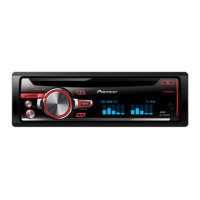
Pioneer DEH-X9650BT
104 pages
Print Icon
To Next Page IconTo Next Page
Loading...
Black plate (1,1)
Owners Manual
戶手
CD RDS RECEIVER
CD RDS
CDRDS
ﯿCD RDS
DEH-X9650BT
DEH-X9650SD
DEH-X8650BT
DEH-X7650SD
<QRD3230-A>1
English

Questions and Answers

  • T
    Tracey BallardAug 18, 2025
    Why won't my Bluetooth device pair with my Pioneer DEH-X9650BT?
    • E
      Erik ColeAug 18, 2025
      If the Bluetooth device won't pair with the Pioneer Car Receiver, it might be due to registration issues. Try deleting the registered information for the receiver on the Bluetooth device and vice versa, if it exists. Then, attempt the pairing process again.
  • A
    amberwhiteAug 20, 2025
    What to do if my Pioneer Car Receiver says there are no songs?
    • C
      Cheryl MartinezAug 20, 2025
      If your Pioneer Car Receiver says there are no songs, transfer audio files to the USB storage device and then connect it.
  • D
    daniel80Aug 23, 2025
    What to do if a call on my Pioneer DEH-X9650BT Car Receiver was immediately terminated?
    • E
      Eric WelchAug 23, 2025
      If a call made with a Bluetooth-connected phone was immediately terminated, the communication between the Pioneer Car Receiver and the phone might not have ended correctly. Reconnect the Bluetooth connection between the receiver and the phone.
  • K
    Kimberly HayesAug 26, 2025
    What to do if my Pioneer DEH-X9650BT says no USB or iPod is connected?
    • J
      Jennifer HallAug 26, 2025
      If the Pioneer Car Receiver displays this message, connect a compatible USB storage device or iPod.
  • A
    Andrew GillAug 27, 2025
    What to do if my Pioneer Car Receiver says the USB storage device has security enabled?
    • N
      Natalie WilsonAug 28, 2025
      If the connected USB storage device has security enabled, try switching the display or playing another track or file on your Pioneer Car Receiver.
  • T
    Teresa WatsonAug 29, 2025
    What to do if my Pioneer Car Receiver shows an electrical or mechanical error?
    • E
      Erin JohnsonAug 30, 2025
      If there is an electrical or mechanical error, turn the ignition switch off and then back on. Alternatively, switch to a different source and then back to the CD player on your Pioneer Car Receiver.
  • S
    Shawn SmithSep 1, 2025
    What to do if my Pioneer DEH-X9650BT Car Receiver disc is scratched?
    • L
      Laura StephensonSep 1, 2025
      If the disc is scratched, replace the disc in your Pioneer Car Receiver.
  • G
    Gregory BradleySep 3, 2025
    What to do if my Pioneer DEH-X9650BT says unsupported CD format?
    • M
      Megan HubbardSep 3, 2025
      If the CD format is unsupported, replace the disc in your Pioneer Car Receiver.
  • Q
    qchristensenSep 6, 2025
    What to do if my Pioneer DEH-X9650BT disc contains DRM protected files?
    • R
      randallfrankSep 6, 2025
      If the inserted disc contains DRM protected files, replace the disc in your Pioneer Car Receiver.
  • E
    Eric HullSep 8, 2025
    What to do if my Pioneer DEH-X9650BT Car Receiver inserted disc is blank?
    • T
      Terri WilsonSep 8, 2025
      If the inserted disc is blank, replace the disc in your Pioneer Car Receiver.

Pioneer DEH-X9650BT Specifications

General IconGeneral
BrandPioneer
ModelDEH-X9650BT
CategoryCar Receiver
LanguageEnglish

Related product manuals