EasyManua.ls Logo

Pioneer PL-X430 - Page 11

Pioneer PL-X430
28 pages
Print Icon
To Next Page IconTo Next Page
To Previous Page IconTo Previous Page
Loading...
MAINTENANCE
STYLUS
REPLACEMENT
PROCEDURE
Please
carry
out
these
operations
after
setting
the
stereo
amplifier
to
minimum
volume.
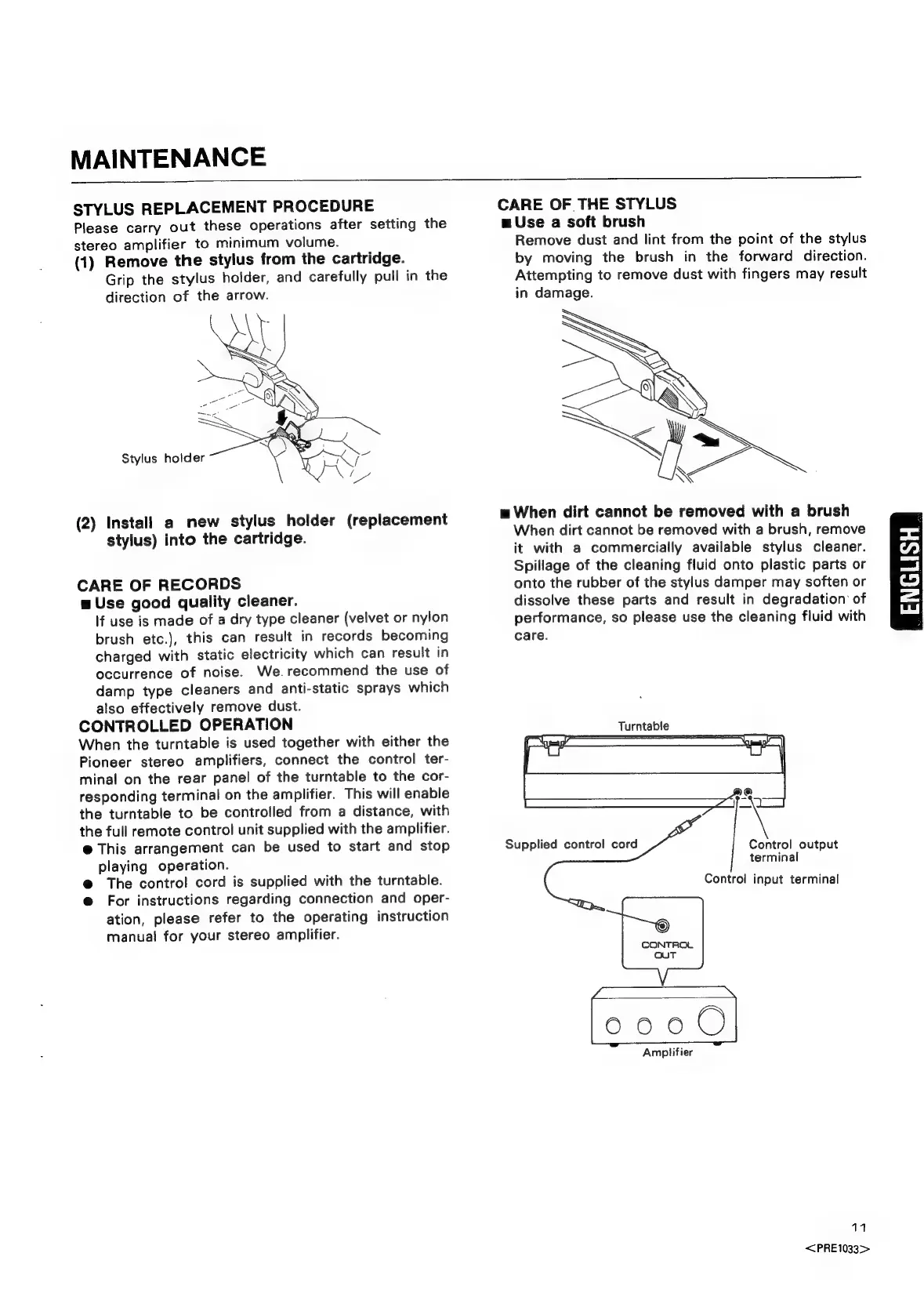
(1)
Remove
the
stylus
from
the
cartridge.
Grip
the
stylus
holder,
and
carefully
pull
in
the
direction
of
the
arrow.
(2)
Install
a
new
stylus
holder
(replacement
stylus)
into
the
cartridge.
CARE
OF
RECORDS
w
Use
good
quality
cleaner.
If
use
is
made
of
a
dry
type
cleaner
(velvet
or
nylon
brush
etc.),
this
can
result
in
records
becoming
charged
with
static
electricity
which
can
result
in
occurrence
of
noise.
We.recommend
the
use
of
damp
type
cleaners
and
anti-static
sprays
which
also
effectively
remove
dust.
CONTROLLED
OPERATION
When
the
turntable
is
used
together
with
either
the
Pioneer
stereo
amplifiers,
connect
the
control
ter-
minal
on the
rear
panel
of
the
turntable
to
the
cor-
responding
terminal
on
the
amplifier.
This
will
enable
the
turntable
to
be
controlled
from
a
distance,
with
the
full
remote
control
unit
supplied
with
the
amplifier.
@
This
arrangement
can
be
used
to
start
and
stop
playing
operation.
@
The
control
cord
is
supplied
with
the
turntable.
@
For
instructions
regarding
connection
and
oper-
ation,
please
refer
to
the
operating
instruction
manual
for
your
stereo
amplifier.
CARE
OF
THE
STYLUS
mu
Use
a
soft
brush
Remove
dust
and
lint
from
the
point
of
the
stylus
by
moving
the
brush
in
the
forward
direction.
Attempting
to
remove
dust
with
fingers
may
result
in
damage.
mu
When
dirt
cannot
be
removed
with
a
brush
When
dirt
cannot
be
removed
with
a
brush,
remove
it
with
a
commercially
available
stylus
cleaner.
Spillage
of
the
cleaning
fluid
onto
plastic
parts
or
onto
the
rubber
of
the
stylus
damper
may
soften
or
dissolve
these
parts
and
result
in
degradation
of
performance,
so
please
use
the
cleaning
fluid
with
care.
Turntable
Supplied
control
cord
Control
output
terminal
Control
input
terminal
©
CONTROL
OUT
0000
Amplifier
11
<PRE1033>