EasyManua.ls Logo

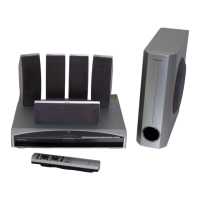
Pioneer XV-DV370 - User Manual

Pioneer XV-DV370
141 pages
Print Icon
To Next Page IconTo Next Page
Loading...
Operating Instructions
| Mode d’emploi | Bedienungsanleitung
Discover the benefits of registering your product online at
http://www.pioneer.co.uk
(or http://www.pioneer.eu).
Découvrez les nombreux avantages offerts en enregistrant votre
produit en ligne maintenant sur http://www.pioneer.fr
(ou http://www.pioneer.eu).
Bitte nutzen Sie die Möglichkeit zur Registrierung Ihres Produktes
unter http://www.pioneer.de (oder http://www.pioneer.eu)
DCS-363
XV-DV363
DVD/CD Receiver
Récepteur-lecteur DVD/CD
DVD/CD Receiver
S-DV363
Speaker System
Système Acoustique
Lautsprechersystem
DCS-370
XV-DV370
DVD/CD Receiver
Récepteur-lecteur DVD/CD
DVD/CD Receiver
S-DV370T
S-DV370SW
Speaker System
Système Acoustique
Lautsprechersystem
cover & anki.fm 1 ページ 2007年1月26日 金曜日 午前11時0分


Table of Contents

Other manuals for Pioneer XV-DV370

Questions and Answers

  • J
    jennifer47Aug 12, 2025
    What to do if the opening screen is not displayed on Pioneer XV-DV370 Receiver?
    • Y
      ystewartAug 12, 2025
      If the opening screen is not displayed on your Pioneer Receiver, check the video signal path between DVD IC (DVD MAIN Assy IC201) and video-out terminal (see the block diagram).
  • J
    jcolemanAug 20, 2025
    What to do if there is picture disturbance during Pioneer Receiver playback?
    • M
      Morgan AyalaAug 20, 2025
      If you experience picture disturbance such as block noise or freezing during playback on your Pioneer Receiver, check the disc for scratches or dirt. Also, verify that the disc format is compatible. You can also check the video signals. Composite video signal (IC401-pin 25) S video signal (IC401-pin 21, pin 26) RGB video signal (IC401-pin 16, pin 18, pin 20).
  • D
    Douglas WardAug 25, 2025
    What to do if playback stops on Pioneer XV-DV370 Receiver?
    • S
      Stacy RothAug 25, 2025
      If playback stops on your Pioneer Receiver, check if the 650-nm LD has deteriorated. If the voltage at each end of R322 and R325 on the DVD MAIN Assy is 0.4 V or more, the 650-nm LD has definitely deteriorated. Also, check if the 780-nm LD has deteriorated. If the voltage at each end of R321 and R326 on the DVD MAIN Assy is 0.4 V or more, the 780-nm LD has definitely deteriorated. Check for any abnormality in FG waveform (IC201-pin 50). Ensure the disc is free of scratches or dirt.
  • P
    Pamela SullivanAug 27, 2025
    How to fix a Pioneer XV-DV370 tray that won't open?
    • L
      Larry ClarkAug 27, 2025
      If the tray of your Pioneer Receiver won't open, check if the voltage of CN104-pin 3 and pin 5 on the DVD MAIN Assy changes normally. Pin 3 (SW2(TRIN)): Tray is fully closed: "L" Pin 5 (SW1(TROUT)): Tray is fully opened: "L". Also, check if the signal is input into IC101-pin 11 (TROPEN) on the DVD MAIN Assy. At open: 3.3V, At close: 0V. Check if the signals are output from IC101-pin 1 and pin 2 (CN103-pin 1 and pin 2) on the DVD MAIN Assy. Pin 2: Approx. 6V during opening tray approx. 0V during closing tray. Pin 1: Approx. 0V during opening tray approx. 6V during closing tray. Verify that wires of CN104 and CN103 on the DVD MAIN Assy are not disconnected or damaged. Check whether the voltage of CN102-pin 1 on the DVD MAIN Assy changes to 0V by pressing the Inside switch.
  • A
    Audrey RamirezAug 31, 2025
    How to troubleshoot Pioneer XV-DV370 Receiver when playback is impossible due to no focusing?
    • D
      Dawn DouglasAug 31, 2025
      If playback is impossible on your Pioneer Receiver due to no focusing, check if the signals are output from IC101-pin 3 (FOCS_DRV) and pin 4 (FOCS_RTN) on the DVD MAIN Assy. Verify that the 650-nm LD emits light, the pickup lens moves up/down, and the actuator spring bends. Inspect plastic parts for damage, ensure the shaft is attached, and check if the turntable is detached or tilted. Verify that the flexible cable of CN101 on the DVD MAIN Assy is neither disconnected nor damaged. Check if signal output from IC201-pin 42 (FOSO) on the DVD MAIN Assy. (Device control of about 1.4 V is output usually. It is fluctuated by about 250 mV with focus up / down.)
  • S
    Shane MoralesSep 4, 2025
    What to do if the spindle does not turn on Pioneer XV-DV370 Receiver?
    • V
      vsmithSep 4, 2025
      If the spindle does not turn on your Pioneer Receiver, check if the signals are output from IC101-pin 30 (W), pin 33 (V) and pin 35 (U) on the DVD MAIN Assy. Check if pin 26 (STBY) is fixed LOW (pin 26 is High at playback: 3V). Also, verify that there are no detached parts from the spindle motor or any foreign objects lodged in it. Ensure that wires of CN102 on the DVD MAIN Assy are not disconnected or damaged. Check if signal output from IC201-pin 37 (DMSO) on the DVD MAIN Assy.
  • J
    Jeffrey AndersonNov 15, 2025
    What to do if opening screen is not displayed on Pioneer XV-DV370 Receiver, but the FL display lights?
    • N
      nicole01Nov 15, 2025
      If the opening screen is not displayed, but the FL display lights on your Pioneer Receiver, check if the signals are output from IC201-pin 97 (MDATA) and pin 98 (SCLK) on the DVD MAIN Assy (in the range of 0-3V). Also, check if the signals are input into IC5501-pin 50 (MDATA) and pin 51 (SCLK) on the DVD MAIN Assy (in the range of 0-3V). Check that the following voltage are output : Q1302-collector on the DVD MAIN Assy: 5V. Verify if a resonator (X201: 27MHz) on the DVD MAIN Assy is oscillating. Check if a signal output from IC203-pin 28 (PRD#) on the DVD MAIN Assy? (Is a signal fluctuating for several hundred mS after the power is turned on ?). Check if a signal is input into IC5501-pin 67 (DVD ACK) on the DVD MAIN Assy ? (Is a signal fluctuating ?) -> Communication with FL Control IC. Ch...

Summary

Safety and Installation Precautions

General Warnings

Safety warnings regarding water, fire hazards, and proper ventilation for the unit.

Operational Guidelines and Warnings

Operating Environment and Power Cord Handling

Recommendations for installation environment, ventilation, and safe handling of the power cord.

Controls and Displays

Front Panel Controls

Description and function of buttons and indicators on the unit's front panel.

Remote Control Layout

Detailed explanation of the remote control buttons and their functions.

Remote Control Functions

Explanation of various remote control buttons for playback, sound, and system settings.

Front Panel Display Indicators

Explanation of symbols and indicators shown on the unit's front panel display.

Getting Started

Home Theater Sound Setup

Guide to setting up speakers for optimal surround sound and adjusting channel levels.

Playing Discs and Basic Controls

Instructions for loading discs and using basic playback controls on the remote.

Disc Playback Features

USB Playback

Using the USB Interface and Basic Controls

Connecting USB devices and using basic playback controls for audio and JPEG files.

Initial Settings Menu

Video Output Settings

Configuring video output options like TV screen aspect ratio and HDMI resolution.

Troubleshooting

General Troubleshooting

Common problems and their solutions, including power issues, sound output, and remote control.

DVD;CD;Video CD Playback Issues

Solutions for common playback problems with DVD, CD, and Video CD discs.

Tuner, USB, and HDMI Connection Issues

Troubleshooting steps for tuner reception, USB device recognition, and HDMI connectivity.

Error Messages and System Reset

List of error messages, how to reset the system, and set the key lock feature.

Pioneer XV-DV370 Specifications

General IconGeneral
BrandPioneer
ModelXV-DV370
CategoryReceiver
LanguageEnglish

Related product manuals