Daily Schedule to Arm or Disarm Alarm System
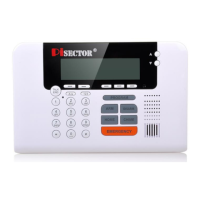
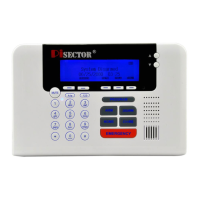
Press PROGRAM key on console. Enter the default password 888 888. Use scroll key to select Daily Schedule.
Enable If you want to enable this function, first select Disable then press Enter, set NO, then back and select
Enable, you can set the Arm time for your departure, and Disarm Time for when you arrive Home, then the
system will Arm/Disarm automatically on schedule, so that you will never forget to arm or disarm system.
Disable If you want to disable this function, select Disable then press Enter and check Yes. Default is set to
disable as YES.
System Settings
Press PROGRAM key on console. Enter the default password 888 888. Use scroll key to select
System Settings, you will see below list.
Password Select Password then press Enter you will see Old Password 888888 then press Enter and input 6
digits(not letter or icons) new password press Enter and input same password to confirm your new password,
then press Save
Arm Delay Time You can change the Delay time to allow you to have enough time to leave the house.
Defaultis set at 60 seconds. The Delay Time for entire system.
Alarm Delay Time You can change the Delay time that allows you to open the door to disarm system when
you return home. Default is set to 60 seconds.( This Alarm Delay time only works when you set a individual
sensor as Delay Zone. Otherwise it does not work. E.g. Disarm system press PROGRAM key then input
password, highlight Sensor press Enter, highlight Edit press Enter, than highlight Manual Search and
choose the sensor name then press enter, use scroll key find Delay Zone then press Enter and check Yes,
save it. )
Landline Cut Warning If you set Yes, during System Arm or Home Status, if an intruder cuts the landline or
unplugs the landline jack, the system will immediately go off and sirens will start alarming. Default is No
Ring Time Before Answer Allows you to change the ring times for answering your regular homephone, e.g.
if you set it as 5 rings, during 5 rings you can answer your regular home phone, after 5 rings if no one
answer the regular home phone, the alarm system will answer it. You will hear a prompt "Enter your
Password" then you can enter your password 888 888 to control the System. Press 1 to Arm System, Press
2 to Disarm System, Press 3 to listen in. Press # to end.
Door/Window Open Reminder If you set it Yes, you are not able to arm your system normally when doors
or windows are open. It will remind you which zone door or window is open. You must close it, unless you
arm the system by pressing button and holding for 3 seconds to force system to be armed. The default is
set toYes.
Date/Time Allows you to manually set your local date and time
Language English
Factory Reset<Restore Defaults>Allows you to set all functions as default without deleting your sensors and
sirens so you do not need to re-program again. If you choose<Format System>, it will go back to factory
default and format all your settings including your sensors and sirens. Then you will need to re-program all
sensors, sirens and remotes to the console again. Be aware of this function.


 To Next Page
 Loading...