4
Trouble-
Shooting
Before
Using
Initial
Settings
Connecting
The Wires
Installing
The Product
How to
Operate
Features
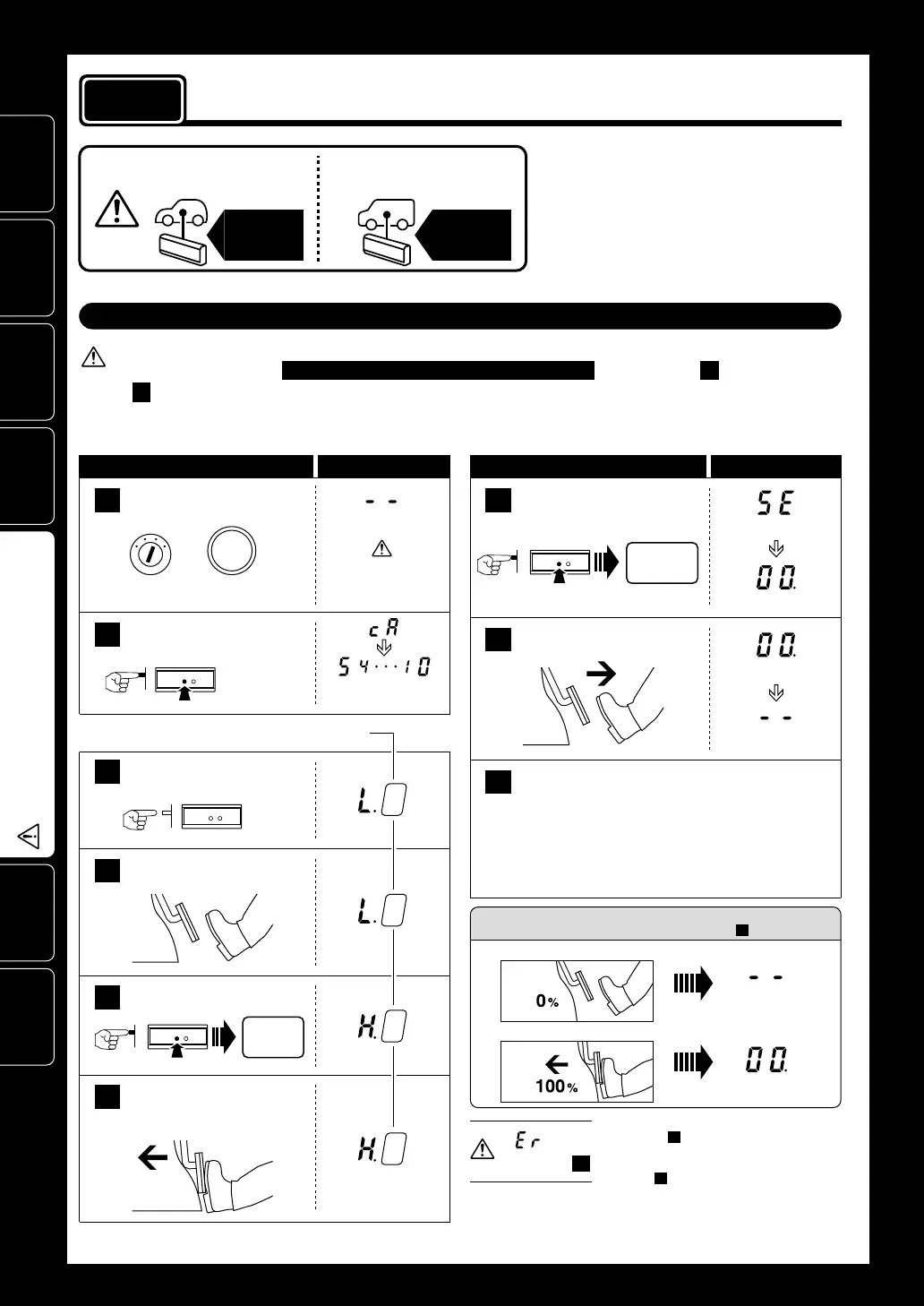
Make sure to carry out
this operation.
Press until
“0” appears
Release
START
ENGINE
STOP
ON
Press
Press
Do not press in on pedal
Press down on pedal
Check the Settings
(100%)
(Normal Mode)
1
2
Controller Display Area
Operational Procedure
7
With the accelerator at 100%,
press the
SET
switch.
8
Once the display changes to
00. release the accelerator.
Press the SET switch
until “0” is displayed.
3
When “0” appears
release the SET switch.
4
Pedal is not pressed down.
(Release the accelerator to 0%)
6
Pedal is completely
pressed down.
(Press in on the accelerator to 100%)
Count down from 5 to 0
after the “
cA
” blinking.
0%
Controller Display Area
Operational Procedure
Set to
100
%
100%
The values shown in the display will
vary depending on the type of car.
(SET)
(100%)
(100%)
(Normal Mode)
9
[Making the Settings]
Setting Completed
If the device is re-installed into a different vehicle, make
sure to carry out these settings again.
After having finished settings and the battery or
wires have been disconnected it is not necessary
to carry out “Initial Settings” .
Turn the ignition ON.
(engine not running)
(Normal Mode)
Without braking,
press down twice
or
If
--
does not appear,
press the MODE switch
until
--
appears.
5
Press the SET switch.
Set to
0
%
Before making the “Initial Settings”
procedure
3
Initial Settings
(
Degree of Acceleration Setting
)
Make sure to carry out these settings.
1. Make settings only after having completed all wiring (connector installation).
2. Make settings with the ignition in the ON position
(
engine not running
)
and the gear in P
(
Parking
)
or
N
(
Neutral
)
.
When installing for
the first time
When installing into a
different car
Initial
Settings
Initial
Settings
• This operation sets the car’s accelerator
characteristics into the controller unit.
• If the “Initial Settings” are not carried out,
the unit will remain in NORMAL Mode even
if the Mode is switched.
• If this settings have been improperly made
a Check Engine Light may go on.
Note: If the display is incorrect, start
again from step above.
2
7
7
If is
displayed at
If after the “Er” is shown the display returns to
as shown in 4 ( “L.1” or so on), it means that
the degree of acceleration settings have not
been confirmed properly. Re-do the settings
from step 4 .


 To Next Page