EasyManua.ls Logo

Pivot 3-drive PRO - User Manual

Pivot 3-drive PRO
8 pages
Print Icon
To Next Page IconTo Next Page
Loading...
1
Trouble-
Shooting
Before
Using
Initial
Settings
Connecting
The Wires
Installing
The Product
How to
Operate
Features
3-drive PRO
P
r
E
POWER
RESPONSE
ECO
3-drive PRO
P
r
E
POWER
RESPONSE
ECO
3
-
drive
PRO
User’s Manual
(This Book)
Please check the contents of the packageContents
Controller
[65×26×13.5(D) mm]
Unit
[50×22×70(D) mm]
Zip Ties
(Large) × 2
(Small) × 2
Throttle Controller
Part Names
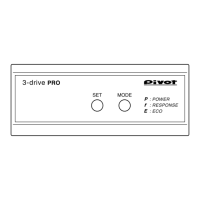
Display
1
SET Switch
2
MODE Switch
3
Switching Modes
Mode Display
Degree of
Acceleration Display
(5–100%)
Display Each Settings
Double-sided Tapes
[45×14mm] × 2
[25×35mm] × 1
L-shaped Fastener
(3DP As of July, 2018 No.2)
Thank you for purchasing PIVOT product.
Please read this manual carefully and keep it for future reference.
USER’S MANUAL
Product
If this product is given to another
user, make sure to include this
User’s Manual.
Product Number :
3DP
()
Before Using / Contents ……………………………………… 1
Part Names …………………………………………………… 1
Features………………………………………………………… 2
procedure 1
Connecting The Wires ………………………… 3
procedure 2
Installing The Product ………………………… 3
procedure 3
Initial Settings (Degree of Acceleration Setting)…… 4
How to Operate………………………………………………… 5
Display Items…………………………………………………… 6
Troubleshooting ……………………………………………… 7
For Adjusting the Change
Ratio for each Mode
Initial Settings
Turning off the Display
Note: This product is interlocked
with the ECU (engine computer)
power. Depending on the model of
car, the display may remain on for
up to 15 minutes even after the
ignition has been turned off; this is
normal.
After installation, make sure to carry out “Initial Settings .
After having installed this product, make sure to make settings for your car’s special characteristics by carrying out the
“Initial Settings” on Page 4. If the “Initial Settings” are not carried out, a Check Engine Light may go on. Also, the unit
will remain in NORMAL Mode even if the Mode is switched.
Worried about Installation?
If you are worried about carrying out wiring or other installation procedures please consult your dealer.
Do not install this product if the ECU is not the original one or when a sub-ECU from other companies is being used.
Only use with Manufacturer’ s Original ECU.
When uninstalling the product, make sure to return it to NORMAL Mode before carrying out any work. Reconnecting this
product in a different mode may cause the Check Engine Light to come on.
Set to NORMAL Mode upon Removal of Product.
Under no circumstances should modifications or changes be made to this product. Doing so may cause damage not only to the
product, but to the car and the operation of the car in which it is installed.
Modifying this Product is Forbidden.
Only use 3-drive Specialized Harness.
Using another type of harness will cause troubles and failure; use only the 3-drive specialized harness.

Questions and Answers

  • A
    anna84Jul 27, 2025
    What to do if a Check Engine Light comes on after installing the Pivot Controller?
    • T
      Timothy GreenJul 28, 2025
      If a check engine light appears after installing the Pivot Controller, it could be due to several reasons. First, ensure that the accelerator connector or specialized harness wasn't disconnected while the ignition was in the ON position, or within 15 minutes of turning it OFF. If so, reconnect the connector. Also, verify that the initial settings were properly configured. If not, redo the initial settings. Finally, if the product was in a mode other than NORMAL when removed from a car and installed in a different car, return it to NORMAL mode and then perform the initial settings.
  • C
    Christina SmithAug 2, 2025
    Why won't the Mode and/or setting changes save on my Pivot 3-drive PRO Controller?
    • C
      Curtis MccallAug 3, 2025
      If the Mode and/or the setting of change ratios can't be saved on your Pivot Controller, it's likely because the ignition was turned to the OFF position too quickly after adjusting the settings. To resolve this, after setting the change ratios or changing the Mode, wait at least two seconds before turning the ignition OFF.
  • D
    Dr. Amber WilliamsAug 8, 2025
    How to fix a Pivot 3-drive PRO Controller when the display won't light up?
    • J
      Jamie SandersAug 8, 2025
      If the ignition is ON, but the Main Unit display of your Pivot Controller doesn't light up, or if the display turns OFF during use, the issue might be due to a poor connection. Check the 5-pin and 6-pin connectors to ensure they are properly wired and connected. Also, check the Specialized Harness for poor connections or if the incorrect Specialized Harness is being used.
  • S
    Shawn DiazAug 15, 2025
    What to do if the Mode change on my Pivot 3-drive PRO is not noticeable?
    • J
      Julie SmithAug 15, 2025
      If you don't feel any changes even after changing the Mode on your Pivot Controller, it's likely that the initial settings were not properly carried out. Please, make the initial settings.
  • P
    Penny DavisAug 21, 2025
    Why does 'Er an' appear when making initial settings on my Pivot 3-drive PRO?
    • A
      Aaron TaylorAug 21, 2025
      If “Er an” appears in the display while making initial settings on your Pivot Controller, it indicates that the initial settings were not properly carried out. Please, make the initial settings.

Summary

Part Names and Components

Display Elements

Identifies the Mode Display and Acceleration Display on the controller unit.

Control Switches

Details the SET and MODE switches for adjusting settings and modes.

Display Behavior After Ignition Off

Explains the normal display behavior after the car ignition is turned off.

Features of the 3-drive PRO

Installation and Compatibility

Highlights no OBD connection, genuine-style installation, and euro car compatibility.

Performance and Control

Covers 17-step adjustment, 4 modes, and precise accelerator monitoring.

Safety Systems

Includes malfunction prevention and automatic return to NORMAL mode.

Procedure 1: Connecting The Wires

Basic Wiring Diagram

Illustrates the connection between controller, unit, specialized harness, and accelerator.

Important Disconnection Procedure

Emphasizes waiting 15 minutes after ignition off before disconnecting the accelerator connector.

Procedure 2: Installing The Product

Controller Installation Methods

Details options for mounting the controller using tape or L-shaped fasteners.

Unit Cable Management

Guidance on securing cables to prevent damage and ensure proper connection.

Unit Mounting Locations

Recommendations for installing the unit in protected areas away from water.

Procedure 3: Initial Settings

Importance of Initial Settings

Explains that settings configure car characteristics and prevent Check Engine Light.

Prerequisites for Settings

Specifies conditions before starting: wiring complete, ignition ON, car in Park/Neutral.

Step-by-Step Setting Guide

Detailed instructions for setting accelerator pedal positions (0% and 100%).

Verifying Initial Settings

Instructions on how to check if the initial settings were applied correctly.

How to Operate

Switching Operating Modes

Explains how to cycle through NORMAL, ECO, RESPONSE, and POWER modes.

Adjusting Change Ratio

Details how to adjust the sensitivity level within each selected mode.

Mode Functionality Overview

Summarizes the effects of POWER, RESPONSE, and ECO modes on acceleration and fuel efficiency.

Degree of Acceleration Monitor

Monitor Display Explanation

Defines how the monitor displays accelerator pedal pressure from 5% to 100%.

Practical Usage Examples

Provides guidance on checking acceleration during ECO and regular driving.

Settings Display States

Shows specific displays during initial settings (e.g., CA, L.O, H.O, SE).

Troubleshooting Common Issues

Display and Power Problems

Addresses issues like the main unit display not lighting up or going off during use.

Check Engine Light Issues

Solutions for when the Check Engine Light is illuminated due to product use or settings.

Settings and Mode Functionality

Troubleshoots problems with initial settings, mode changes not being felt, or saved settings.

Safety Warnings and Precautions

General Operation Warnings

Advises against improper use, operating switches while driving, and cable damage.

Installation and Handling Cautions

Caution against improper installation, using incorrect harnesses, and modifying the product.

How to Turn Off Check Engine Light

Provides steps to reset the Check Engine Light if it appears due to product operation.

Pivot 3-drive PRO Specifications

General IconGeneral
Product namePivot 3-drive PRO
CategoryController
Cruise controlYes
Safety systemYes (various safety features)
InterfaceWired

Related product manuals