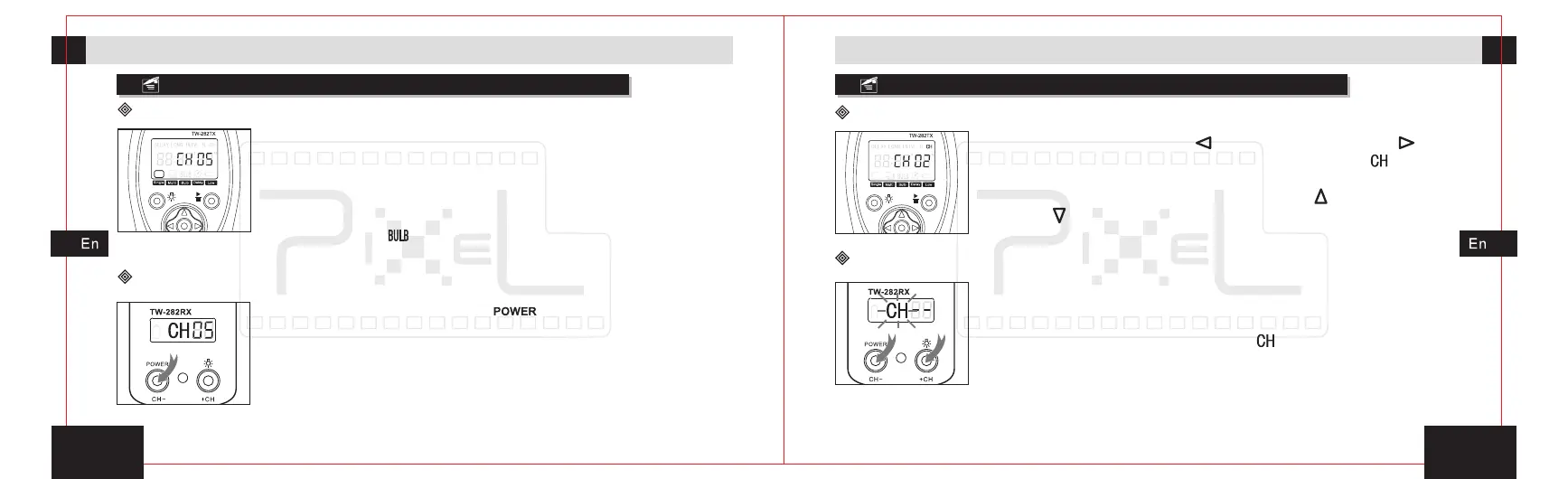
1. Press left move button[ ]or right move button[ ]will
move the functional icon to the channel icon[ ].
2. Press the set button into the channel setting.
3. Thought pressing increment button[ ]or decrement
button[ ] to adjust the channel number.
1 3
1 2
Turned on/off the power
2s
Channel setting
Channel setting for transmitter(TW-282TX)
Preparation for installation and usePreparation for installation and use
The transmitter(TW-282TX)
1. Press any button once, and turn on the power of transmitter.
2. Turn on the power, set
the timing plan and communication channel unchanged.
3. The displ ay shows the single shooting icon an d
communication channel.
4. The transmitter without any operation (except timing plan or
implementing [ ] status) will shut down automatically after
one minute.
transmitter in single shooting state,
The receiver(TW-282RX)
1. Press the power button[ ]2s, turn on the receiver
power, screen display communication channel
2. After turn on the power, the set timing communication
channel remain effectively.
3. The receiver does not turn off automatically. In the
power-on state, press power button 2s and the receiver
will be turned off.
.
Channel setting for receiver(TW-282RX)
1. Turn the power on, the communication channel will be
default[- -]or the last setting.
2. CH-
.
3. Set the communication channel, press[ ]plus one,
press[CH-]minus one.
4. 10s no action exit and save your settings.
Press the button[+CH]and[ ]at the same time to
enter the channel settings, the [ ] icon on the LCD will
blinks
+CH



 To Next Page