14
OPERATING INSTRUCTIONS (cont.)
ADJUSTING THE PICTURE
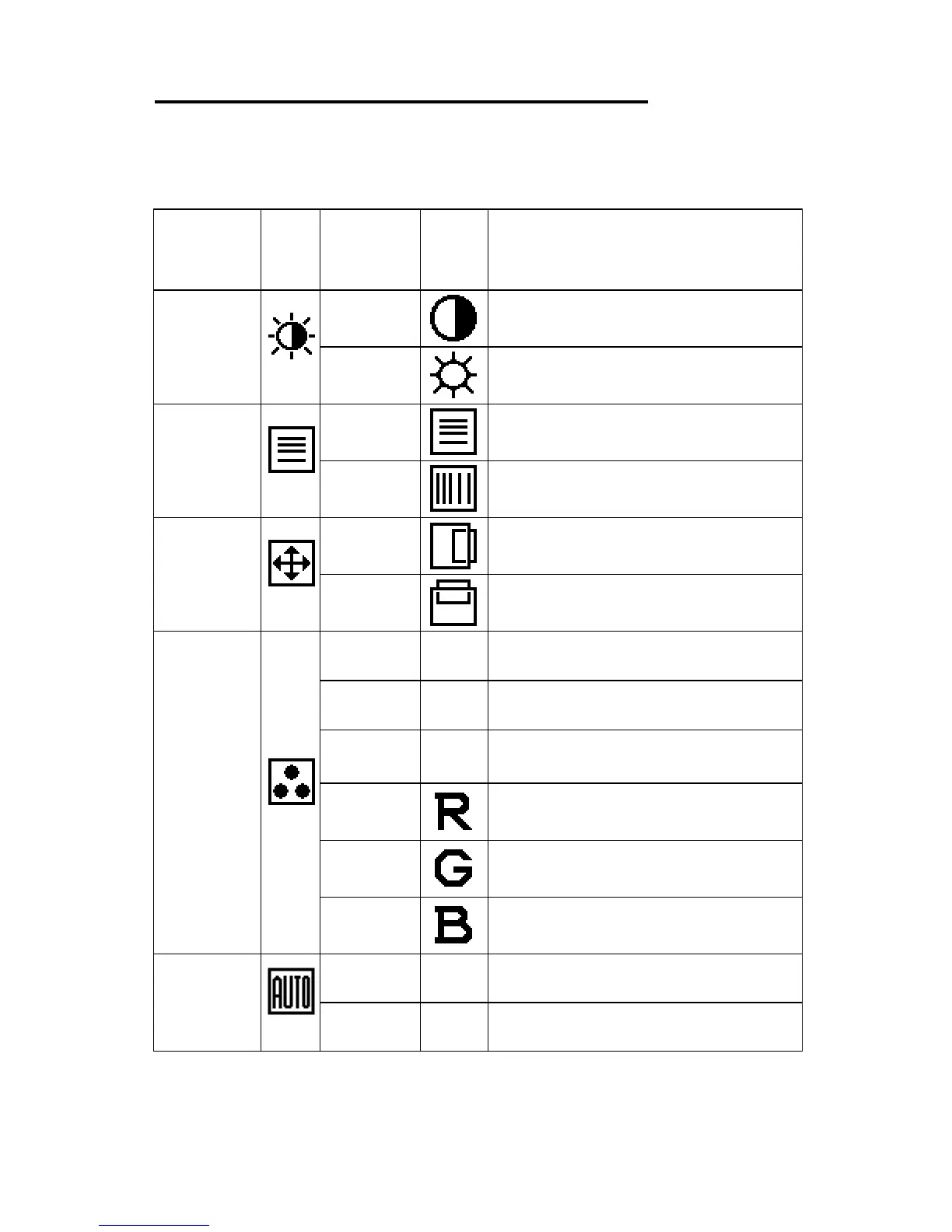
The descriptions for function control LEDS
Main Menu
Item
Main
Menu
Icon
Sub Menu
Item
Sub
Menu
Icon
Description
Luminance
Contrast Contrast from Digital-register.
Brightness
Backlight Adjustment.
Image
Setup
Focus
Adjust Picture Phase to reduce
Horizontal-Line noise.
Clock
Adjust picture Clock to reduce
Vertical-Line noise.
Image
Position
H.Position
Adjust the horizontal position of
the picture.
V.Position
Adjust the vertical position of the
picture.
Color
Temp.
Warm N/A
Recall Warm Color Temperature
from EEPROM.
Cool N/A
Recall Cool Color Temperature
from EEPROM.
sRGB N/A
Recall sRGB Temperature from
EEPROM
.
User/ Red Red Gain from Digital-register.
User /
Green
Green Gain Digital-register.
User /
Blue
Blue Gain from Digital-register.
Auto
Config
Yes N/A
Auto Adjust the H/V Position,
Focus and Clock of picture.
No N/A
Do not execute Auto Config,
return to main menu.



 To Next Page