Need help?
Do you have a question about the Planet IPOE-E174 and is the answer not in the manual?
Lists the items included with the IPOE-E174 Industrial PoE Extender, such as the device, manual, and mounting kit.
Illustrates a typical network setup showing the IPOE-E174 extending PoE power to multiple IP cameras.
Details the product's physical ports, power-over-ethernet capabilities, layer 2 switching features, and industrial design.
Provides comprehensive data including network connectors, switch architecture, throughput, power, dimensions, and environmental ratings.
Outlines the PoE output budget, power delivery standards (802.3af/at/bt), and the maximum number of powered devices supported.
Presents detailed diagrams showing the width, depth, and height of the IPOE-E174, including mounting kit dimensions.
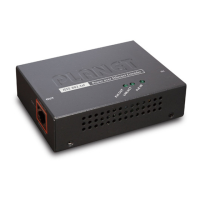
Describes the front panel layout, status LEDs (PWR, PoE Input, LNK/ACT, PoE-in-Use), and PoE power usage indicators.
Explains the procedures for installing the IPOE-E174, covering both DIN-rail and wall-mount plate mounting options.
Details how to connect the IPOE-E174's 'PoE IN' port to a PSE, such as a PoE switch or injector, for power and data.
Guides on connecting the IPOE-E174's 'PoE-in-Use' ports to powered devices (PDs) like IP cameras or access points.
Provides contact information, online FAQ resources, and email for support regarding PLANET products.
 General
| Model | IPOE-E174 |
|---|---|
| Dimensions | 94 x 70 x 26 mm |
| Weight | 200g |
| Data Rate | 10/100/1000Mbps |
| Type | Extender |
| Power over Ethernet | IEEE 802.3af |
| Storage Temperature | -40 ~ 85 degrees C |
| Humidity | 5% to 95% non-condensing |


 To Next Page