18
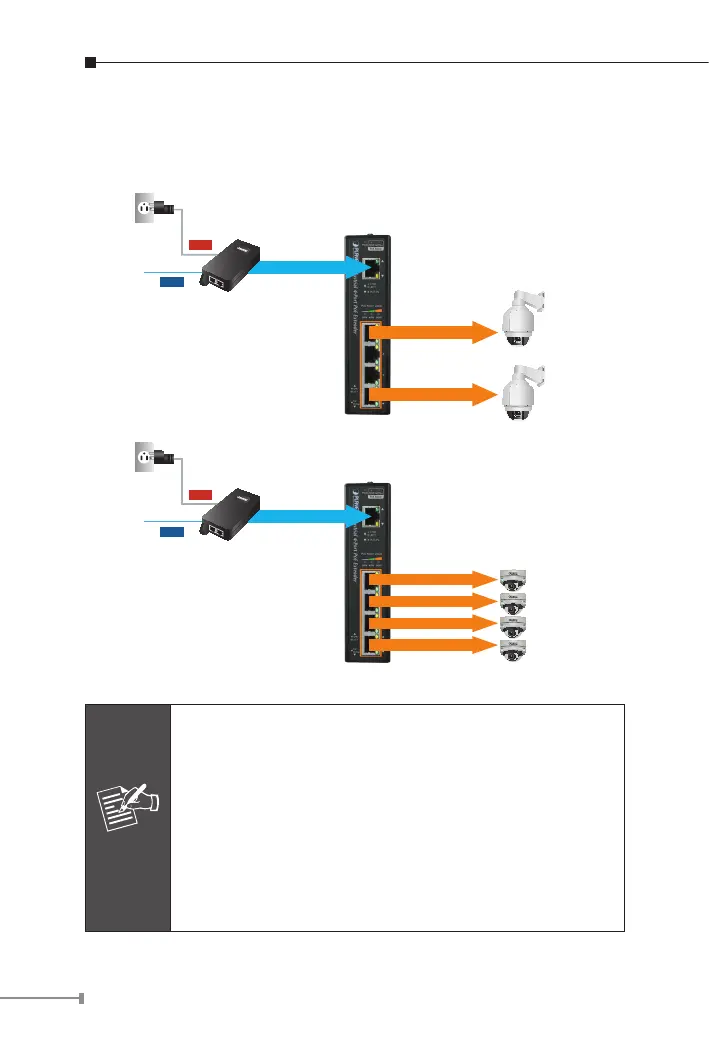
Step 3: Once the IPOE-E174 detects the existence of an IEEE
802.3at/af device, the “PoE-in-Use” LED indicator will be lit
steadily, showing it is providing power.
Ultra PoE
(60W)
IEEE 802.3at
(25W)
IEEE 802.3at
(25W)
PoE PTZ IP Cemera
Ultra PoE
(60W)
IEEE 802.3at
(12W)
IEEE 802.3at
(12W)
IEEE 802.3at
(12W)
IEEE 802.3at
(12W)
PoE Dome IP Camera
Power
Data
Power
Data
Note
1. If the connected device is not fully complying with
IEEE 802.3af/at standard or in-line power device, the
PoE-in-Use LED indicator of the IPOE-E174 will not be
lit steadily.
2. According to IEEE 802.3af/at standard, the IPOE-E174
will not inject power to the cable if not connecting to
a standard IEEE 802.3af/at device.
3. DO NOT connect any PSE to port 1 ~ port 4 of the
IPOE-E174; it may damage the device permanently.



 To Next Page