9
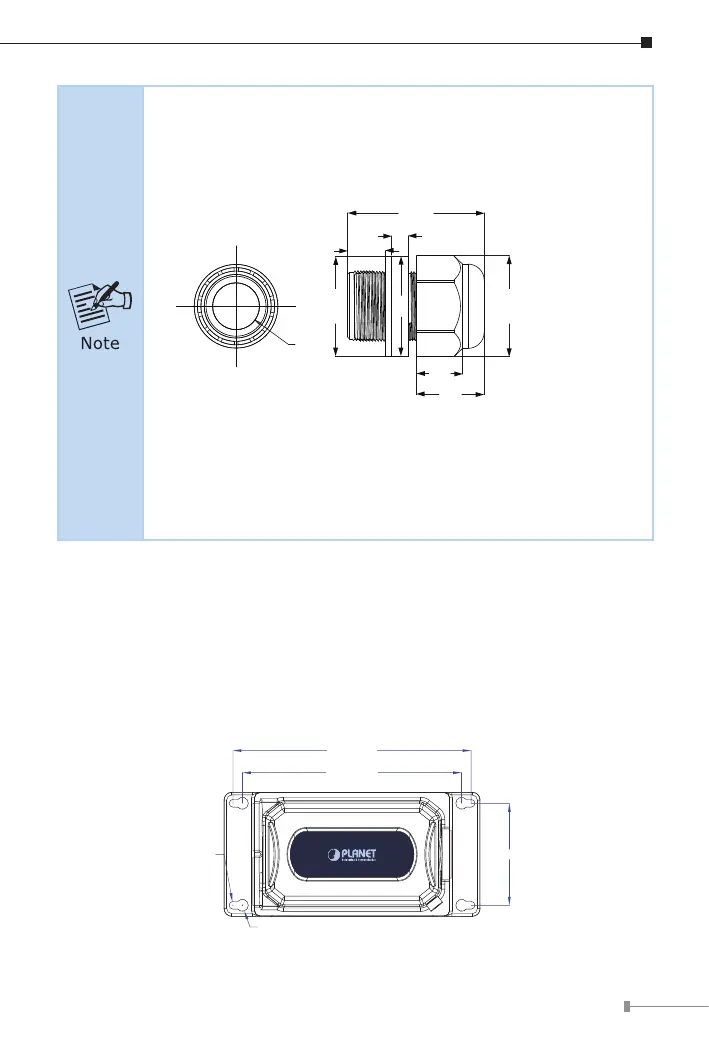
1. Use only the waterproof cable gland provided in the package
of the IPOE-E302.
2. If the above installation procedure is not properly followed,
the warranty will be invalidated.
11.31mm
40.78mm
5.00mm
30.22mm
29.80mm
20.18
13.72
14.00
30.10
3. If the waterproof cable gland is found missing or damage,
please contact your local reseller where you purchased from.
4. Never use any waterproof cable gland that is not purchased
from PLANET or doesn’t have the same dimensions of the
IPOE-E302; it will damage the device permanently.
3.3 Wall-mount Installation
To install the Outdoor PoE Extender on the wall, please follow the instructions
described below.
Step 1: Find the wall that you want to mount the Outdoor PoE Extender on.
Step 2: Refer to the picture below to screw the four screws on the wall.
129.00mm
4.50mm



 To Next Page