11
3.5 Connecting IPOE-E302 to PSE
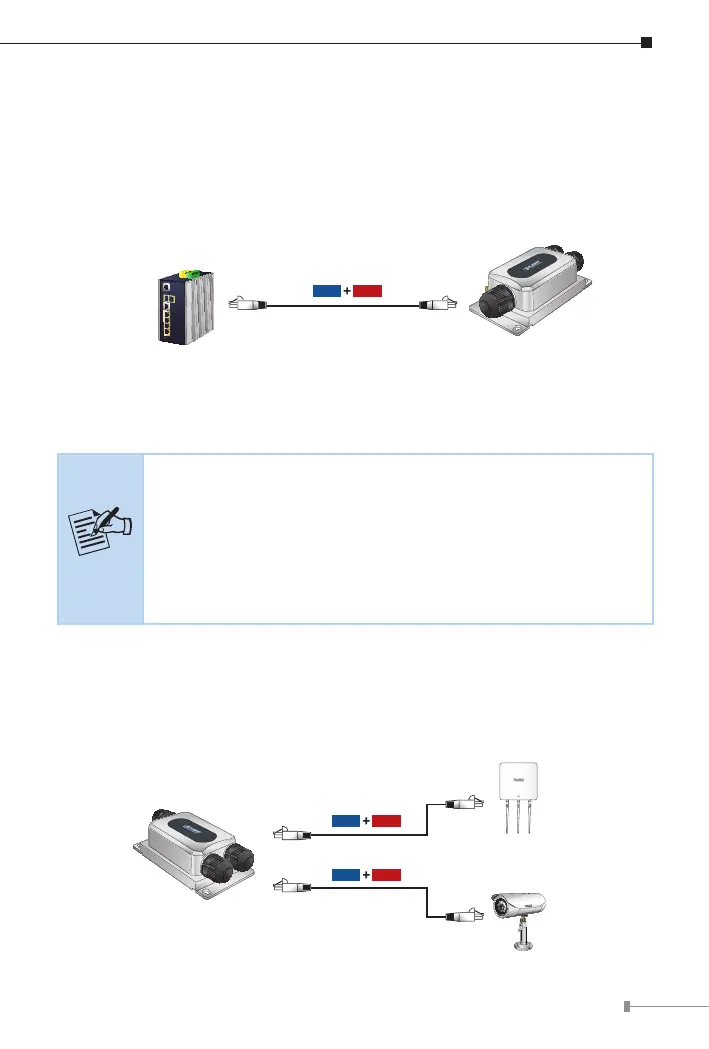
The Outdoor PoE Extender has three RJ45 ports of which one is the PoE++
In port connected to the PSE and the other two are PoE+/ PoE++ Out ports
connected to the PDs.
Step 1: Connect a standard Cat5e/6 UTP cable from a remote PSE, such as
PoE switch, to the “PoE++ In” port of the IPOE-E302.
Power
Data
100m
802.3bt PoE Switch (PSE)
IPOE-E302
Step 2: The PSE delivers both Ethernet Data and PoE power over UTP cable
to the IPOE-E302 and the “LAN” LED will be lit steadily.
Note
1. If the LED is not lit, please check the remote PSE or the
cable connecting to a PC or a network device to see if the
cable is correct. Or with an 802.3at/bt device such as the
target PD, check whether the power injection is correct.
2. Never connect any non-standard PoE PSE to the IPOE-
E302; it will damage the device permanently.
3.6 Connecting IPOE-E302 to PD
Step 1: Connect the additional Cat5e/6 cable from the PoE++ Out of the
IPOE-E302 to a remote PD.
PoE Wireless AP
PoE Camera
IPOE-E302
Power
Data
100m
Power
Data
100m



 To Next Page