Enterprise HD PoE IP Phone
VIP-2020PT
If user makes the above configuration, after user dials 11 digit numbers started with from 135 to
139, the phone will send out 0 plus the dialed numbers automatically.
Use this phone User can realize dialing out via different lines without switch in web interface.
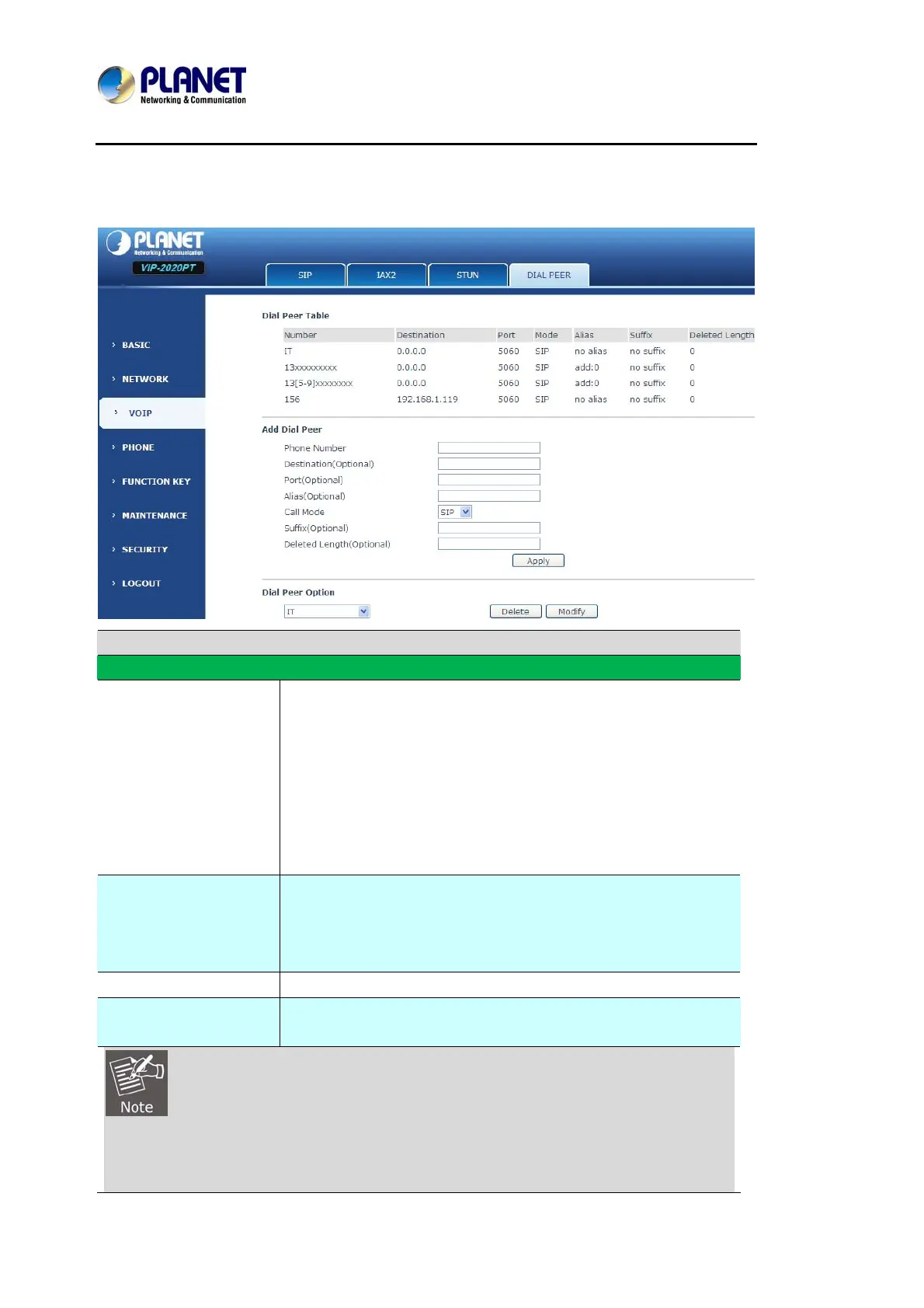
DIAL PEER
Field name Explanation
Phone number
There are two types of matching conditions: one is full matching,
the other is prefix matching. In the Full matching, User need input
User desired phone number in this blank, and then User need
dial the phone number to realize calling to what the phone
number is mapped. In the prefix matching, User need input User
desired prefix number and T; then dial the prefix and a phone
number to realize calling to what User prefix number is mapped.
The prefix number supports at most 30 digits.
Destination
Set Destination address. This is optional config item. If User want
to set peer to peer call, please input destination IP address or
domain name. If User want to use this dial rule on SIP2 line, User
need input 255.255.255.255 or 0.0.0.2 in it.SIP3 into 0.0.0.3
Port Set the Signal port, the default is 5060 for SIP.
Alias
Set alias. This is optional config item. If User don’t set Alias, it will
show no alias.
There are four types of aliases.
1) Add: xxx, it means that User need dial xxx in front of phone number, which will reduce
dialing number length.



 To Next Page