EasyManua.ls Logo

Plantronics 220 - PAIRING; QUICKPAIR FEATURE INSTRUCTIONS

Plantronics 220
12 pages
Print Icon
To Next Page IconTo Next Page
To Previous Page IconTo Previous Page
Loading...
4
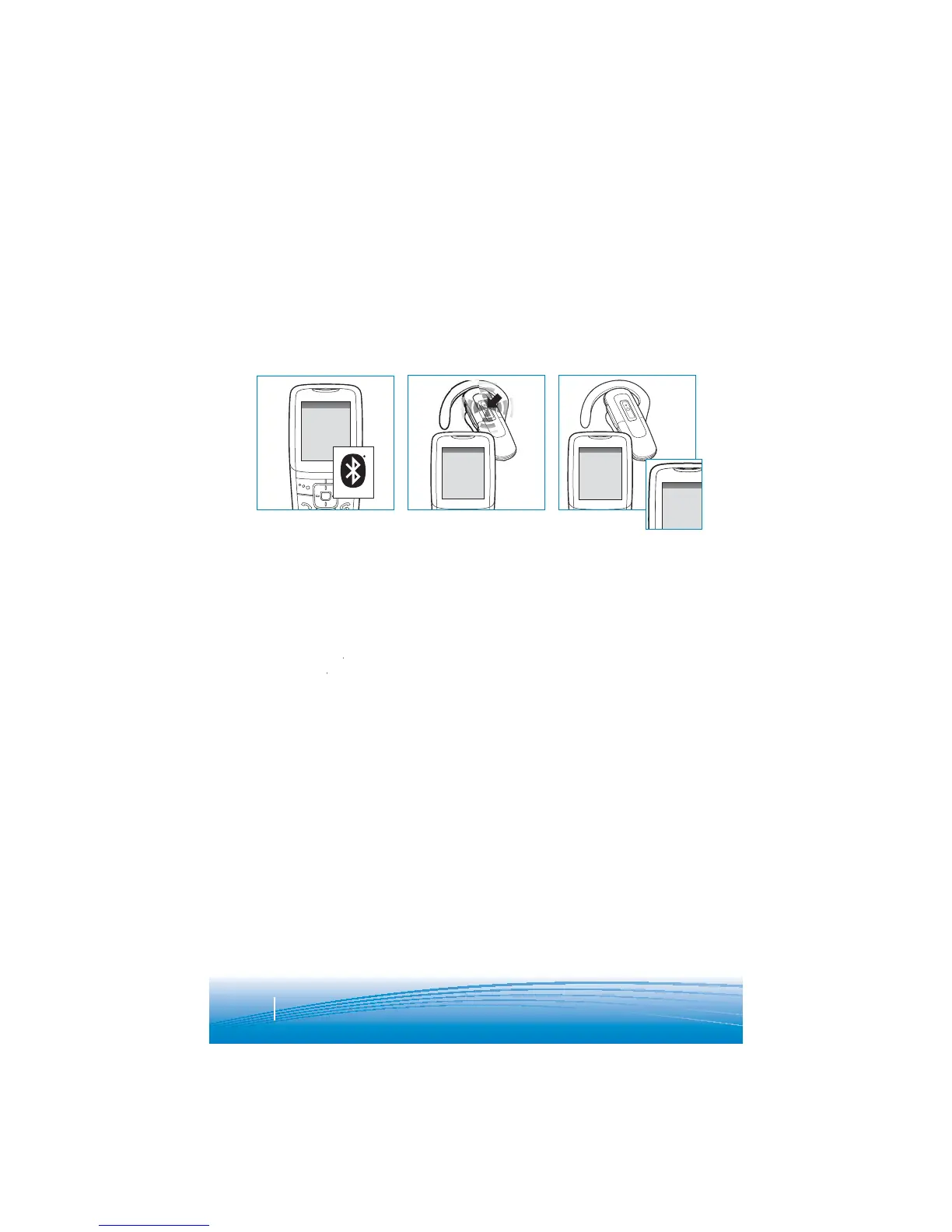
PAIRING
Step One:
Prepare Phone—
Turn on Bluetooth
F
or most phones,
g
o
t
o
S
ettin
g
s/
Tools
m
e
n
u
a
n
d
selec
t
Blue
t
oo
t
h
o
r
and
y
s
elect
On.
(Or see
the user
g
uide
f
or
y
our
p
hone.
)
SETTINGS
SETTINGS
Time and Date
Phone Settings
Bluetooth
Sound Settings
Network Services
Security
Reset Settings
BLUETOOTH
Discover/
Search
BLUETOOTH
220Plantronic s
PASSKEY
0000
This headset comes with
Q
uickPair
TM
technolo
g
y so pa
i
r
i
n
g
w
i
th your
Blue
t
oo
t
h
p
hone
i
s even eas
i
er. Follow the
i
nstruct
i
ons below to
p
a
i
r your
phone with your headset for the first time.
Step Two:
Prepare Headset—
Pairing Mode
B
egin with headset
t
u
rn
ed
off
. T
u
rn
headset on
(
hold call
co
ntr
o
l
bu
tt
o
n f
o
r
2
s
econds until the light
f
lashes blue) and it
wi
ll automat
i
cally
g
o
i
nto pa
i
r
i
ng mode,
f
lashing red and blue.
Step Three:
Pairing—
Add Headset to Phone
F
or most phones,
g
o
t
o
S
ettin
g
s/Tools
>
Bl
ue
t
oo
th >
Sea
r
c
h
or
Add
a
D
evice, t
he
n
S
elect
220Plantronics.”
For passkey enter
0000
. H
eadse
t will
f
lash blue when
p
aired
success
f
ull
y
. It is now
powered on and ready
t
o use.
NOTE: Normally you only need to
p
a
i
r the headset and handset once.
If
headset has been
p
reviously
p
aired with another device,
f
ollow
pa
i
r
i
ng
i
nstruct
i
ons on the next page.
Q
UICKP
A
IR FE
A
TURE INSTRUCTION
S

Related product manuals